



9
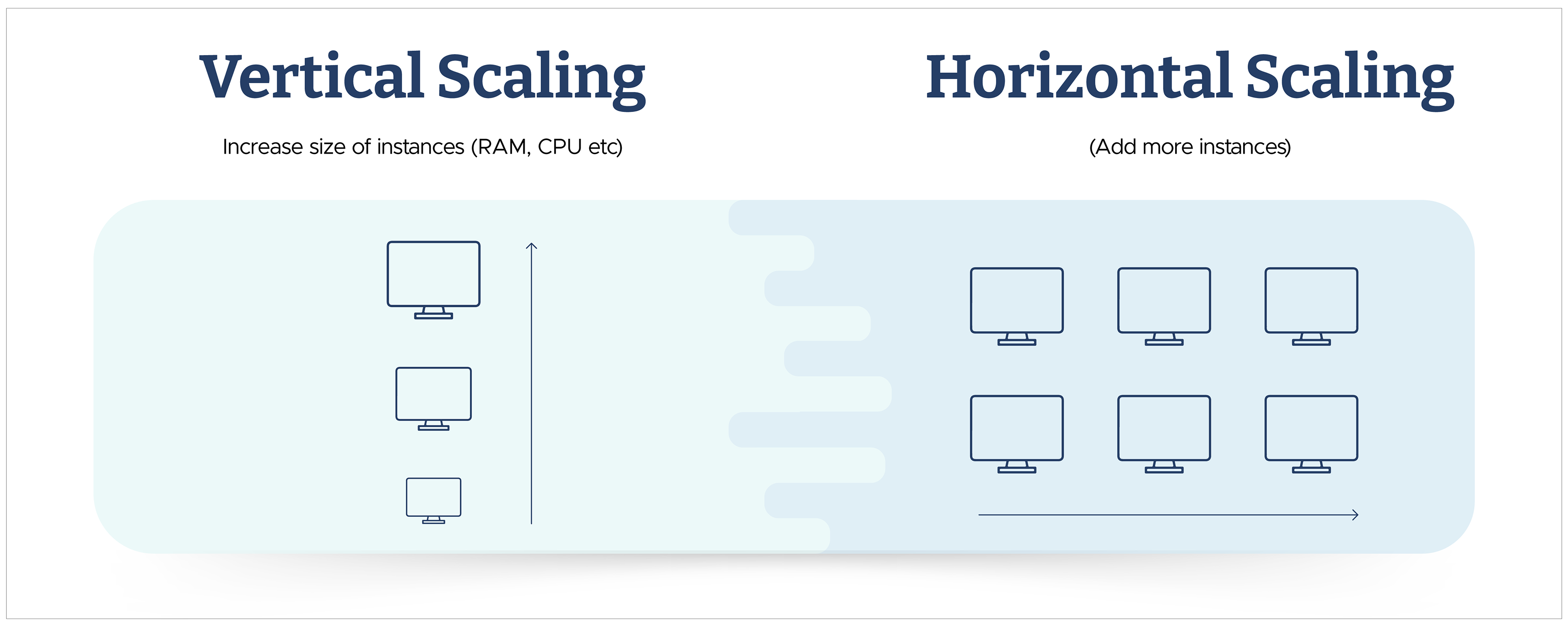
9Imagine you're hosting a party, and the number of guests can vary. Vertical scaling is like renting a bigger venue to accommodate more people. It involves increasing the capacity of the existing space, like moving to a larger hall.
On the other hand, horizontal scaling is akin to hiring additional rooms in the same-sized venue. Instead of enlarging the existing space, you add more identical spaces to handle more guests. Each room operates independently, contributing to the overall capacity and ensuring a smooth flow of the party.
In AWS terms, vertical scaling means increasing the size of a single server (more CPU, RAM, etc.), while horizontal scaling involves adding more servers to distribute the load across multiple machines. Let's understand more about horizontal vs vertical scaling.
Scaling in AWS - Types and Differences
Scaling in AWS refers to the ability to dynamically adjust your application or system resources to meet changing demand, ensuring optimal performance, cost efficiency, and reliability.
There are two primary types of scaling: horizontal and vertical scaling:
- Vertical Scaling (Scaling Up): Vertical scaling involves increasing the capacity of a single resource, such as upgrading a server's CPU, RAM, or storage. AWS Example: You might vertically scale an Amazon EC2 instance by choosing a larger instance type with more compute power or memory.
Horizontal Scaling (Scaling Out): Horizontal scaling involves adding more instances or resources to your application or system to distribute the load and handle increased demand. AWS Example: You might horizontally scale a web application by adding more EC2 instances behind a load balancer, allowing the application to handle a higher number of concurrent users.
AWS Services and Resources - Scaled Horizontally, Vertically, or Both
Scaling extends across your cloud applications and infrastructure, including EC2, Elastic Load Balancing (ELB), Relational Database Service (RDS), Lambda functions, DynamoDB, and SQS (Simple Queue Service).
To learn about Amazon RDS vs Amazon Aurora, click here.
The ability to scale resources horizontally or vertically depends on the specific AWS service and resource. To answer the question of horizontal vs vertical scaling, consider the following breakdown of how each mentioned resource can be scaled:
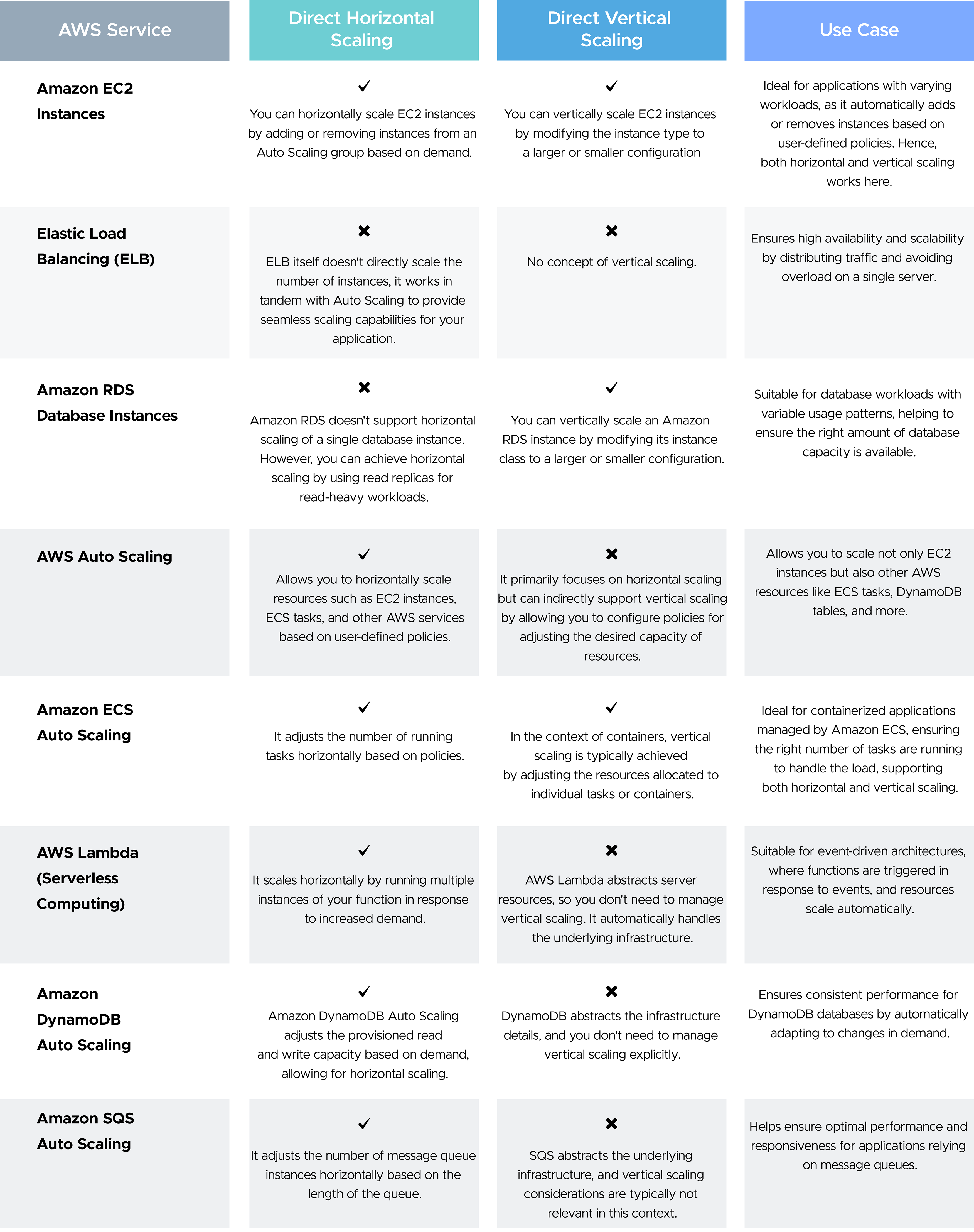
In summary, many AWS resources can scale horizontally by adding or removing instances, while others, like EC2 instances and RDS databases, can also scale vertically by adjusting their configuration. The specific scalability options depend on each service's nature and design.
Check out some proven AWS RDS Cost Optimization strategies here.
Real-World Examples: Horizontal and Vertical Scaling in Practice
- Horizontal scaling: Netflix runs its streaming platform across thousands of distributed instances rather than a handful of giant servers. When demand spikes during a big release, it adds more instances behind load balancers instead of resizing existing ones, the same pattern behind large-scale web apps built on EC2 Auto Scaling groups.
- Horizontal scaling: Uber's dispatch and matching systems handle wildly uneven, geography-driven demand (rush hour in one city, quiet overnight in another). Horizontally scaled, stateless services let capacity shift to wherever demand is, without any single server becoming a bottleneck.
- Vertical scaling: traditional e-commerce on a monolith. A monolithic e-commerce application backed by a single relational database is a classic vertical-scaling candidate. Because the app and database aren't designed to be distributed, the practical fix for more load is a bigger RDS instance (more vCPU/RAM) rather than splitting the database across nodes, at least until the workload outgrows what a single instance can offer, at which point read replicas or sharding (a horizontal strategy) become necessary.
- Database-specific note: Relational databases (like a single AWS RDS instance) hit a vertical ceiling; eventually, there's no bigger instance type to move to. Horizontal scaling for databases usually means sharding or read replicas, which adds complexity (data consistency, cross-shard queries) that a single vertically scaled instance doesn't have to deal with. This is a big part of why teams make database scaling decisions earlier and more carefully than stateless app-tier scaling.
Scaling Benefits in AWS
The ability to quickly add to your pool of cloud resources during high-demand periods drives the success of the operation. Horizontal and vertical scaling in AWS help strike a balance between seamless resource allocation and system performance. Based on a particular use case, whether you choose horizontal scaling or vertical scaling, the following benefits can be enjoyed:
Performance Optimization
Imagine a single-lane highway struggling with traffic. Horizontal scaling in AWS is like adding lanes, allowing more traffic to flow smoothly and preventing delays. You can see the power of horizontal scaling in delivering a consistently delightful experience during a sudden influx of online shoppers or a peak season for your SaaS platform.
Cloud Cost Efficiency
Think of paying for a gym membership you rarely use. Traditional infrastructure often wastes resources and adds unnecessary costs. Scaling helps optimize resource usage.
With vertical scaling, you can upgrade existing instances instead of maintaining an unnecessarily large infrastructure. This translates to cloud cost optimization, akin to downsizing the infrastructure during slower periods. Furthermore, horizontal scaling lets you pay only for the instances you actively use, eliminating wasted resources and optimizing cloud spend. So, horizontal and vertical scaling work together to improve cost efficiency.
Reliability and High Availability
Imagine a single bridge being the only way to cross a river: If it collapses, transportation grinds to a halt. Scaling helps build redundancy and resilience. With horizontal scaling, you create a safety net of redundant instances. If one instance encounters a technical error, like a stumbling acrobat, the others seamlessly pick up the slack, ensuring minimal downtime and uninterrupted performance. This distributed workload model improves fault tolerance, protecting your application from unexpected issues and ensuring high availability for your audience.
Elasticity
Think of a rubber band that can stretch and contract: Your AWS infrastructure should be able to adapt to changing demands. AWS Auto Scaling offers similar flexibility.
Auto Scaling adjusts resources based on predefined metrics, whether CPU usage or network traffic. This ensures your application thrives amidst sudden market shifts or unexpected growth, allowing you to quickly add resources and scale up your performance in response to the market's applause.
Based on the details above, you can explore the benefits of horizontal and vertical scaling for your AWS resources and choose the option that best fits your needs.
Cost Comparison: When Does Horizontal Become Cheaper Than Vertical?
Vertical scaling looks cheaper at small scale; one bigger instance is simpler to manage and has less overhead than a fleet. But instance pricing isn't linear: doubling an instance's vCPU/RAM doesn't just double the price; it often costs more per unit of compute as you move into larger instance classes. Horizontal scaling with smaller commodity instances tends to catch up and overtake vertical scaling in cost efficiency as load grows, and it avoids paying for a large instance's idle capacity during off-peak hours.
Illustrative example (on-demand EC2 pricing, general-purpose instance family):
| Approach | Configuration | Approx. monthly cost* | Notes |
| Vertical | 1x large instance (8 vCPU/32GB) | ~$280/month | Simple to manage, but idles at 20-30% off-peak; you pay full price 24/7 regardless of load |
| Horizontal | 4x small instances (2 vCPU/8GB each) behind an ALB | ~$220/month + ~$20/month ALB ≈ $240/month | Auto Scaling can shut down 2-3 instances overnight, dropping to ~$140-170/month during off-peak |
| Horizontal, elastic | Same 4x small instances, Auto Scaling group (min 1, max 4) | ~$90–240/month depending on traffic | Costs track actual demand instead of a flat rate |
*Estimates only , illustrative of the pattern, not a quote. Confirm exact rates with the AWS Pricing Calculator for your instance family, region, and commitment type (on-demand vs. Reserved/Savings Plans).
The break-even pattern: for steady, predictable, always-on load, a single right-sized vertical instance is often cheaper and simpler than managing a fleet.
Once your traffic becomes variable- nights/weekends quieter than business hours, seasonal spikes, unpredictable growth- horizontal scaling with Auto Scaling typically becomes cheaper because you stop paying for capacity you aren't using. As a rule of thumb: if peak-to-trough demand varies by more than roughly 30-40%, horizontal scaling usually wins on cost; for flat, constant load, vertical scaling can still be simpler and cheaper.
Based on the details above, you can explore the benefits of horizontal and vertical scaling for your AWS resources and choose the option that best fits your needs.
Whether you need to handle traffic spikes or optimize costs, there's a scaling option for you. Horizontal scaling adds "rooms" (instances) to handle bigger crowds, while vertical scaling "upgrades" the existing space (resources).
Unsure about the best cloud strategy to adopt? CloudKeeper provides comprehensive Cloud FinOps Consulting and Support, helping you with everything you need to scale your cloud effectively.
Frequently Asked Questions
Q1: Is horizontal or vertical scaling better?
Neither is universally better; it depends on the workload. Horizontal scaling generally wins for fault tolerance, high availability, and unpredictable or bursty traffic. Vertical scaling wins for simplicity and for workloads (like traditional relational databases or tightly-coupled monoliths) that are hard to distribute across multiple machines.
Q2: Can you use both horizontal and vertical scaling together?
Yes, and most real-world AWS architectures do. A common pattern is to right-size individual instances vertically (choosing an appropriately powerful instance type) while also running multiple instances horizontally behind a load balancer with Auto Scaling. This combines cost-efficient sizing with the fault tolerance and elasticity of a distributed fleet.
Q3: Which is cheaper, horizontal or vertical scaling?
It depends on how steady your traffic is. For flat, predictable, always-on workloads, a single right-sized vertical instance is often cheaper and simpler. For variable or bursty traffic, horizontal scaling with Auto Scaling is usually cheaper overall because you only pay for the capacity you're actually using, rather than a large instance running at partial utilization around the clock.
Q4: What are the limits of vertical scaling?
Vertical scaling is capped by the largest instance type AWS offers for a given family, and it typically requires downtime (a reboot or instance stop/start) to resize. It also doesn't improve fault tolerance; you still have a single point of failure.
Q5: When should I choose horizontal scaling for a database?
When a single database instance can no longer handle the load even at the largest available instance size, or when you need better fault tolerance than a single instance can provide. This usually means read replicas for read-heavy workloads or sharding for write-heavy workloads; both add operational complexity, so teams generally adopt them only after vertical scaling hits its ceiling.