AWS Database Savings Plans is a commitment-driven discount offering that promises reduced spending across different types of AWS databases. Once purchased, Database Savings Plans automatically apply to eligible instance types, regardless of factors such as region, size, or supported engine.
When purchasing the plan, the customer needs to commit to a consistent usage rate ($/hour). However, the term is currently available only for 1 year as of December 2025, which might not be a strong enough boost to the company’s AWS cost optimization efforts.
Table of content
Which Database Configurations are Covered Under AWS Database Savings Plans?
Your purchased Database Savings plan would automatically apply to the following database engines and deployment types:
a) Database Engine Types:
Amazon Aurora
Amazon RDS
Amazon DynamoDB
Amazon ElastiCache
Amazon DocumentDB (with MongoDB compatibility)
Amazon Neptune
Amazon Keyspaces (for Apache Cassandra)
Amazon Timestream
AWS Database Migration Service (DMS)
b) Deployment Types
Serverless databases
Provisioned DB instances
On-demand throughput
Provisioned capacity (DynamoDB, Keyspaces)
c) Database Regions:
AWS Database Savings Plans are applicable in every region except China. This also means you can migrate your databases between any supported regions, and your Database Savings Plan will still apply.
How Much Can You Save with AWS Database Savings Plans?
Savings with the Database Savings Plan depend significantly on the type of database configurations you are running. The important thing to note is that Serverless configurations are not eligible.
Here’s a breakdown of how much you can save on specific configurations:
What Is the Payment Model for AWS Database Savings Plans?
No Up-Front Payment: You commit to a fixed usage amount ($ per hour). If you do not meet that usage target, you pay the non-discounted on-demand charges for whatever you actually used. This works the same way you were paying earlier.
Advance Payment: Paying up front is usually popular for maximizing cloud cost savings in programs like Reserved Instances or Savings Plans. In the case of AWS Database Savings Plans, there is no extra discount for paying the entire amount up front. The discount remains the same regardless of payment option.
Example: AWS Database Savings Plan
Suppose you are running Amazon Aurora MySQL for your production environment with a predictable workload of 5 dollars per hour.
You purchase an AWS Database Savings Plan with a commitment of $5 per hour. You can either pay up front or continue paying monthly. The discount remains the same in both cases.
As long as your AWS Aurora usage stays at or above 5 dollars per hour, the committed usage is billed at the discounted Database Savings Plans rate, which results in a lower overall bill.
How to Purchase AWS Database Savings Plans?
To purchase your AWS Database Savings Plan, you need to log in to the AWS Billing and Cost Management Console. The recommendations and steps we share below will help guide you toward one of the two approaches for buying this savings plan.
These are the two ways through which you can get the AWS Database Savings Plan:
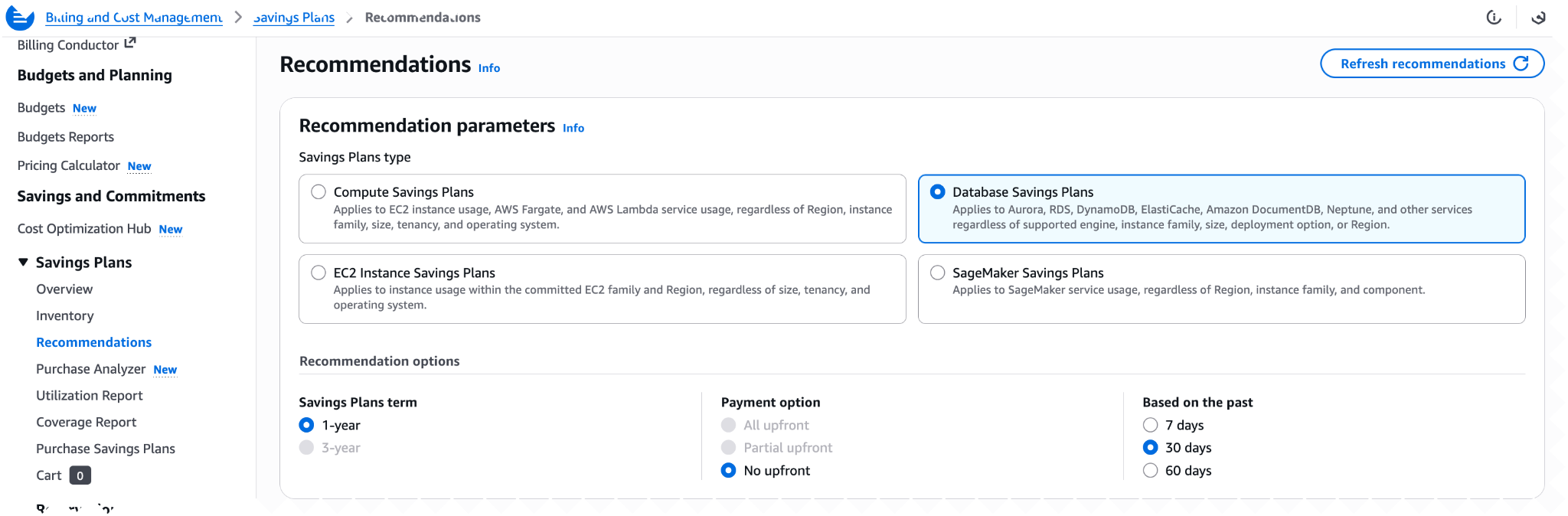
Recommendations Tab: AWS automatically evaluates parameters such as recent usage patterns, utilization percentage, projected coverage, and other factors to provide you with a recommended Database Savings Plan. You should choose this approach if you want to make a quick purchasing decision and your workloads are stable.
Source: AWS
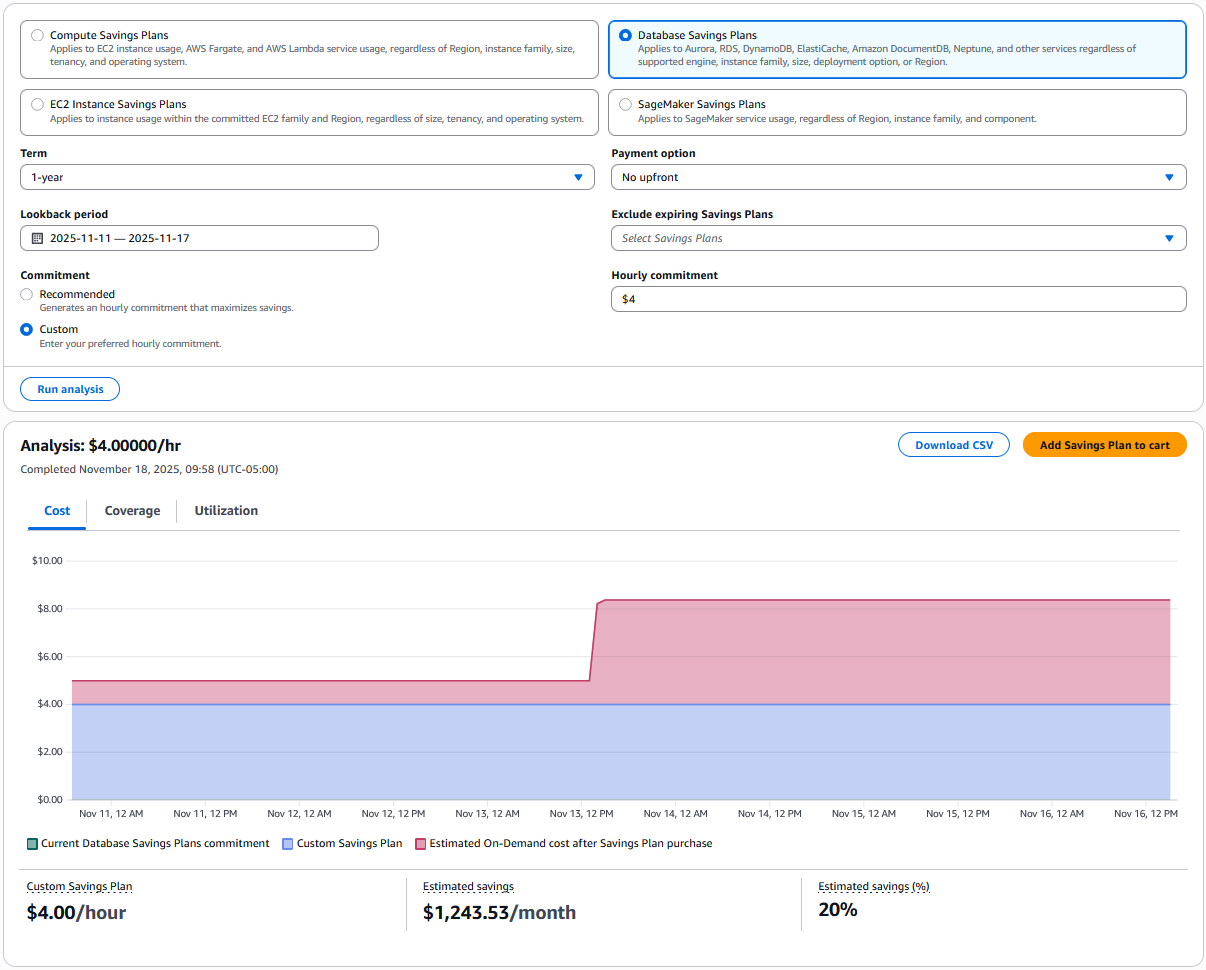
Purchase Analyzer: This approach is more customizable, as AWS leaves all configurations and decision-making to you. This makes it ideal for dynamic workloads and for companies that may need larger database sizes in the future or are planning database migrations.
If your purchasing strategy involves smaller, incremental commitments over time, then the Purchase Analyzer model is the best fit.
Key Features of AWS Database Savings Plans
The following features make AWS Database Savings Plans an attractive choice for companies looking to execute their AWS Cost Optimization strategies:
1. Flexibility: AWS Database Savings Plans allow you to switch between different database configurations and scale up or down, as long as you meet your hourly spend commitment.
For example, you can move a workload from Amazon RDS MySQL on db.m7g to Amazon RDS PostgreSQL on db.r8g, scale storage as needed, or shift the same workload from Asia Pacific (Mumbai) to US West (Oregon) without losing the discount benefit.
2. Automatic Application Across Eligible Usage: The savings automatically apply every hour to any qualifying database usage across supported services. Any consumption beyond your committed spend is simply billed at the regular on-demand rate.
3. Same Discount for Monthly and Yearly Payments: You are not forced to pay one year upfront to unlock maximum cloud savings. Whether you choose monthly payments or a full upfront payment, the discount percentage remains the same.
Limitations of AWS Database Savings Plans
Instance Generation Limitation: AWS Database Savings Plans only apply to instance generations 7 and above. Customers still running older, lower-cost generations must migrate to newer generations to benefit from the plan.
Service Coverage Restrictions : For ElastiCache, only Valkey instances are covered. For Amazon Timestream, only InfluxDB instances qualify for Database Savings Plans.
Cannot Combine Multiple Discount Programs: You cannot apply a Database Savings Plan on top of an existing Reserved Instance or DynamoDB Reserved Capacity for the same workload. Only one discount mechanism can apply to a specific database at a time.
Frequently Asked Questions
Q1. Are AWS Savings Plans and AWS Database Savings Plans the same?
No, AWS Savings Plans and AWS Database Savings Plans are not the same. AWS Savings Plans generally apply to compute usage, while Database Savings Plans apply specifically to supported AWS database services.
Q2. In which AWS regions are Database Savings Plans available?
Database Savings Plans are available in every AWS Region except China. The benefits continue to apply even if you migrate your databases between supported regions.
Q3. What is the difference between RDS Reserved Instances and AWS Database Savings Plans?
RDS Reserved Instances lock you into specific database configurations and Regions. AWS Database Savings Plans provide more flexibility by allowing you to switch between supported configurations and Regions as long as you meet your committed usage.
Q4. Can I use Compute Savings Plans and Database Savings Plans together?
Yes, you can use both. Compute Savings Plans apply to compute usage, and Database Savings Plans apply to database usage, so the two do not conflict.
Certified. Trusted. Industry Recognized.
Stop paying for cloud tools. Start paying for outcomes.