DevOps Engineer
Shaswat Vashistha is a results-driven DevOps professional with 4+ years of experience across AWS, Azure, and GCP.
 Webinar
25 Feb, 2026 | 6 Min read

Running Microsoft SQL Server on Amazon EC2 instances offers flexibility and control, but it also involves a range of cost components that must be carefully considered to align with business needs. While this approach may appear cost-effective upfront, especially for development or non-critical workloads, it demands manual management of licensing, backups, failover, monitoring, and patching.
Licensing costs vary based on the edition and licensing model selected:
Pay-as-you-go (License Included) pricing:
a) Standard Edition: $73 per core per month (~$0.10/hr)
b) Enterprise Edition: $274 per core per month (~$0.375/hr)
Subscription-based licensing:
a) Standard Edition: $1,418 per 2 cores per year
b) Enterprise Edition: $5,434 per 2 cores per year
Licensing costs must be multiplied by the number of cores used in your EC2 instance.
For complete and up-to-date Microsoft SQL Server licensing details, refer to the official pricing guide:
Microsoft SQL Server 2022 Pricing
Let’s consider a deployment using an r5.xlarge instance (4 vCPUs = 2 physical cores):
EC2 Instance Cost (Windows Base AMI):
$0.436/hour = $3,817.44/year
With passive standby: $7,634.88/year
EBS gp3 (200 GB):
$0.08/GB/month = $192/year
Data Transfer:
100 GB between AZs (same region): ~$1
100 GB to another region: ~$2
SQL Server Enterprise License:
$5,434/year (for 2 cores)
Total Estimated Annual Cost (Without DR):
Total Estimated Annual Cost (With DR in Another Region):
Amazon RDS for SQL Server is a fully managed service provided by AWS, designed to reduce operational overhead by handling routine database tasks such as provisioning, patching, backup, monitoring, and failover. It is particularly well-suited for production environments that require high availability, compliance, and scalability, with minimal manual intervention.
You can learn more about Amazon RDS vs Amazon Aurora here. This helps you gain further clarity on the concept we’re discussing.
In this model, AWS includes licensing costs for both Windows Server and Microsoft SQL Server under the License Included pricing model, which simplifies procurement and compliance management.
With DR in Another Region:
A second RDS instance in a different region would incur a similar cost (license + compute + storage), plus cross-region data transfer.
Estimated annual cost including DR: ~$54,300/year
For more detailed pricing of RDS MS-SQl Server, please refer to this resource.
For r5.xlarge instance type - 4vcpu and 32gb memory
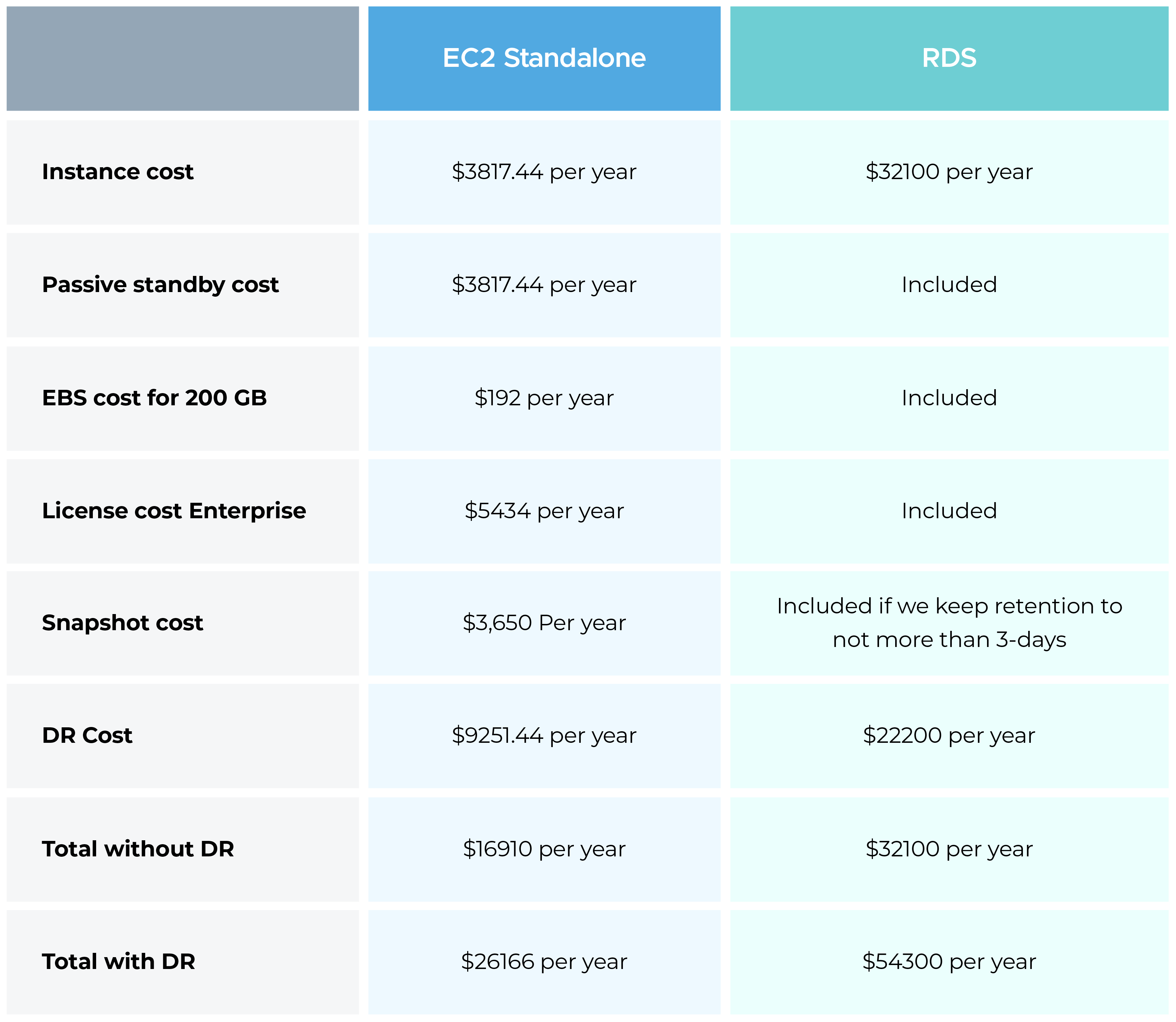
Although Amazon RDS for SQL Server Enterprise (Multi-AZ) may appear more expensive than a standalone AWS EC2 deployment, it delivers significant long-term value by reducing operational complexity, improving reliability, and providing full AWS support—making it ideal for production-grade and high-availability workloads.
With Amazon RDS, AWS manages the entire database environment, including infrastructure, patching, backups, and monitoring. In the event of performance issues or failures, AWS Support can investigate and resolve them directly. In contrast, Amazon EC2-based deployments leave all responsibilities—database configuration, patching, backup, and recovery—on the customer, with AWS support limited to the EC2 layer only.
For the connection guide to RDS MS-SQL server, please refer to this resource here.
Full administrative control over the OS or SQL Server is needed.
Certain SQL Server features not available in AWS RDS are required.
Cost-sensitive dev/test environments.
In-house expertise is available to manage availability, backups, and licensing.
While the upfront cost of AWS RDS (Multi-AZ) is higher, it delivers major operational advantages—automated high availability, backups, patching, simplified licensing, integrated monitoring, and comprehensive AWS support. For critical production environments where uptime, scalability, and supportability are key, RDS offers a more reliable and low-maintenance solution.

99% of companies saved up to 15% monthly with this plan & achieved peak performance.