APIs usually do not break because business logic is wrong. They break when the edge
behavior is inconsistent: one service enforces auth, another skips it, a third has no
rate limit, and every team implements policy differently.
Kong helps you standardize this entire edge layer. It can start as a reverse proxy and evolve into a complete API platform for routing, authentication, authorization, traffic control, observability, and governance.
This blog explains how to use Kong as a full-fledged API gateway in a general-purpose setup, with architecture patterns, runnable examples, and a migration path.
What is Kong?
Kong is a high-performance, open-source API gateway built on NGINX. It sits between clients and backend services and enforces policies without requiring code changes in each service.
Kong is plugin-driven. That plugin model is the reason it scales from simple routing to enterprise-grade API governance.
Core Concepts You Must Know
Kong has four foundational building blocks:
- Service: Your upstream backend endpoint (for example, https://api.example.com).
- Route: The matching rule that maps incoming traffic to a service (path, method, host, headers).
- Plugin: Middleware policy applied globally, per service, per route, or per consumer.
- Consumer: A client identity (application, partner, or user) that can have credentials and individual limits.
Think of it this way: the route decides where traffic goes; plugin decides how traffic is allowed and shaped.
Why Kong as a Full-Fledged Gateway
A proxy only forwards traffic. A full-fledged gateway enforces platform-wide behavior:
- Unified authentication and authorization
- Per-client throttling and quota control
- Security headers and request normalization
- Centralized logs, metrics, and tracing context
- Safer rollout and governance across environments
Reference Architecture
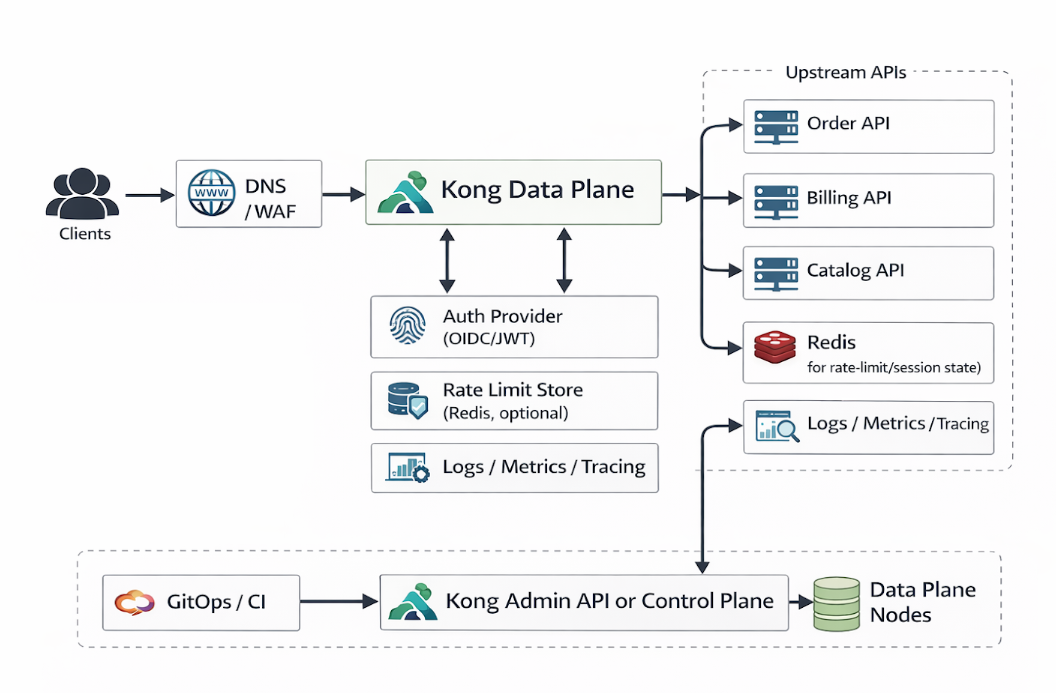
Control plane handles configuration. Data plane handles live traffic. This separation improves safety and scalability.
Getting Kong Running with Docker
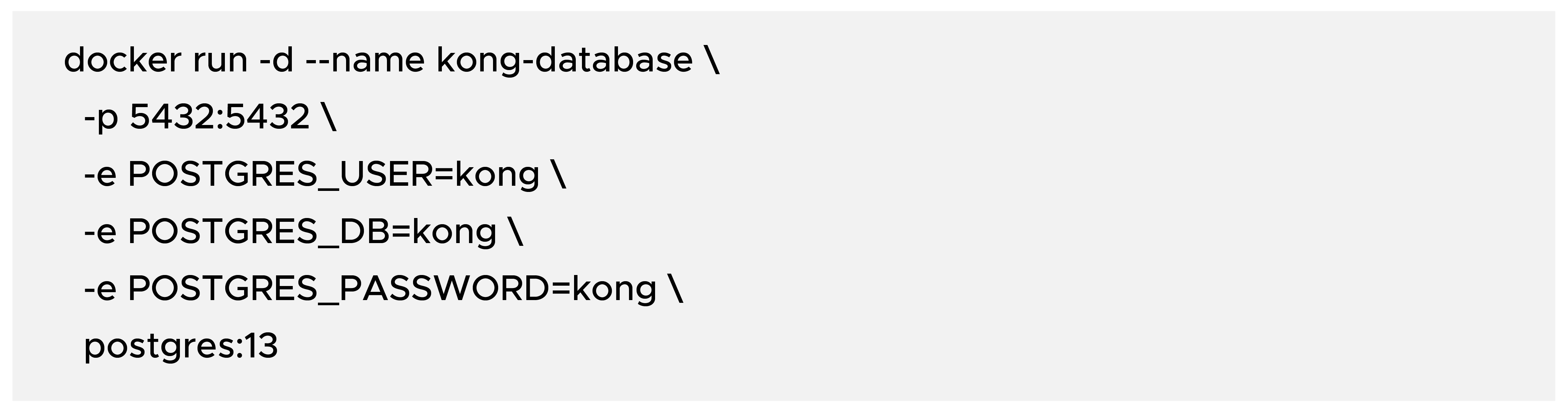
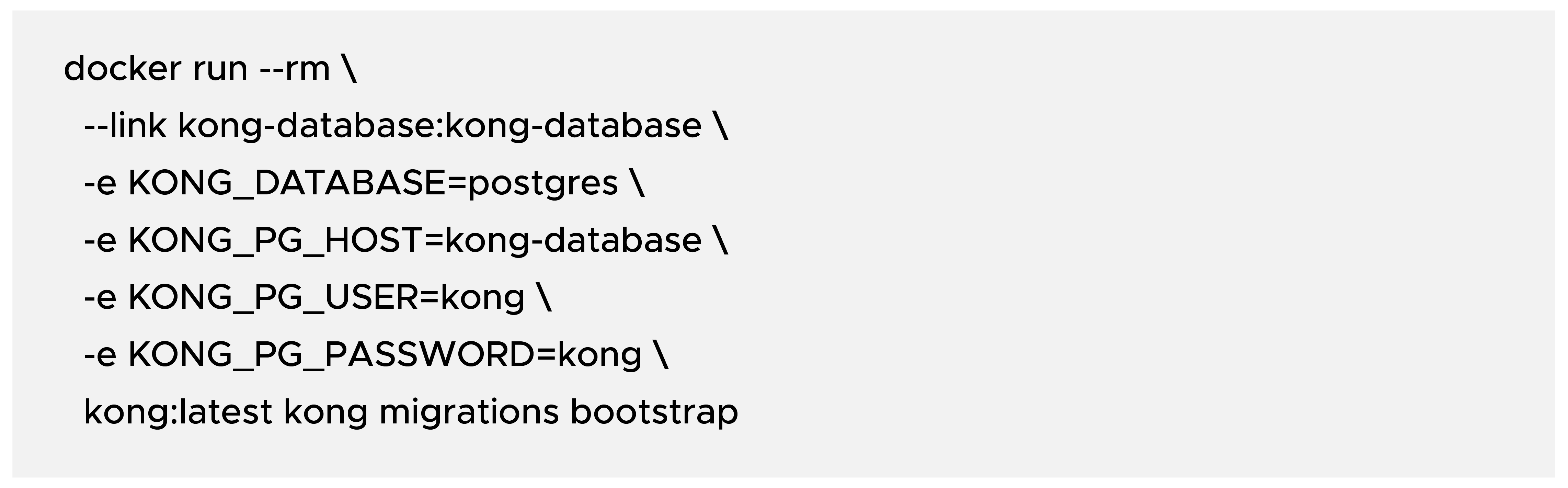
You need a database and Kong container. The following setup uses PostgreSQL.
Step 1: Start PostgreSQL
Step 2: Bootstrap Kong database migrations
Step 3: Start Kong
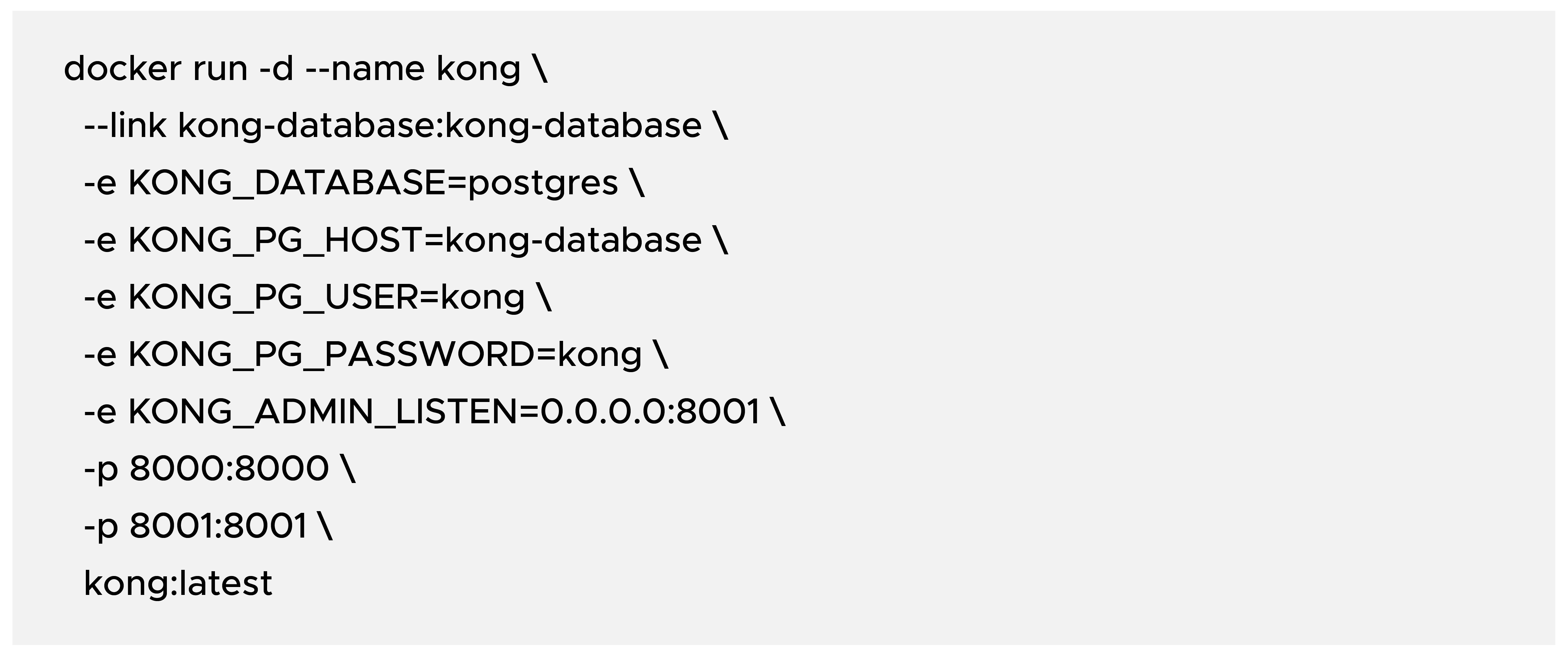
Ports to remember:
- 8000: Proxy traffic (client requests)
- 8001: Admin API (configuration endpoint)
Quick health check:

Create Your First Service and Route

- Create a route for that service

Now requests to localhost:8000/v1 are proxied to https://api.example.com/v1.
Add Essential Gateway Plugins
1) API Key Authentication
Enable key-auth on service:

Create a consumer:

Issue an API key:

Result: requests without apikey header return 401 Unauthorized.
2) Rate Limiting

This caps traffic at 100 requests/minute per default keying strategy.
3) CORS

Verify End-to-End Behavior
- Without API key (expect 401):

- With API key (expect a successful upstream response):

Detailed Use Cases and Patterns
Pattern A: Public Partner APIs
- Use OIDC/JWT or key-auth based on partner integration maturity.
- Apply strict per-consumer limits and clear error contracts.
- Add request/response logging with sensitive field masking.
Pattern B: Internal Microservices
- Use service identity (JWT) and relaxed but bounded limits.
- Add correlation IDs at gateway to unify tracing across services.
Pattern C: Browser Frontend APIs
- Standardize CORS policies at the gateway, not per backend.
- Enforce origin allowlists and credential behavior consistently.
Before vs After Migration Snapshot
Before:
- Every service owns edge logic (auth, limits, headers).
- Security behavior differs by team and release cycle.
- Onboarding a new API requires repeated boilerplate.
After:
- Kong owns edge policy and traffic governance.
- Services focus on business logic only.
- New APIs reuse standard route and plugin templates.
Operational Best Practices
- Never expose the Admin API publicly. Bind it to localhost/private network and protect it with network controls.
- Use decK for configuration as code (export, review, version, deploy).
- Use Redis-backed rate limiting in distributed deployments so counters stay consistent across nodes.
- Keep plugin templates by API category (public, internal, admin).
- Add CI checks for route conflicts, missing auth, and policy regressions.
Conclusion
Kong becomes a full-fledged API gateway when you use it as a policy platform, not only as a router.
Start with service and route mapping, then layer authentication, consumer identity, and rate controls. Add observability and config-as-code early. With that model, API delivery becomes faster, safer, and easier to operate at scale.




 Webinar