DevOps Engineer
Akash is an engineering enthusiast who enjoys building scalable, reliable systems.


Find your cloud savings in under 5 minutes

Get a $100 reward on signup

If you run AWS with multiple accounts, private DNS resolution becomes important very quickly.
Maybe you have a centralized shared services account where networking and DNS are managed for everyone. Or maybe you have a decentralized model where each account owns its own services and DNS. Both patterns are common, and both can work well, but the way private DNS resolution behaves in each design is often misunderstood.
The key to understanding this is simple:
AWS already provides a built-in DNS resolver inside every Virtual Private Cloud.
Once you understand how that resolver works, it becomes much easier to design cross-account private DNS the right way.
Let’s start with the two architectures most teams use.
In a centralized model, DNS is mostly managed from one shared services account or shared services VPC.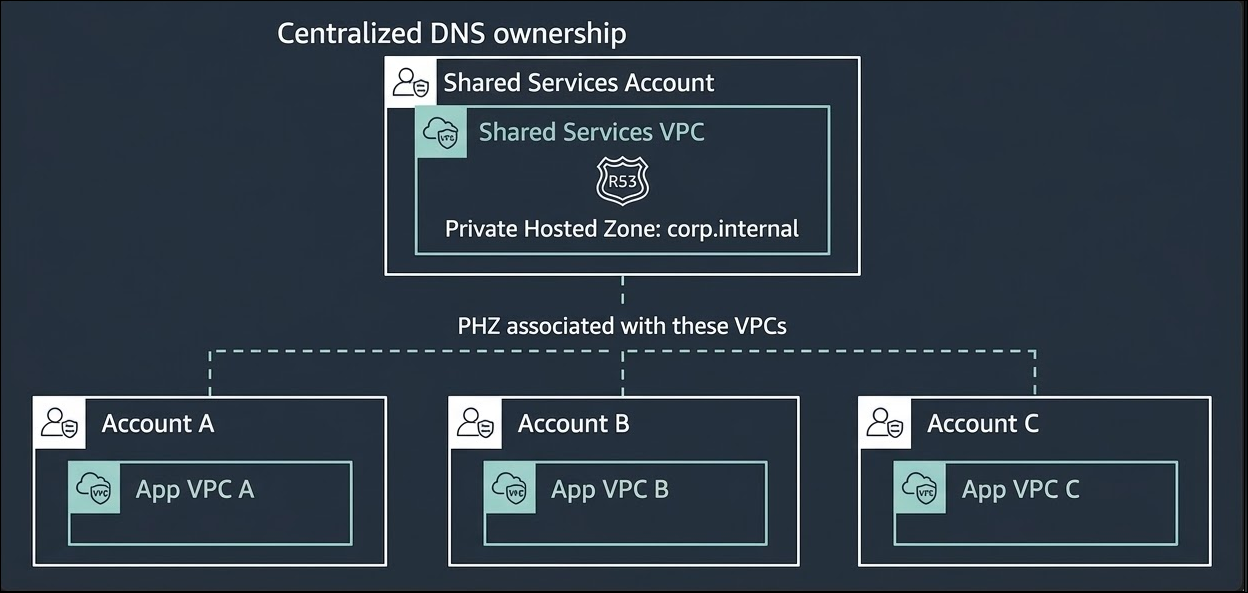
For example:
This is attractive because it gives you one place to manage private domains, records, and integrations with on-premises DNS.
A typical example looks like this:
This model gives you central governance and consistent DNS management.
But it also raises a common question:
How do VPCs in other accounts resolve private names?
The answer is not “by forwarding queries to another VPC.”
The better answer is usually by associating the same Private Hosted Zone with those VPCs.
In a decentralized model, each AWS account owns its own DNS.
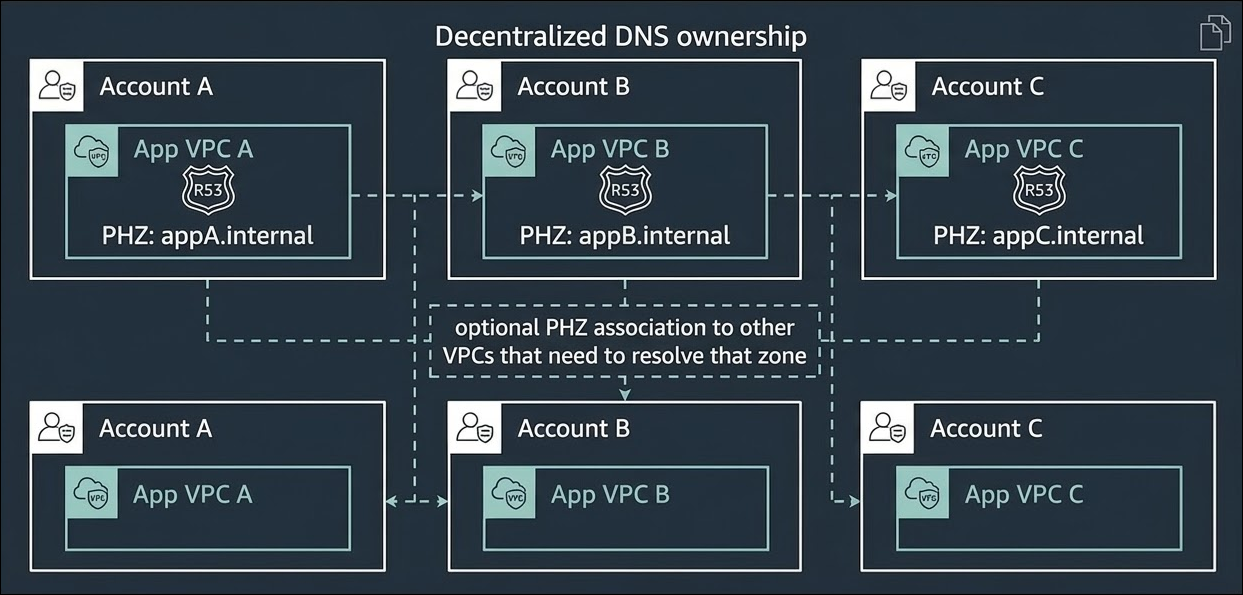
That means:
For example:
This model is useful when different teams need independence. It reduces the blast radius because one team’s DNS changes do not automatically affect everyone else.
The tradeoff is that you now have distributed ownership, so you need naming standards and governance to keep things organized.
Before cross-account DNS, understand DNS inside a VPC
This is the part many people skip, but it is the most important one.
Every VPC in AWS comes with an Amazon-provided DNS resolver.
This resolver is available at:
Examples:
That resolver is local to the VPC experience. Instances inside the VPC use it for DNS lookups.
So when an Amazon EC2 instance asks for:
efs.corp.internal
the flow is normally:
Instance → Amazon-provided Route 53 Resolver inside the VPC → DNS answer
That answer might come from:
The important idea is this:
Instances do not need to query a DNS server in another VPC just because the record is managed elsewhere.
If the right Private Hosted Zone is associated with the VPC, the query is resolved through the local Amazon-provided resolver.
Historically, many teams tried to solve cross-account private DNS by doing one of these:
That works in some cases, especially for hybrid DNS with on-premises, but for AWS-to-AWS private name resolution, it often adds unnecessary complexity.
Why?
Because it turns a local DNS lookup into a network dependency.
Instead of resolving locally inside the VPC, the query has to travel somewhere else first.
That creates extra cost, more moving parts, and more failure scenarios.
For private DNS resolution across AWS accounts, the better design is usually:
Share or associate the Private Hosted Zone with every VPC that needs to resolve it.
For example, imagine this setup:
Instead of forwarding corp.internal queries from VPC A to a central resolver endpoint, you associate the same PHZ with:
Now each VPC resolves the same private records locally.
From an instance in VPC A:
efs.corp.internal
The flow is:
Instance → Amazon DNS Resolver inside VPC A → Private Hosted Zone lookup → Answer returned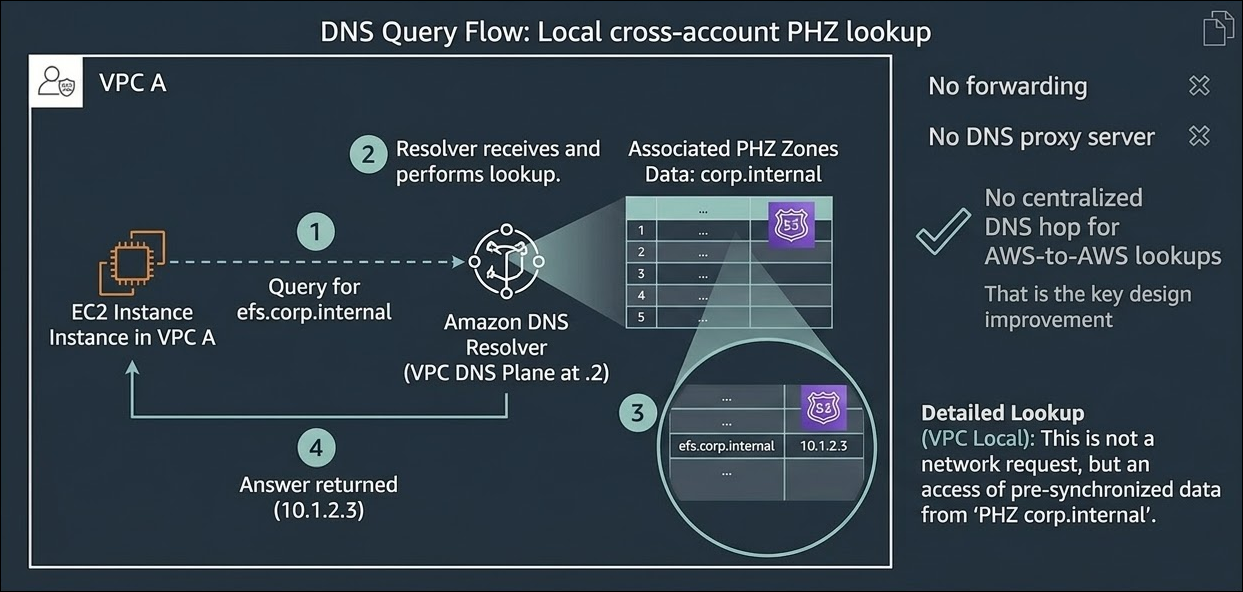
Key points of this design:
Each VPC uses its own built-in Route 53 Resolver path.
That means resolution is not dependent on a central DNS forwarding layer for internal AWS private names.
If one part of the environment has trouble, other VPCs are less likely to be affected.
For example:
This is especially valuable in multi-account environments where resilience matters.
A lot of DNS pain comes from unnecessary forwarding chains.
When you use the PHZ association:
When something fails, troubleshooting is easier because the question becomes:
“Is the PHZ associated with this VPC, and is the record there?”
That is much easier than tracing forwarding rules across accounts and endpoints.
Resolver endpoints cost money.
If you deploy inbound and outbound endpoints across multiple Availability Zones, the cost adds up fast.
By contrast, associating a Private Hosted Zone with VPCs does not require you to build a resolver-endpoint-based design just for AWS-to-AWS private resolution.
So for many internal AWS use cases, PHZ association is the more cost-effective design.
If you grow from 3 VPCs to 30, or from 10 accounts to 100, centralized forwarding becomes harder to manage.
You have more:
PHZ association keeps the design cleaner. The DNS data is shared where needed, and resolution remains local inside each VPC.
This does not mean Resolver endpoints are useless.
They are still important for hybrid DNS, especially when you need DNS between AWS and on-premises environments.
Examples:
So the rule of thumb is:
That distinction clears up a lot of confusion.
The Amazon-provided DNS resolver is the reason this architecture works so well.
Because every VPC already has a native resolver, AWS can let workloads in that VPC resolve records from any Private Hosted Zone associated with it.
That means you do not need to “send DNS traffic” to wherever the zone was created.
This is a big conceptual shift for beginners.
Many people assume:
“The hosted zone lives in another account, so my query must go there.”
But that is not how it works from the workload’s point of view.
What matters is not where the PHZ was created.
What matters is whether the PHZ is associated with the VPC that is making the query.
Once it is associated, workloads in that VPC can resolve the records using the built-in resolver.
That is why private DNS works smoothly in some designs and fails in others.
There is no single answer. It depends on how your organization works.
A centralized model is better when:
A decentralized model is better when:
In both models, the same DNS principle still applies:
Do not force AWS-to-AWS private DNS through central forwarding if PHZ association can solve it more directly.
The recommended approach in most cases :
Private DNS resolution in AWS works best when each VPC resolves names locally using its built-in Route 53 Resolver, with the required Private Hosted Zones associated directly to that VPC.
That design is usually simpler, cheaper, and more resilient than pushing every query through centralized DNS forwarders.
AWS already gives you a DNS resolver in every VPC. The smartest design is usually the one that takes advantage of it.
And in multi-account AWS, that often means sharing the zone, not forwarding the query.

99% of companies saved up to 15% monthly with this plan & achieved peak performance.