Senior Cloud Engineer
Naveen is a cloud and infrastructure professional with hands-on experience in building, automating, and managing scalable AWS environments.

23 Dec, 2025 | 4 Min read

There are several ways of cloud cost optimization with Amazon SNS, and in this article, we’ll explore one method, which is Amazon SNS, to receive alerts about cost and resource utilization.
Almost everyone working with AWS has used SNS at some point, and if you’re a beginner, you’ve likely at least heard of it. In this article, I’ll walk you through how to leverage the Simple Notification Service (SNS) to monitor AWS costs and resources effectively.
The very first question that may come to mind is: why SNS?
Amazon Simple Notification Service (SNS) is a versatile solution that can be integrated with AWS CloudWatch and AWS Budgets to trigger real-time notifications across multiple endpoints such as email, AWS Lambda, SMS, Slack, and more.
These real-time notifications ensure that cost anomalies and resource overutilization can be addressed immediately.
One of the major advantages of Amazon SNS is its scalability. It can trigger alerts across multiple channels at once, providing the right visibility to different stakeholders in real time. Even in the rare case where one channel fails, other endpoints will still receive the alerts, ensuring that the responsible teams can take timely action.
Moreover, Amazon SNS is not limited to alerting. It can also be used to perform automated optimization tasks by triggering Lambda functions to stop idle or unused resources, or to resize over-provisioned resources. This makes SNS not just a monitoring tool, but also a mechanism for taking corrective action when needed.
Finally, when it comes to cost, SNS itself is very cost-effective compared to building a custom alerting system. It is simple, fully managed, and economical. To give you an idea, the first 1 million requests per month are free, making it a budget-friendly option for organizations of any size.
At the core of SNS lies the topic, which serves as the central communication unit and a logical access point where publishers send messages and subscribers receive them.
AWS Simple Notification Service topics enable a decoupled, scalable, reliable, and flexible workflow. Publishers don’t need to know the details of subscribers, making the system loosely coupled. Scalability is built in, as a single topic can support millions of subscribers. Reliability and flexibility come from the fact that subscribers can be entirely different systems, ranging from applications to monitoring tools.
Topics are commonly used for alerting teams in real time about cost and resource utilization, application events, or even triggering automation workflows.
Now that we understand the value of SNS, let’s walk through the process of integrating it with AWS Budgets to receive alerts whenever your costs exceed a predefined threshold.
The process is straightforward:
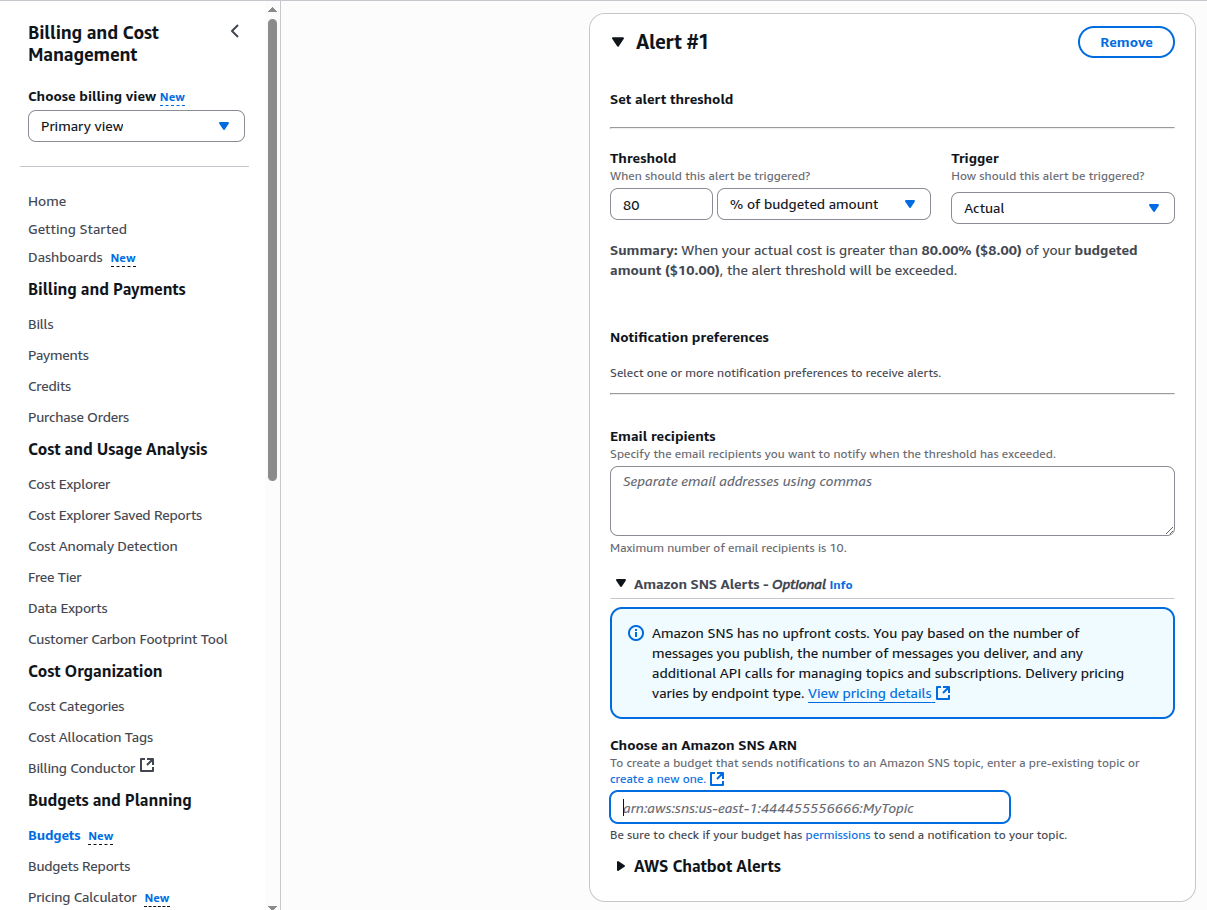
From this point onward, whenever your monthly budget threshold is exceeded, AWS Budgets will automatically trigger the SNS topic. All subscribers to that topic, whether via email, SMS, Slack, Lambda functions, or other endpoints, will instantly receive the alert. This ensures that the relevant teams are informed in real time and can take timely action.
In addition to monitoring costs, SNS can also be used to track resource utilization.
For example, let’s take an AWS EC2 instance where we want to receive a notification whenever CPU utilization reaches 70% or higher. This allows the relevant team to take timely action before performance is impacted.
Let’s assume we have an EC2 instance already running. As we know, AWS provides several pre-configured instance metrics through Amazon CloudWatch, and CPU utilization is one of the most important among them.
Steps to Configure:
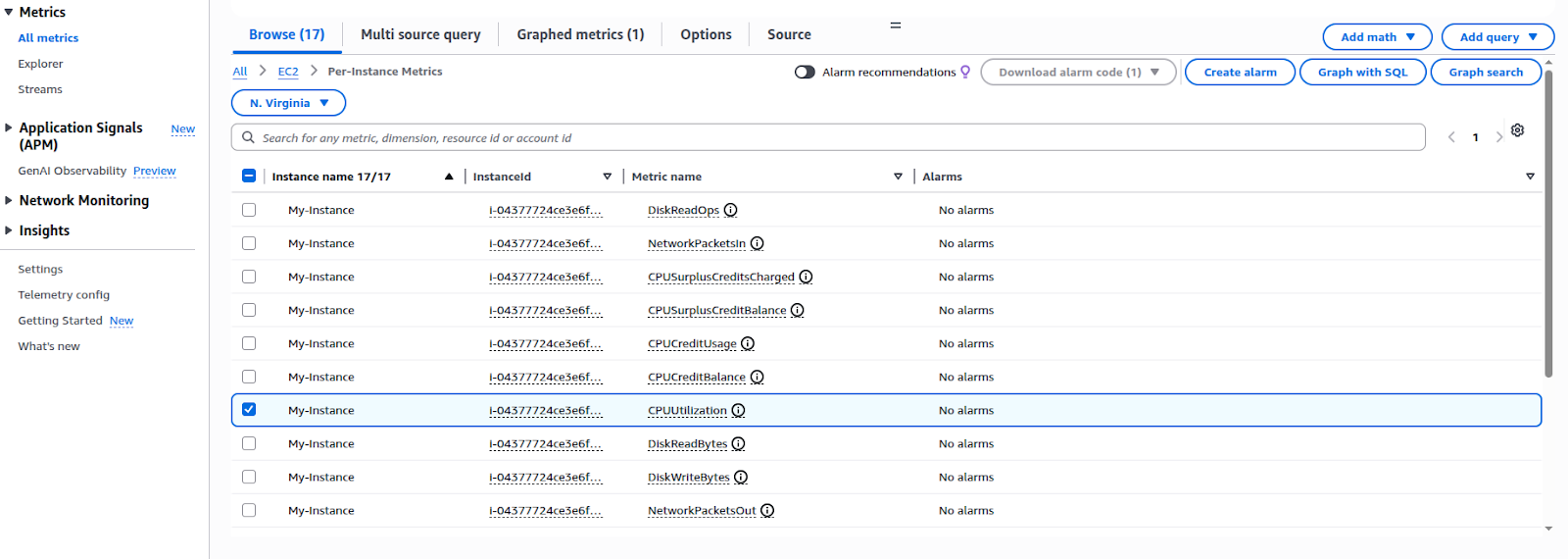
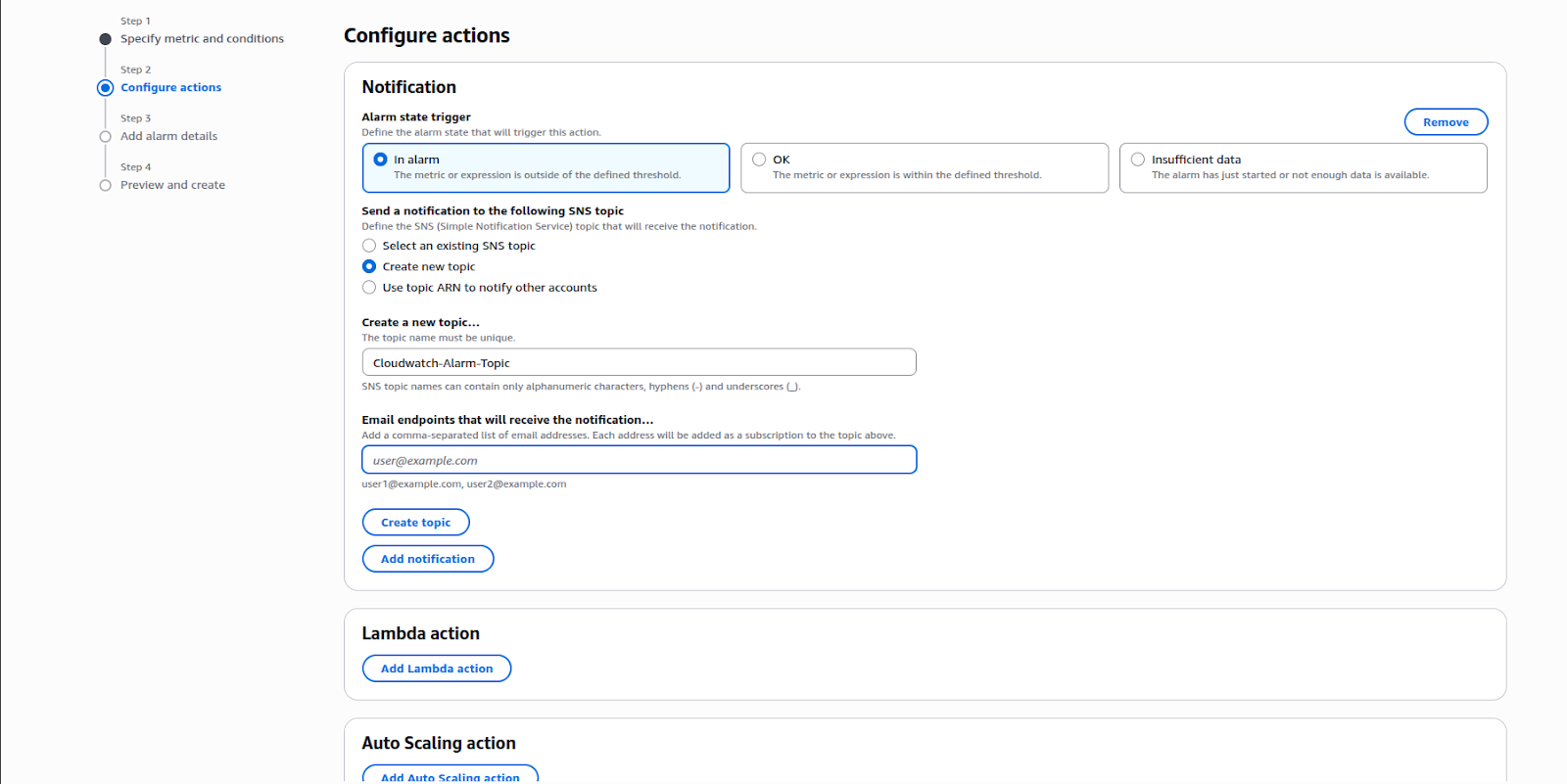
With this integration in place, whenever the CPU utilization of your AWS EC2 instance reaches 70% or higher, CloudWatch will trigger the SNS topic. All subscribed endpoints, whether Slack, Email, or SMS will immediately receive the notification, enabling teams to take timely action.
Amazon SNS makes AWS cost and resource monitoring both proactive and practical. By pairing SNS with AWS Budgets and CloudWatch, you get real-time visibility into spend and utilization, plus the option to trigger automated remediation when thresholds are reached.
This combination scales effortlessly across teams and channels, Email, SMS, Slack, Lambda, and more, so the right people are alerted at the right time.

99% of companies saved up to 15% monthly with this plan & achieved peak performance.