DevOps Engineer
Priyansh Choudhary is a cloud and automation enthusiast focused on building scalable and reliable infrastructure.


Find your cloud savings in under 5 minutes

Get a $100 reward on signup


In large-scale cloud environments, even well-architected systems optimized after comprehensive Well-Architected Reviews can hide subtle scaling bottlenecks that appear only under high load.
This post walks through a real-world incident in which a customer’s Amazon ECS Fargate deployment scaled flawlessly up to a few hundred tasks but consistently failed when concurrency approached 600 tasks. At that threshold, new tasks stalled in the PENDING state indefinitely, halting large-scale testing.
What followed was a deep technical investigation into Amazon Fargate’s launch path, service quotas, and networking dependencies.
At smaller scales, Amazon ECS Fargate tasks launched and ran without issue. But at higher concurrency (around 600 parallel tasks), a consistent pattern emerged:
The absence of obvious failures pointed to a more nuanced constraint, something shared and nonlinear that only became visible under load. AWS Support initially suggested common culprits such as service quotas,
AWS ENI limits, or delays in AWS ECR image unpacking, but none aligned fully with the observed behavior.
This led us to shift our approach; instead of searching for a single “hard limit,” we began analyzing the launch process as a dependency chain, where even small inefficiencies could magnify under scale.
The customer ran Amazon ECS Fargate tasks in a private VPC in the ap-southeast-1 region. Their workflow involved pulling large container images (~600 MB) as part of a data processing pipeline. Tasks were launched in bulk, up to 600 in parallel, from private subnets. The VPC had both Amazon ECR and Amazon S3 VPC endpoints configured.
Key architectural details we captured:
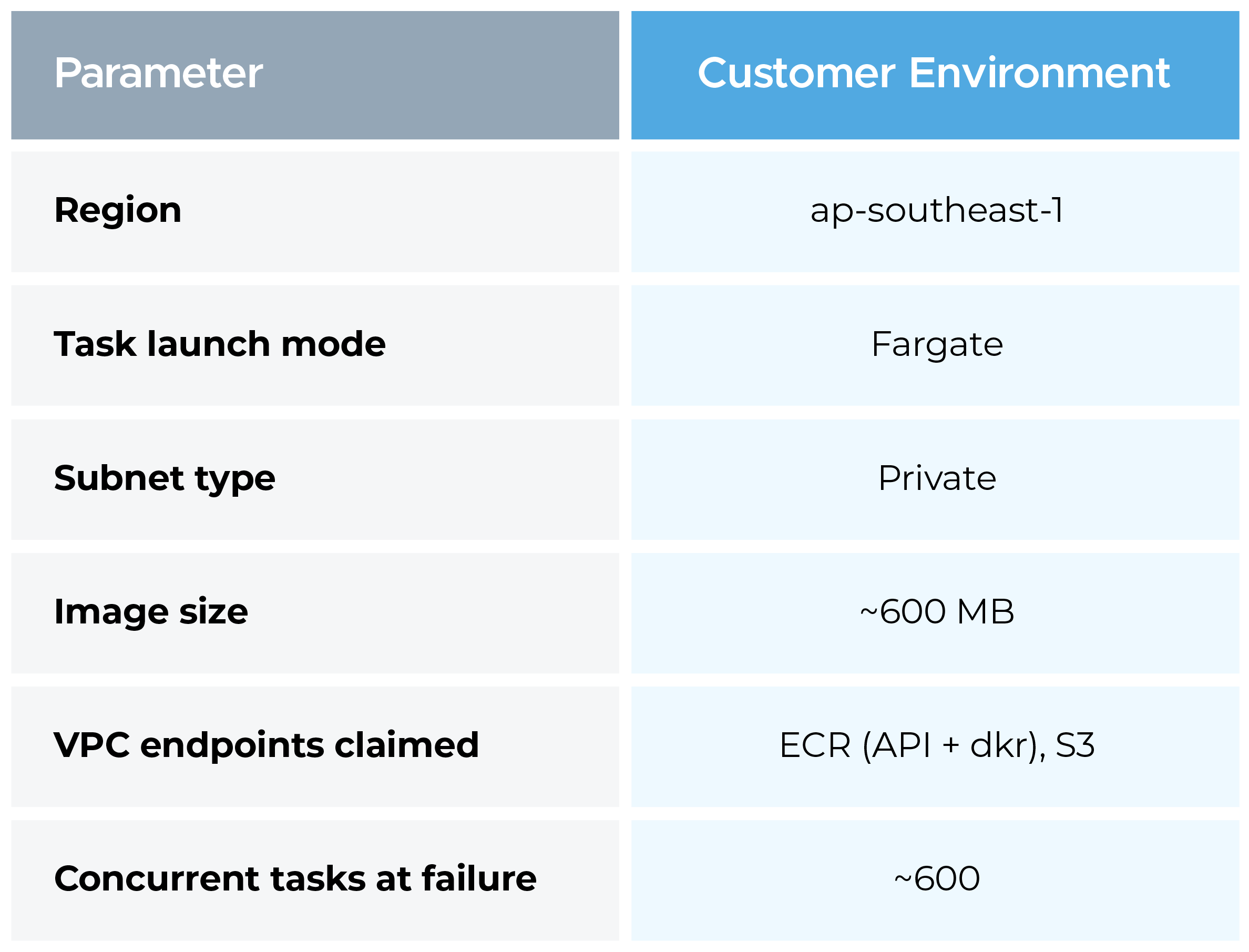
Clean AWS account in the same region (ap-southeast-1), built from scratch to match these constraints. The rationale: a new account eliminates shared-resource noise, prior quota consumption, and any accumulated misconfiguration drift that could confound results.
Replication steps:
The first test (~170 tasks) showed some stalling, expected in a cold AWS account where the underlying infrastructure warms up for the first time. Tests 2 through 4 all completed cleanly at 600 concurrent tasks, with no PENDING-state delays.
This result was decisive: AWS infrastructure in ap-southeast-1 was not capacity-constrained. The bottleneck was not in Fargate scheduling, ENI provisioning, or regional capacity. The failure belonged to something entirely different. That single finding redirected the entire investigation.
With AWS infrastructure ruled out, we shifted focus to the customer's network path.
We requested Amazon CloudWatch metrics for the customer's ECR VPC endpoints. The result was an unambiguous zero traffic recorded on those endpoints. In parallel, NAT Gateway throughput metrics showed a spike to nearly 20 GB/min, coinciding exactly with large-scale task launches.
Specific metrics checked:
So, despite VPC endpoints being present in the account, ECS Fargate tasks were routing all ECR and S3 image-pull traffic through the NAT Gateway, out to the public internet, and back.
VPC endpoints don't self-activate for ECS. For Fargate tasks to use them, several conditions must all be true simultaneously:
At low task counts, NAT bandwidth saturation isn't visible. A single 600 MB image pull is unremarkable. But 600 concurrent pulls, each fetching the same image independently, since Fargate has no shared layer cache across tasks, translates to roughly 360 GB of data traversing the NAT Gateway in a short burst. NAT Gateways have a baseline bandwidth of 5 Gbps (scalable, but not instantaneous), and contention at that volume introduces latency that cascades into Fargate's image-pull timeout window, leaving tasks stuck in PENDING.
The remediation involved three targeted changes:
Post-fix results were immediate:
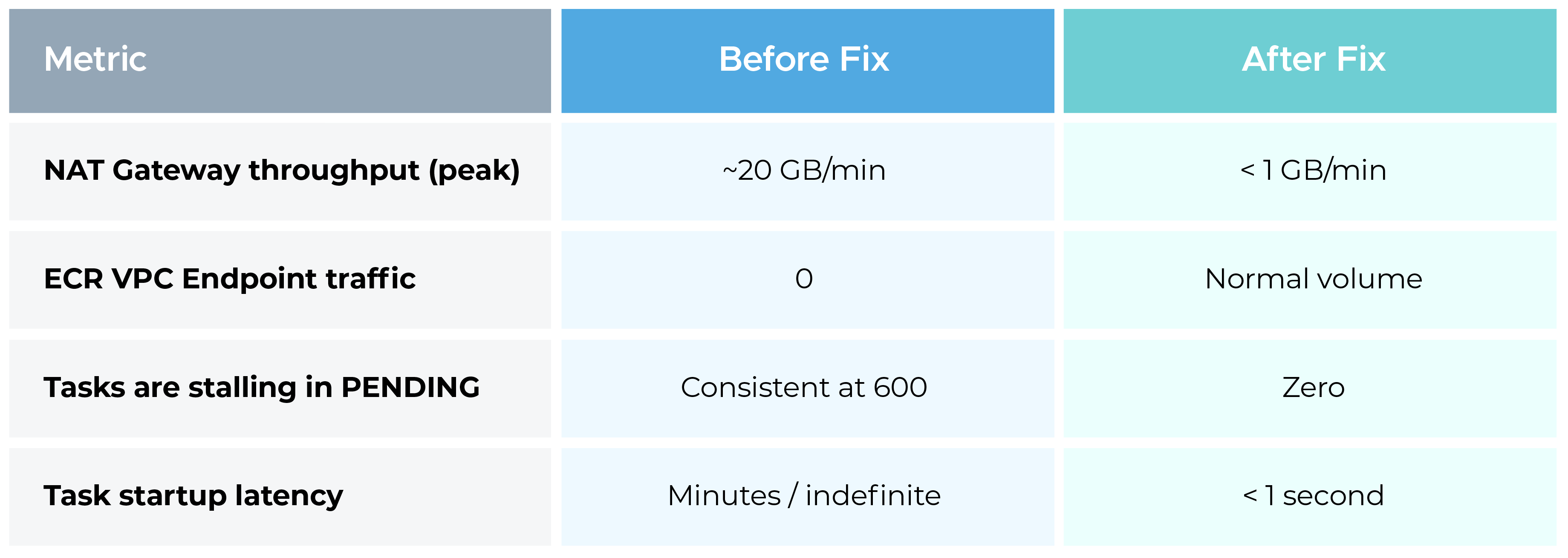
This incident underscored several key lessons for Cloud architects and DevOps engineers:
Scaling failures aren’t always about compute capacity. In this case, the control plane (Amazon ECS orchestration) was fine, the data plane (network path for image pulls) was the bottleneck. Always confirm that ECR and S3 endpoints are configured for private traffic to avoid NAT dependency.
A clean AWS environment can serve as a diagnostic sandbox. By mirroring the environment, we proved that AWS infrastructure wasn’t at fault, narrowing focus to customer configuration. Replication transforms troubleshooting from guesswork to evidence-driven discovery.
Scalability isn’t just about quotas. It’s about how shared components behave under stress, in this case, NAT Gateway bandwidth saturation. Anticipate such inter-service contention early in design reviews and capacity modeling.
The key to this issue was identifying the right metrics to monitor. Only after analyzing CloudWatch metrics for both the ECR VPC endpoints and NAT Gateway throughput were we able to pinpoint the root cause. Effective troubleshooting requires knowing which metrics to examine and correlating them to reveal the underlying problem.
By correctly routing ECR image-pull traffic through the VPC endpoints, we removed a hidden scaling bottleneck that only surfaced at extreme concurrency. What once caused hundreds of tasks to stall in PENDING now scales seamlessly past 600 tasks with consistent, low-latency startup.
The broader takeaway is simple:
Cloud scaling failures aren’t always caused by a lack of compute capacity, but sometimes by hidden configuration or network issues that appear only under heavy load. Solving them requires going beyond dashboards, validating network paths, replicating environments, and applying first-principles troubleshooting.

99% of companies saved up to 15% monthly with this plan & achieved peak performance.