4
4You optimized your architecture. You right-sized your instances. You even turned off dev environments on weekends.
And your AWS bill still made you flinch.
The problem might not be what you're running. It might be how you're paying for it. Pricing model selection is the most underrated lever in cloud cost optimisation, and it requires zero code changes.
AWS gives you three ways to cut compute costs significantly: the AWS Savings Plan, Reserved Instances, and Spot Instances. Each saves you anywhere from 40% to 90% versus On-Demand. But they are built for very different workloads, and picking the wrong one is just as expensive as picking none at all.
The Core Trade-Off Across All Three
- AWS Savings Plan: Commit to a spend amount, get flexibility in return
- Reserved Instances (RIs): Commit to a specific resource, get the deepest discount
- Spot Instances: Accept interruption risk, pay the lowest price on AWS
The right answer depends on your workload's predictability, your team's operational maturity, and how much your infrastructure is likely to evolve.
Head-to-Head Comparison: Find Your Fit Fast
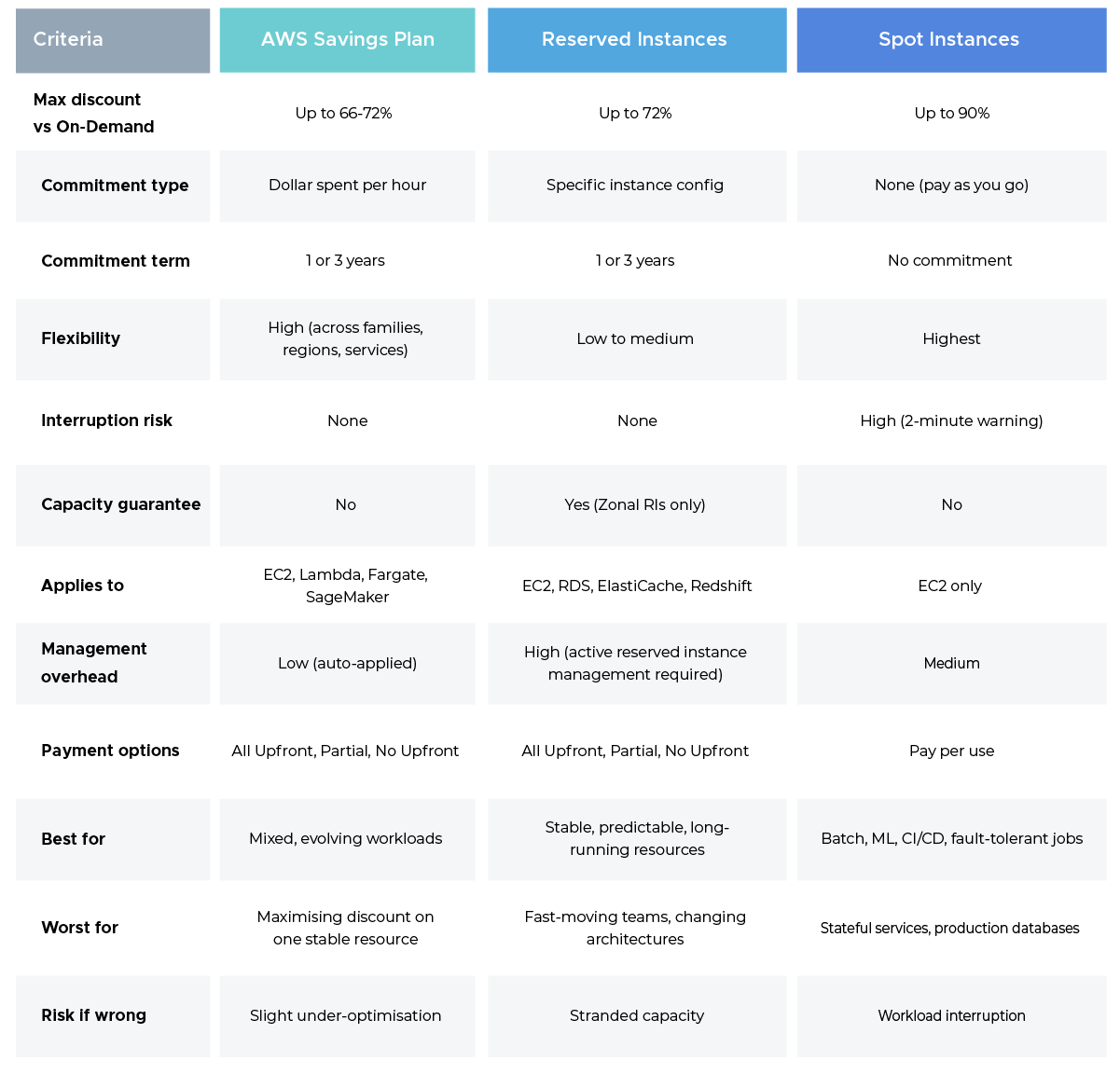
Quick read: Not sure where to start? The AWS Savings Plan covers the most ground with the least overhead. Use Reserved Instances to go deeper on specific stable resources and push everything interruptible to Spot.
AWS Savings Plan: The Smart Default
An AWS Savings Plan commits you to a minimum hourly spend on AWS compute over 1 or 3 years, in exchange for discounts up to 66% (Compute Plans) or 72% (EC2 Instance Plans) off On-Demand rates.
The key advantage: AWS applies the discount automatically to your most expensive eligible usage. No manual matching, no inventory tracking. That simplicity makes it the go-to starting point for most cloud cost optimisation strategies.
Best fit: Teams that move fast, run mixed EC2 and serverless workloads, or want to simplify reserved instance management without tracking individual RI inventory.
Honest trade-off: Slightly lower ceiling than the deepest RI discounts. If you have a perfectly stable workload and the discipline to manage it, RIs go further.
Reserved Instances: Maximum Savings, Maximum Commitment
Reserved Instances deliver discounts up to 72% off On-Demand, but require committing to specific instance configurations. This is not a model for teams that change their minds often.
Regional RIs apply flexibly across a family within a region. Zonal RIs lock to a specific Availability Zone but come with a capacity guarantee, which matters when supply is constrained.
Best fit: Steady-state workloads like RDS databases, ElastiCache clusters, or persistent application servers where the instance type will not change over the commitment term.
The hidden cost: Poor reserved instance management is where organisations quietly bleed money. Utilisation below 80%, unmonitored expirations silently flipping back to On-Demand pricing, and mismatched Convertible vs Standard RIs can erode every dollar saved. Someone on your team needs to own this continuously, not just at purchase time.
Spot Instances: Radical Savings for Fault-Tolerant Workloads
Spot gives you access to unused AWS capacity at up to 90% off On-Demand. The catch: AWS can reclaim it with a two-minute warning.
Best fit: Stateless, interruptible workloads including EMR jobs, ML training runs, rendering pipelines, and CI/CD runners. Containerised workloads on EKS or ECS handle interruptions especially well.
Never use Spot for: Databases, stateful services, or any customer-facing application that cannot tolerate sudden node loss.
The one rule: Diversify across multiple instance families and Availability Zones. When one pool is reclaimed, your workload keeps running in another.
The Winning Strategy: Layer All Three
The most cost-efficient AWS environments do not pick one model. They layer all three:
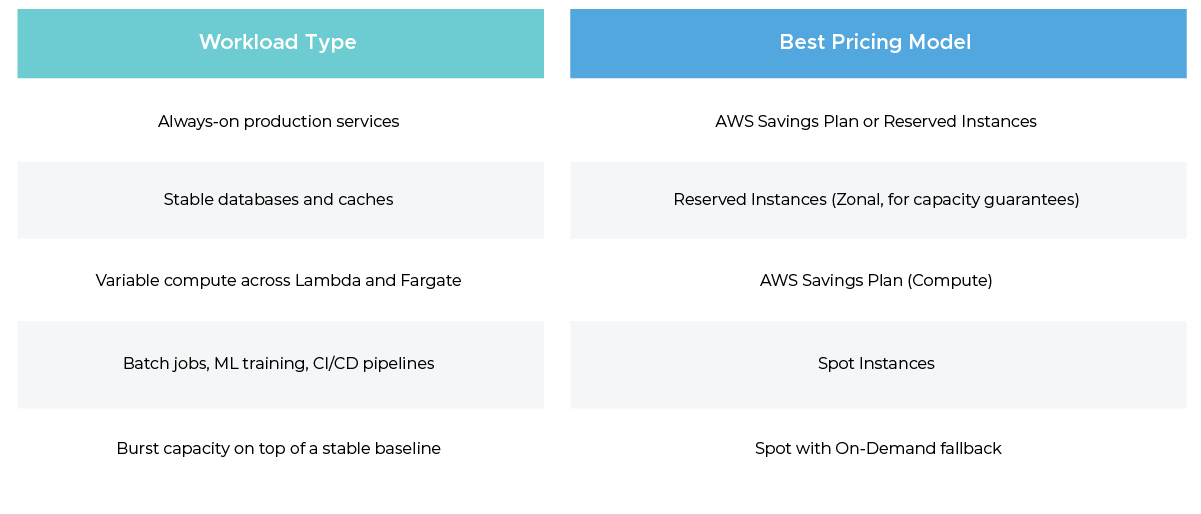
Cover your baseline with an AWS Savings Plan, lock in specific long-lived resources like RDS with Reserved Instances, and route all interruptible workloads to Spot. This layered approach typically delivers 50 to 65% overall savings versus a pure On-Demand footprint.
Where to Start This Week
Open AWS Cost Explorer and pull your last 30 days of On-Demand spend. Flat, consistent usage patterns are your RI or Savings Plan candidates. Batch and non-production workloads are your Spot candidates.
You do not need to do everything at once. Committing even 30% of your baseline compute to an AWS Savings Plan produces real savings within the first billing cycle.
Cloud cost optimisation is not about finding one perfect pricing model. It is about matching the right tool to every layer of your stack.
That is a decision you can make today.