


8
8For many organisations, AWS Savings Plans and Reserved Instances (RIs) are among the first tools used to reduce cloud costs. These products offer a compelling promise - commit to predictable usage and unlock huge discounts - sometimes more than 70% - compared to On-Demand pricing. Yet many teams continue to see cloud bills rise despite making significant commitment purchases.
Commitments reduce the cost of eligible workloads, but they do not automatically create an efficient cloud environment. Choosing the wrong commitment type, purchasing commitments before rightsizing workloads, or failing to adapt as usage patterns change can all limit the value organisations receive from their investments. To maximise savings, FinOps teams need to look beyond discounts and focus on how commitments align with actual cloud consumption.
What AWS commitments actually cover (and what they don’t)?
AWS offers two primary commitment-based pricing models to help organisations reduce cloud costs: Savings Plans and Reserved Instances (RIs). Both offer discounted pricing compared to On-Demand rates, but the level of flexibility varies by commitment type.
Compute Savings Plans
The most flexible commitment option available on AWS. Compute Savings Plans apply automatically across Amazon EC2, AWS Lambda, and AWS Fargate, allowing organisations to change instance families, sizes, operating systems, and even Regions while continuing to receive discounted pricing.
Best suited for: Dynamic cloud environments where workloads evolve frequently.
EC2 Instance Savings Plans
These plans offer deeper discounts in exchange for committing to a specific EC2 instance family within a particular AWS Region. There is still flexibility across instance sizes, operating systems, and tenancy options within that family.
Best suited for: Stable workloads with predictable infrastructure requirements.
Database Savings Plans
Database Savings Plans provide discounted pricing across a range of AWS database services, including Amazon RDS, Aurora, DynamoDB, ElastiCache, Amazon OpenSearch Service, DocumentDB, Neptune, and other supported services.
Best suited for: Organisations with consistent database workloads looking to reduce long-term database infrastructure costs.
Reserved Instances (RIs)
Reserved Instances offer discounted pricing for long-running workloads with predictable usage patterns. While they can deliver substantial savings, they typically require closer alignment between the purchased commitment and the resources consumed.
Best suited for: Mature environments with stable and well-understood workload patterns.
What these commitments don’t cover?
One of the most common misconceptions is that commitments automatically solve cloud cost challenges. They don't.
Savings Plans and Reserved Instances reduce the cost of eligible compute and database usage. They do not address:
- Idle resources
- Underutilised instances
- Oversized workloads
- Unnecessary storage consumption
- Data transfer charges
- Architectural inefficiencies
- Resources that no longer serve a business purpose
As a result, organisations can have active commitments, receive discounted pricing, and still struggle to reduce overall cloud spend. In many cases, the issue isn't the commitment itself. The challenge lies in how well that commitment aligns with actual cloud usage.
This is where things often start to break down.
The 3 failure modes that prevent commitments from delivering maximum savings
1. Choosing the Wrong Commitment Type
Not all commitments are designed for the same type of workload.
For example, an organisation may purchase EC2 Instance Savings Plans to maximise discounts, only to find that workloads frequently move between instance families or regions. In such cases, the commitment provides less flexibility than the environment requires.
Similarly, Reserved Instances can be highly effective for stable workloads, but they may become difficult to optimise if infrastructure requirements change over time.
Selecting the right commitment model requires a clear understanding of workload behaviour, growth plans, and the level of flexibility the environment needs. A larger discount on paper does not always translate into greater savings in practice.
2. Coverage Gaps
Coverage measures the percentage of your eligible cloud usage that is protected by commitments.
When coverage is low, a significant portion of workloads continues to run on On-Demand pricing, leaving potential savings on the table.
Coverage gaps often emerge when organisations expand their cloud footprint, launch new applications, increase consumption, or adopt new services without revisiting their commitment strategy.
A commitment portfolio that delivered strong coverage six months ago may no longer be sufficient today. Without regular review, organisations can find themselves paying On-Demand rates for a growing share of their cloud usage.
3. Mismatched Usage Patterns
Cloud environments are constantly changing.
Teams rightsize workloads, migrate applications, adopt newer instance families, move workloads across regions, or modernise platforms using serverless services and containers. While these changes are often beneficial from a cost and performance perspective, they can affect how commitments are consumed.
Since usage patterns for cloud workloads are dynamic, commitments may no longer align with the resources they were originally intended to cover. This can result in lower utilisation, missed savings opportunities, and commitments that are no longer delivering their full value.
The challenge then becomes ensuring they continue to match the constraints and requirements of your cloud environment as it evolves.
How to read Coverage vs Utilisation and why do most teams confuse them?
When evaluating the effectiveness of Savings Plans and Reserved Instances, two metrics matter more than almost any others: coverage and utilization.
Although they are closely related, they measure very different things.
Coverage
RI & SP Coverage measures the percentage of your eligible cloud usage that is covered by commitments.
For example, if an organisation has ₹10 lakh of eligible monthly spend and commitments cover ₹8 lakh of that usage, coverage is 80%.
Low coverage typically means a larger share of workloads continues to run on On-Demand pricing, reducing the overall savings opportunity.
Utilization
Utilization measures how much of the commitment you purchased is actually being consumed.
Using the same example, an organisation may purchase commitments worth ₹8 lakh per month. If only ₹6 lakh of those commitments are being used, utilisation is 75%.
Low utilisation often indicates overcommitment. The organisation has purchased more commitment than its workloads currently require.
Why shouldn’t you just look at one metric
Coverage and utilisation need to be viewed together.
An organisation may have high coverage but low utilisation. This often suggests commitments have been over-purchased and some of the commitment spend is going unused.
On the other hand, an organisation may have excellent utilisation but low coverage. In this case, commitments are fully consumed, but a large portion of eligible workloads is still being billed at On-Demand rates.
The goal is not simply to maximise one metric. The objective is to maintain a healthy balance in which commitments are fully utilised while covering as much eligible usage as possible.
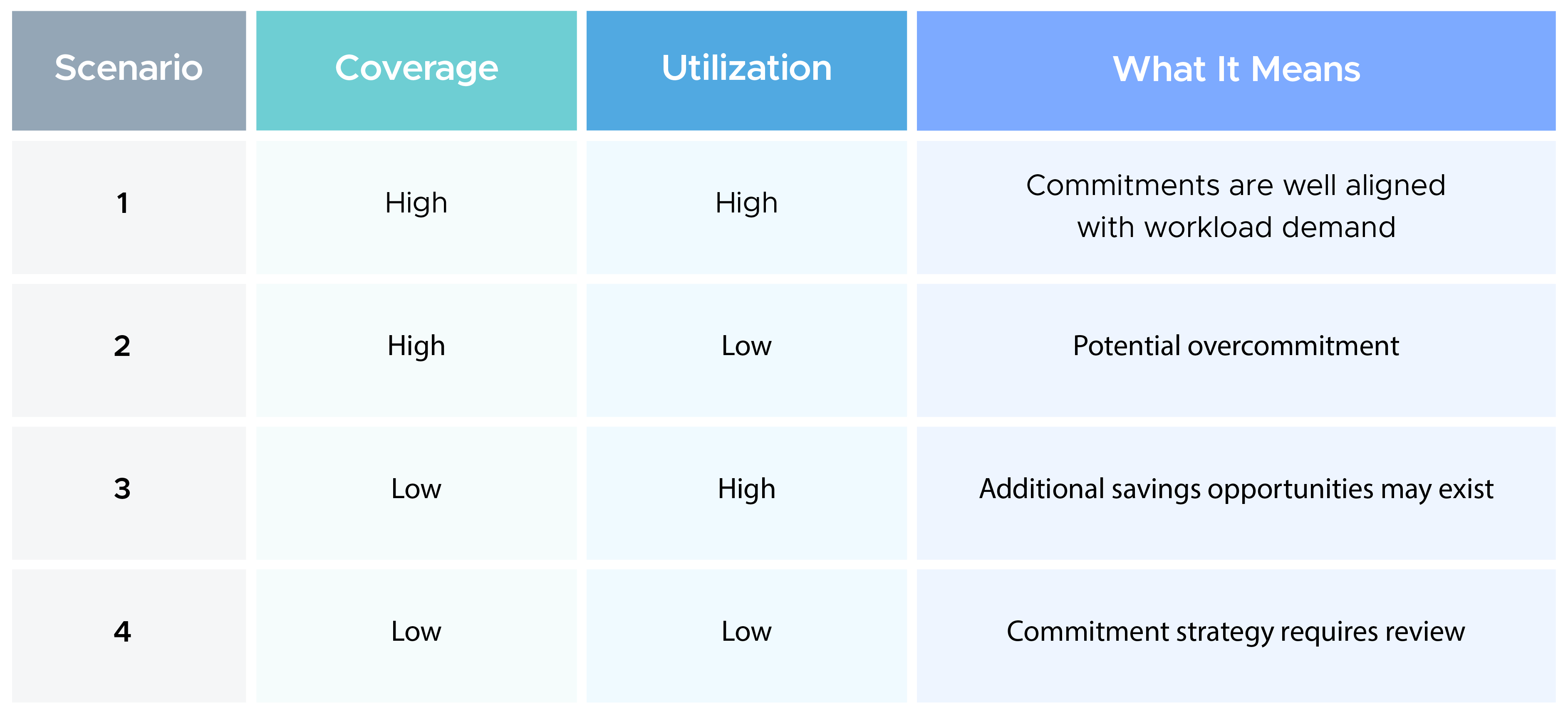
Achieving that balance becomes significantly easier when commitments are based on optimised workloads rather than projected demand alone.
The rightsizing-before-committing rule
One of the most common mistakes organisations make is purchasing commitments before optimising their cloud environment.
At first glance, this approach seems reasonable. If a workload is running today, why not commit to it and start receiving discounted pricing?
The problem is that cloud environments are rarely operating at peak efficiency. Resources may be oversized, underutilised, or no longer aligned with application requirements. When commitments are purchased before these issues are addressed, organisations risk locking in discounts for workloads that will eventually be reduced or modified.
This is why FinOps teams often follow a simple principle: optimize cloud usage first and commit to what remains.
Rightsizing helps establish a more accurate baseline of cloud consumption. Once idle resources are removed, oversized workloads are adjusted, and infrastructure is aligned with actual demand, organisations can make commitment decisions with greater confidence.
The result is a commitment strategy that is more closely aligned with long-term usage patterns, reducing the risk of overcommitment while improving utilisation and overall savings.
How to fix it: Audit → Rightsize → Commit
Achieving maximum value from Savings Plans and Reserved Instances requires an ongoing process rather than a one-time purchase decision.
Audit
Start by reviewing your current commitment portfolio.
This includes evaluating commitment coverage, utilisation levels, upcoming expirations, and areas where workloads continue to run on On-Demand pricing. The goal is to understand whether existing commitments still align with current cloud usage.
Rightsize
Before purchasing additional commitments, optimize the underlying infrastructure.
Remove idle resources, address underutilised workloads, evaluate instance sizing, and identify opportunities to improve efficiency. This creates a cleaner and more predictable baseline for commitment planning.
Commit
Once workloads have been optimised, commitments can be sized with greater accuracy.
The focus should be on stable, recurring demand rather than temporary spikes or projected growth. Commitment decisions based on optimised usage are more likely to achieve strong coverage and utilisation over time.
This process becomes increasingly important as cloud environments grow in scale and complexity. Workloads evolve continuously, making it difficult for teams to manually track changing commitment requirements.
As a result, many organisations are moving towards automated commitment management solutions that continuously monitor usage, recalculate optimal commitment levels, and adapt as cloud environments change.
Simplifying RI&SP management with CloudKeeper Commit
Managing Savings Plans and Reserved Instances isn't a one-time exercise. As and when cloud environments evolve, commitment strategies need to evolve alongside them.
This is where CloudKeeper Commit helps.
CloudKeeper Commit is an AI-powered commitment optimisation platform that continuously analyses cloud usage and automatically adjusts commitment strategies to maximise savings while reducing risk. Instead of relying on periodic reviews or manual calculations, it adapts to changing workload patterns in near real time.
Here's how it works:
- Continuously monitors cloud usage to identify changing consumption patterns and commitment opportunities.
- Dynamically recalculates commitment requirements, ensuring recommendations stay aligned with evolving workloads instead of fixed review cycles.
- Makes incremental, low-risk adjustments rather than large upfront purchases, helping organisations avoid overcommitting.
- Optimises coverage across regions, instance families, and usage pools to maximise the value of existing commitments.
- Selects the most suitable mix of Savings Plans, Reserved Instances, and discounted AWS Marketplace capacity based on current usage.
- Automatically executes purchases and exchanges while remaining fully compliant with AWS commitment models.
The result is a commitment strategy that keeps pace with your cloud environment instead of falling behind it.
CloudKeeper Commit delivers guaranteed savings of 30-45% from Day 1, with quick onboarding, expert support, and a simple outcome-driven commercial model where you pay only when you save.
Savings Plans and Reserved Instances remain powerful tools for reducing AWS costs, but their effectiveness depends on how well they adapt to changing cloud environments. Continuous optimisation, backed by automation and expert guidance, helps organisations maximise the value of every commitment and achieve maximum ROI from their investments towards cloud computing.
Join Mission Possible and uncover hidden AWS savings in as little as five minutes.
Get a clear view of where you're overspending, identify opportunities to optimise your cloud costs, and take the first step towards a more efficient AWS commitment strategy. Eligible participants can also receive a $100 Amazon voucher.
Launch your mission today and see how much you could be saving.
















