DevOps Engineer
Aman is a seasoned DevOps professional skilled in cloud infrastructure, CI/CD pipelines, containerization, and automation.


If you're running applications on Google Kubernetes Engine (GKE) that need to access Google Cloud services like BigQuery, Cloud Storage, or Pub/Sub, you face a critical security question: how do your containerized workloads authenticate to these services without exposing credentials?
For years, teams have wrestled with two problematic approaches: embedding long-lived service account keys in containers or allowing all pods on a node to share the same overly permissive node service account. Both methods violate security best practices and create significant risks. In 2026, there's a better way: Workload Identity Federation for GKE—Google's recommended approach for secure, scalable workload authentication.
Workload Identity Federation for GKE allows your Kubernetes applications to authenticate to Google Cloud APIs using native Kubernetes identities, mapped seamlessly to IAM policies. Instead of managing static credentials, your workloads receive short-lived, automatically rotated tokens that provide exactly the permissions they need—nothing more.
This approach leverages IAM Workload Identity Federation, the same technology that enables secure authentication from external environments like AWS and Azure. For GKE specifically, Google manages the entire workload identity pool and provider infrastructure automatically, so you don't need to configure external identity providers.
Before diving into how Workload Identity Federation works, it's important to understand why the alternatives are problematic.
Service account keys are long-lived credentials—some valid for up to 10 years. This creates several critical vulnerabilities:
Point to Remember: Service account keys can be valid for up to 10 years and cannot be automatically rotated by Google Cloud. Once created, you are responsible for their entire lifecycle, including secure storage, distribution, and rotation.
Using the Compute Engine default service account or assigning a service account to an entire node pool means every workload on that node shares the same identity and permissions. This approach:
In fact, without Workload Identity Federation enabled, any pod can retrieve Google Cloud credentials from the underlying worker node through the metadata server—a serious security gap. While the older metadata concealment feature can mitigate this, Workload Identity Federation is the modern replacement that Google recommends.
Point to Remember: Even with Workload Identity Federation enabled on the cluster, if you don't enable it on specific node pools (Standard clusters), those node pools will still allow pods to access node credentials.
Workload Identity Federation operates through an elegant token exchange mechanism that happens transparently to your application. Understanding this flow helps you troubleshoot issues and appreciate the security model.
When you enable Workload Identity Federation on a GKE cluster, Google automatically provisions three key components:
A fixed-format identity pool (PROJECT_ID.svc.id.goog) is created for your Google Cloud Platform project. This pool provides a naming convention that allows IAM to understand and trust Kubernetes credentials. Importantly, this pool persists even if you delete all clusters in your project.
Your GKE cluster is registered as an identity provider within the workload identity pool, giving it a trusted relationship with Google Cloud IAM.
A metadata server runs as a DaemonSet (one pod per Linux node) on every node in your cluster. This server intercepts credential requests from workloads and orchestrates the token exchange. All traffic to this metadata server stays within the VM instance—it never traverses the network.
Point to Remember: The GKE metadata server takes a few seconds to start accepting requests on a newly created pod. Therefore, attempts to authenticate using Workload Identity Federation for GKE within the first few seconds of a pod's life might fail. Retrying the call will resolve the problem.
When your application requests a Google Cloud API, here's what happens behind the scenes:
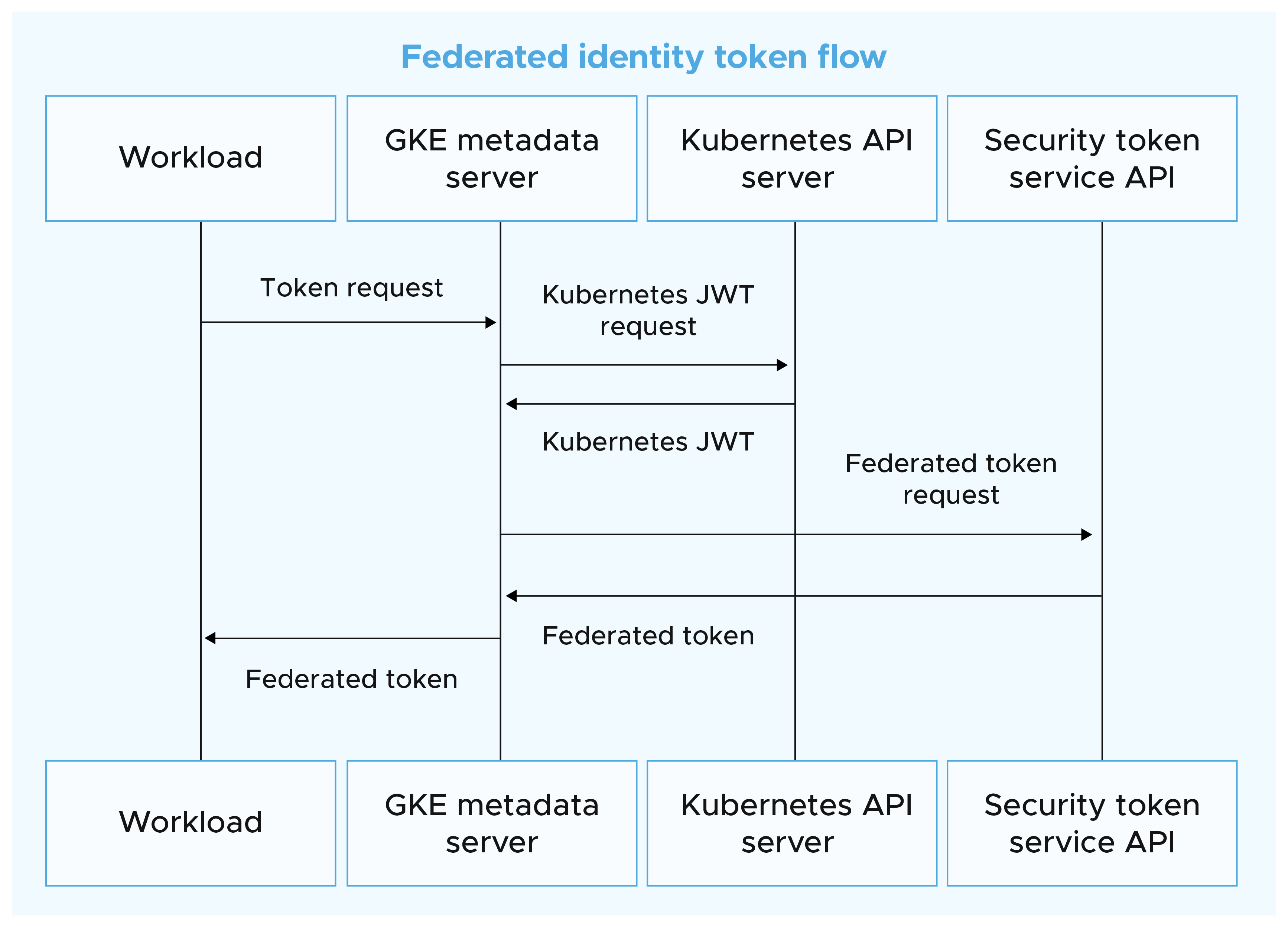
The beauty of this design is that existing code using Google Cloud client libraries works without modification. Your application code remains unchanged—only the infrastructure configuration differs.
Workload Identity Federation for GKE supports two configuration patterns, each suited to different scenarios.
This modern approach, introduced as part of the 2024 update that renamed the feature to "Workload Identity Federation for GKE," allows you to grant permissions directly to Kubernetes resources using IAM principal identifiers.
A principal identifier follows this format:

You can grant permissions to different scopes:
Point to Remember: Use principal (singular) for specific resources like a single ServiceAccount. Use principalSet (plural) for groups of resources like all pods in a namespace or cluster.
When a Google Cloud service doesn't support federated tokens directly, you can configure Kubernetes ServiceAccounts to impersonate IAM service accounts. This method exchanges the federated token for a full IAM service account token.
Point to Remember: Both the IAM policy binding AND the annotation are required for service account impersonation. Missing either one will result in authentication failures.
While more complex, this method provides compatibility with all Google Cloud services and allows you to leverage existing IAM service account configurations.
Start with Approach 1 (Direct Principal Identifiers) whenever possible—it's simpler and requires less infrastructure. Fall back to Approach 2 (Service Account Impersonation) only when you encounter service limitations or have specific requirements that necessitate it.
Let's walk through setting up the Workload Identity Federation using both approaches.
Ensure you have:
Workload Identity Federation is always enabled in Autopilot—no configuration needed at the cluster level. Skip directly to configuring your applications.
Step 1: Enable at the cluster level

Step 2: Enable on node pools (new or existing)
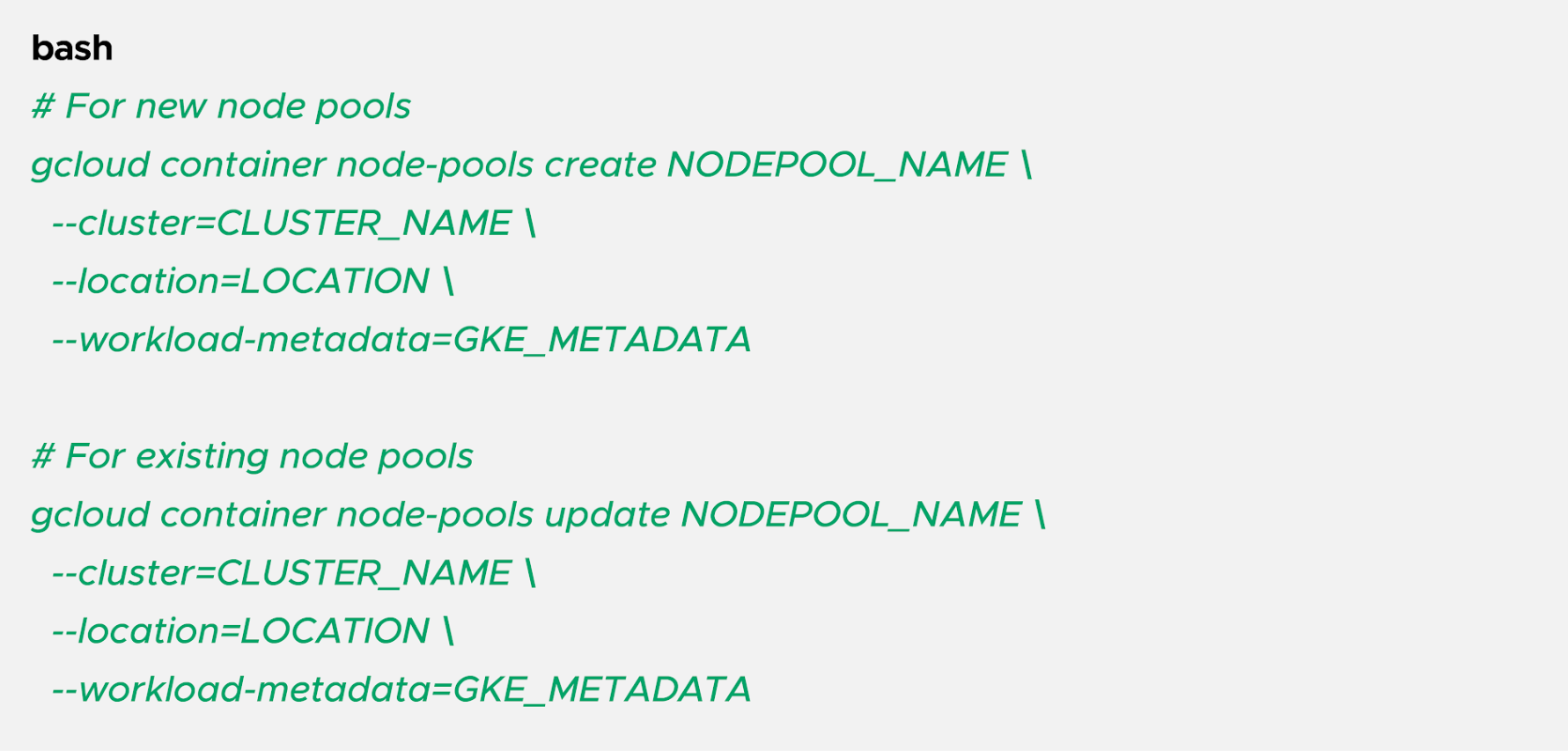
The --workload-metadata=GKE_METADATA flag configures the node pool to use the GKE metadata server.
Point to Remember: Updating existing node pools to enable Workload Identity Federation requires recreating the nodes. Plan for a maintenance window or use node pool migration strategies to avoid downtime.
Step 1: Create a Kubernetes namespace and ServiceAccount
Step 2: Grant IAM permissions using a principal identifier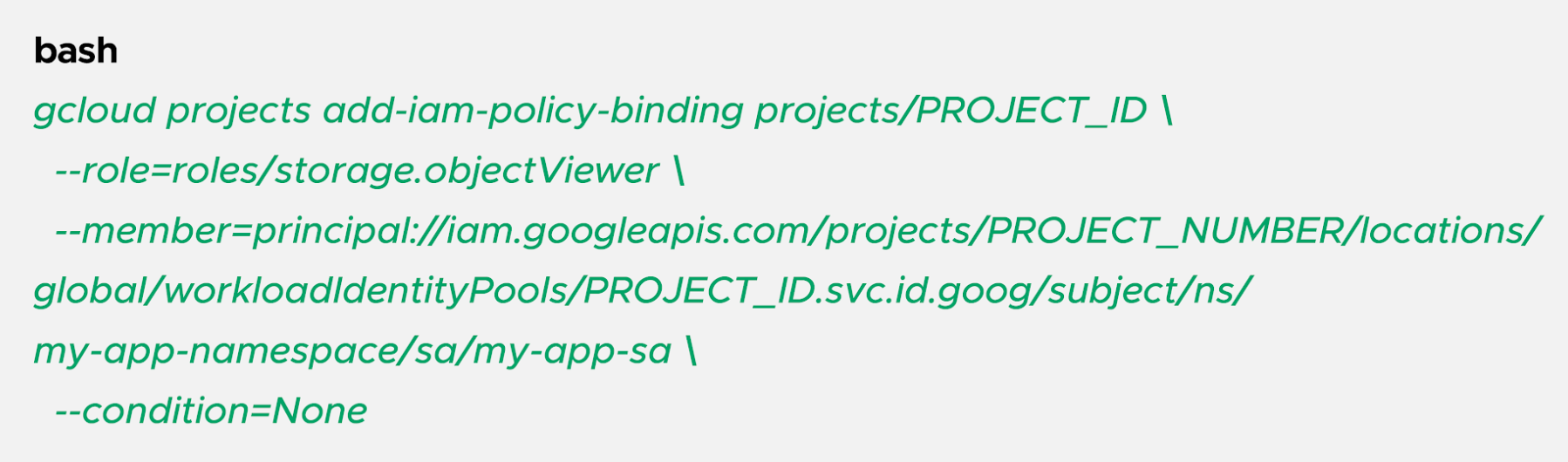
This example grants the Storage Object Viewer role to all pods using the my-app-sa ServiceAccount in the my-app-namespace namespace.
Step 3: Deploy your workload with the ServiceAccount
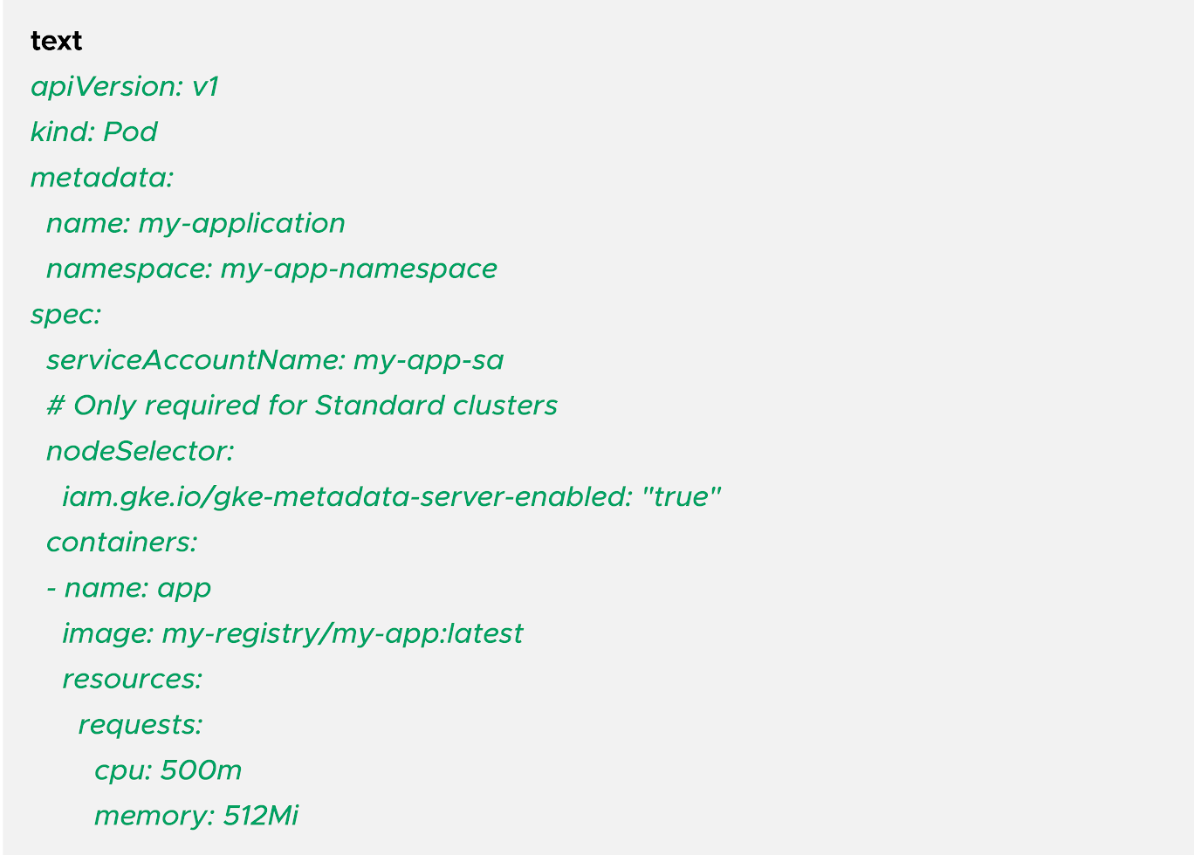
Step 4: Verify the configuration
Deploy the pod and test access:
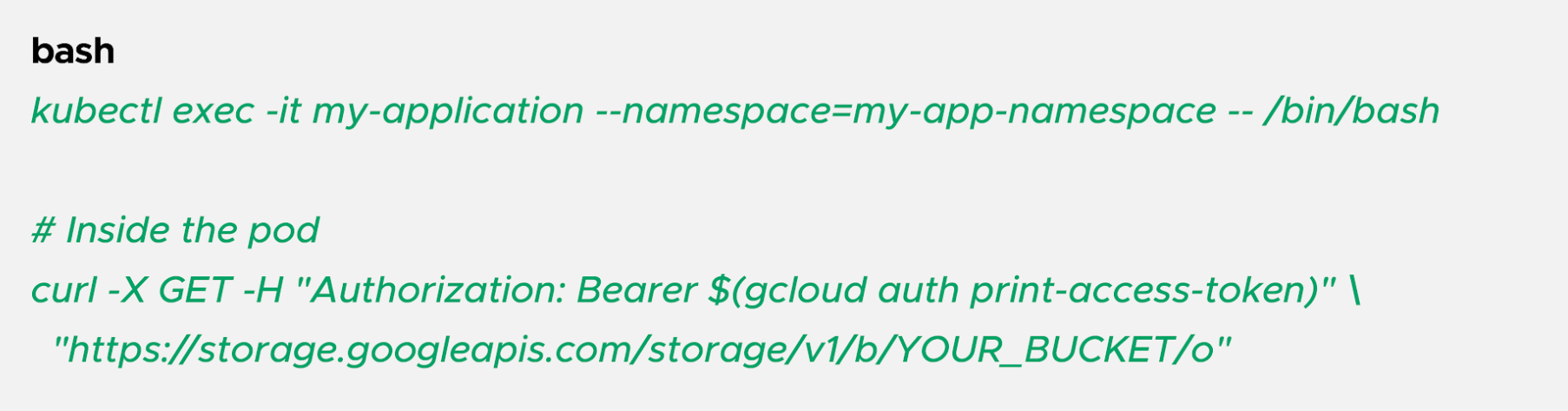
If configured correctly, you'll see a list of objects in the bucket.
Step 1: Create Kubernetes namespace and ServiceAccount (same as Approach 1)

Step 2: Create an IAM service account
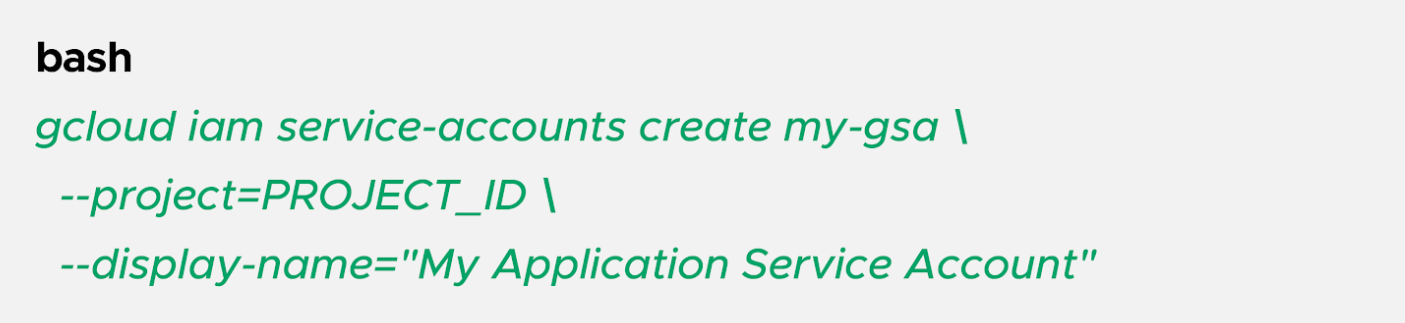
Step 3: Grant the IAM service account permissions to Google Cloud resources

Step 4: Allow the Kubernetes ServiceAccount to impersonate the IAM service account
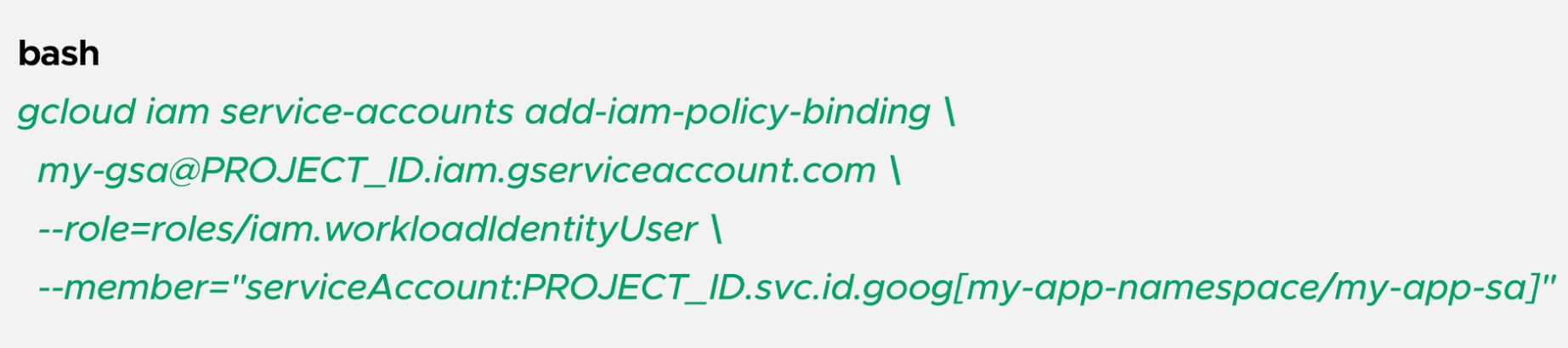
Step 5: Annotate the Kubernetes ServiceAccount
Step 6: Deploy your workload (same pod YAML as Approach 1)
Point to Remember: If workloads in multiple clusters share the same workload identity pool (because they're in the same Google Cloud project), and they have the same namespace and ServiceAccount names, IAM treats them as identical identities.
For example, if you have a backend namespace with a database-reader ServiceAccount in both Cluster A and Cluster B within the same project, any IAM permissions granted to that principal apply to both clusters.
Workload Identity Federation for GKE eliminates the security risks and operational burden of managing service account keys while providing fine-grained, per-workload access control to Google Cloud services. By leveraging short-lived, automatically rotated tokens and native Kubernetes identities, you can build a secure, scalable infrastructure that adheres to modern security best practices.
Whether you're migrating from service account keys or deploying new workloads, implementing Workload Identity Federation should be a top priority. Start with the direct principal identifier approach for simplicity, fall back to service account impersonation only when necessary, and always follow the principle of least privilege.
Your GKE workloads—and your security team—will thank you.

99% of companies saved up to 15% monthly with this plan & achieved peak performance.