DevOps Engineer
Abhay Joshi is a problem solver who enjoys playing with algorithms and building scalable distributed systems.


Kubernetes often feels like it’s missing something obvious: where are the groups? You’ll try to kubectl create group and — surprise — nothing exists. That’s not a bug. It’s intentional.
Kubernetes separates authentication (who are you) from authorization (what can you do). Kubernetes purposely leaves the authentication step out of the core API so it can integrate cleanly with many identity systems: X.509 client certificates, OIDC/JWTS, cloud provider IAMs, LDAP and more. Because of that design choice, Kubernetes itself does not have a first-class “Group” object you can CRUD. Groups are just strings embedded in the authentication identity that the API server receives.
This blog explains what that actually means, where groups come from in real life (certificates, tokens, cloud IAM), how groups are used by RBAC, and how a managed Kubernetes service like Amazon EKS maps IAM principals into Kubernetes users and groups.
1. Client X.509 certificates
When you use client certificates to authenticate to the API server, Kubernetes reads the certificate subject into a username and may extract the Organization (O) fields as groups. In other words, the certificate carries the identity and group information.
So the group is not a separately created object — it’s baked into the certificate.
2. OIDC / JWT tokens
If your cluster’s API server talks to an OIDC provider (Google, Azure AD, Keycloak, etc.), the token contains claims. A typical claim is groups (an array of strings). Kubernetes trusts the token issuer and uses the groups claim as the set of group names for the authenticated user.
3. Cloud provider authentication (EKS example)
Managed providers often authenticate users via the cloud provider’s identity system (AWS IAM, GCP IAM, Azure AD). They map those cloud identities into Kubernetes username and groups strings — usually through an authenticator that runs during the API server auth step. The important bit: the mapping produces group names (strings) that RBAC later checks.
A group is a string label attached to a user’s identity during authentication. RBAC checks those strings when deciding whether to allow an operation. There is no apiVersion: v1, kind: Group resource that you can kubectl apply.
Because groups are just strings, anything that authenticates and produces a group name will work with RBAC. That design is flexible but also means group membership is external — managed by your identity system, not by Kubernetes.
RBAC uses Role/ClusterRole to define permissions and RoleBinding/ClusterRoleBinding to bind those permissions to Subjects (users, groups, or serviceAccounts). Here’s a tiny example showing how groups are used:
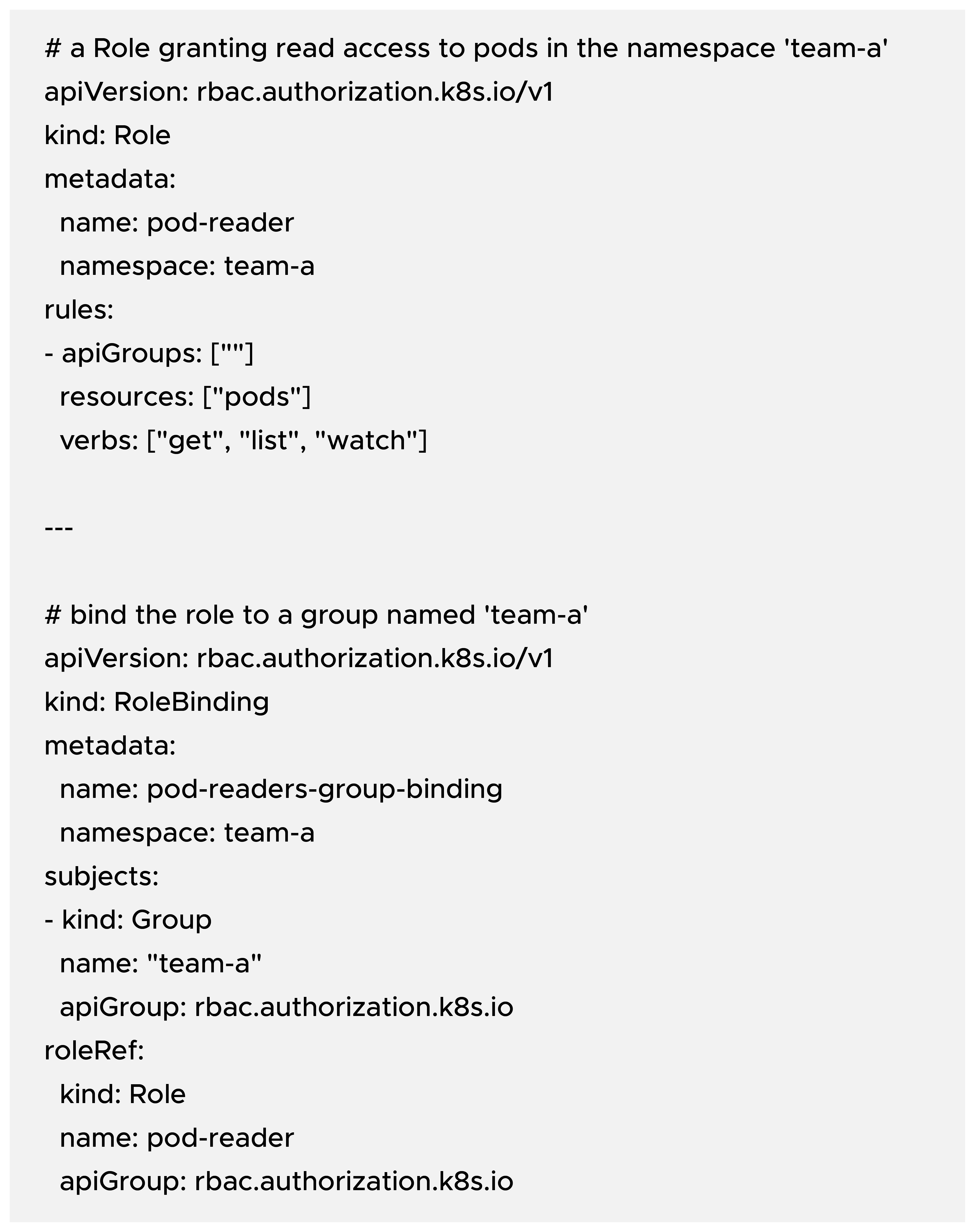
Notice subjects[0].kind: Group — that name is just a string. The binding will allow any authenticated user who arrives with the team-a group string to use the pod-reader Role in the team-a namespace.
Amazon EKS provides an authentication bridge between AWS IAM and the Kubernetes API server. This bridge maps an IAM principal (an IAM user or role) to a Kubernetes username and a set of groups. The mechanism works through an authenticator layer that inspects incoming requests, validates AWS IAM credentials, and returns the resolved username and groups to the Kubernetes API server.
Traditionally, EKS uses the aws-auth ConfigMap in the kube-system namespace to define these mappings. Each mapRoles or mapUsers entry effectively says: “When IAM principal X authenticates, treat them as Kubernetes user Y and attach these group strings.”
Conceptually, it looks like this: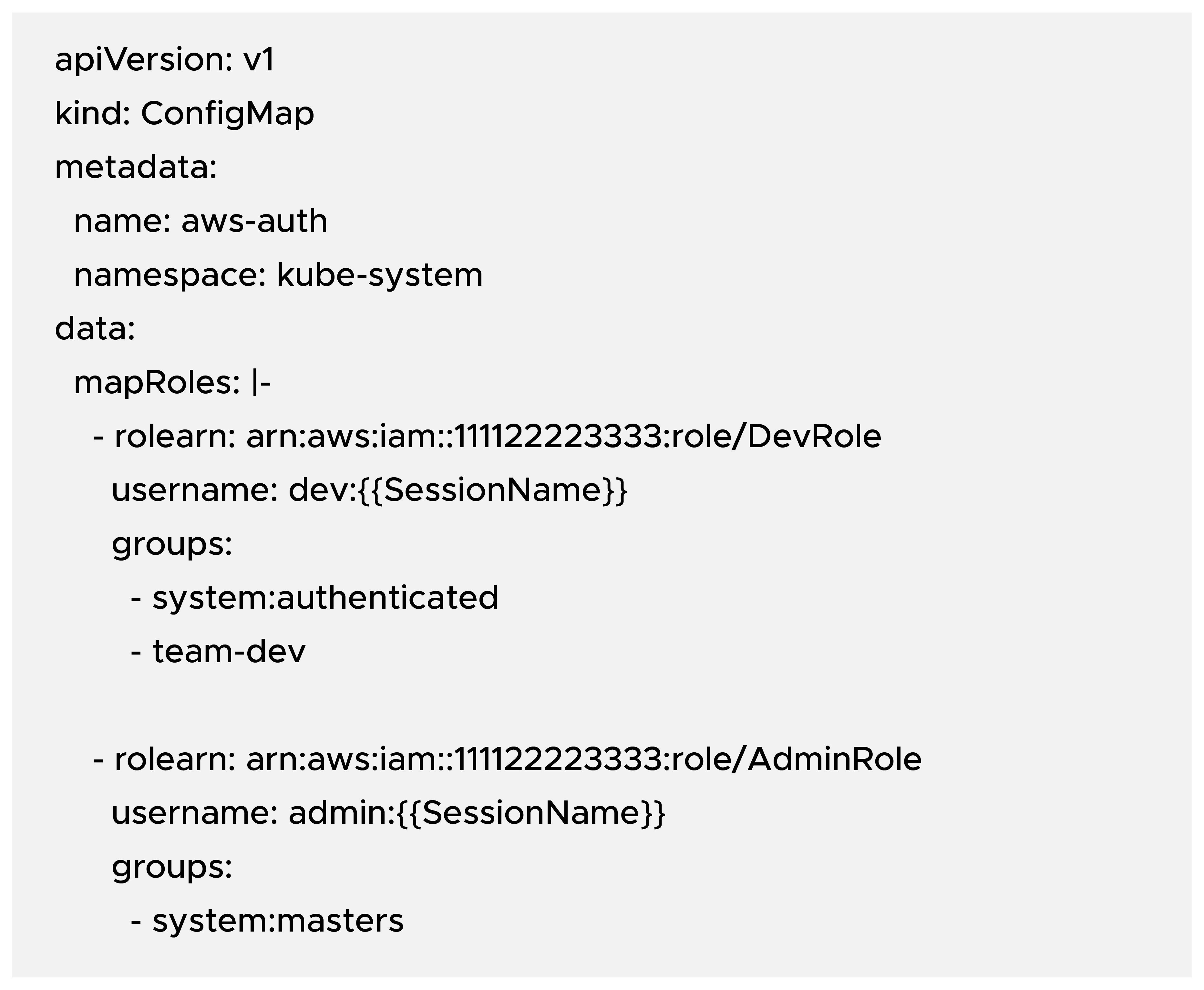
Key takeaways:
It’s also worth noting that AWS now recommends using EKS Access Entries as the modern approach to managing cluster access instead of directly editing aws-auth. Access Entries formalize and simplify IAM-to-Kubernetes identity mapping — but that topic deserves its own deep dive for another time.
After step 1, the IAM principal is authenticated and arrives at the API server carrying groups: ["readers"]. After steps 2–3, RBAC will allow anyone with the readers group to list pods cluster-wide.
Kubernetes purposely avoids owning authentication and group membership. That avoids reinventing identity systems and gives you freedom to integrate with corporate SSO, IAM, PKI, or custom solutions. But it also means that groups are an external primitive — strings declared by whatever authenticates users. Kubernetes RBAC then trusts those group strings, and you must author the Role/RoleBinding objects that reference them.

99% of companies saved up to 15% monthly with this plan & achieved peak performance.