DevOps Engineer
Priyansh Pathak is a tech enthusiast focused on automation, cloud-native platforms, and Kubernetes on AWS, with hands-on experience in Python-based automation and evaluating modern DevOps tooling t


Find your cloud savings in under 5 minutes

Get a $100 reward on signup

Pod In-Place Resizing is a Kubernetes feature that lets you modify a pod's CPU and memory requests or limits without restarting the pod, and previously, updating resource values required deleting and recreating pods, which could result in application restarts and possible downtime. In-place resizing addresses this limitation by enabling Kubernetes to dynamically adjust resources for running containers, thereby improving workload stability and operational flexibility.
This feature is particularly helpful for managing unpredictable workloads, optimizing Kubernetes resource utilization and allocation, and performing live tuning in production environments—all without interfering with running applications.
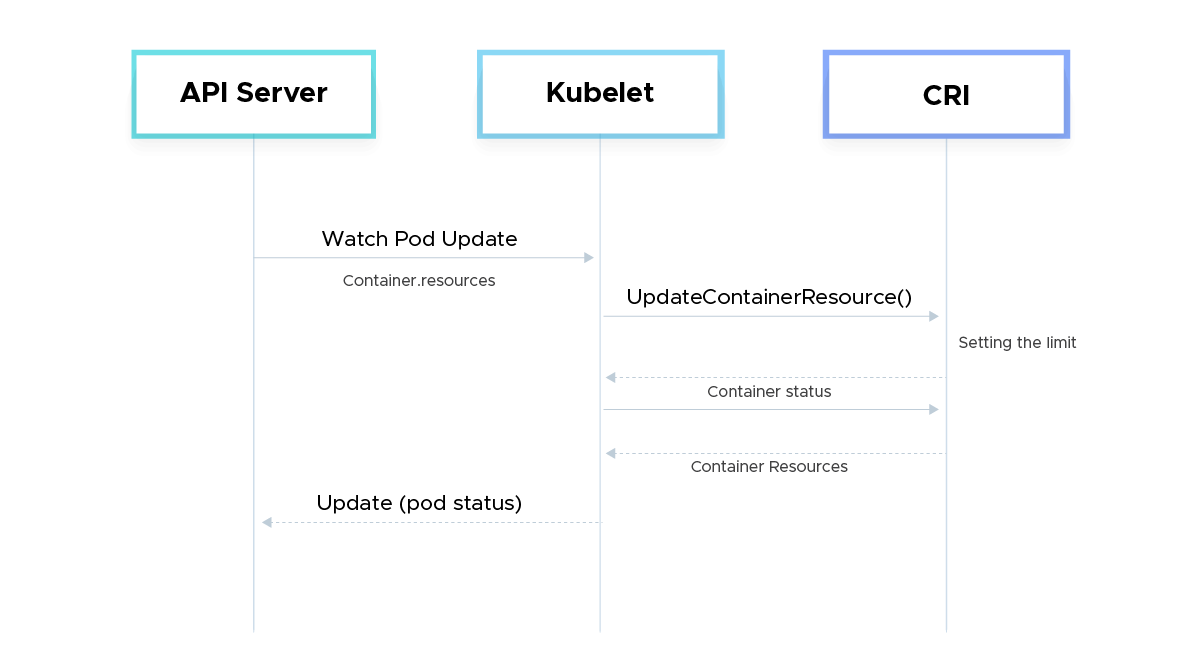
The scheduler makes scheduling decisions based on the maximum of a container's allocated requests, intended requests, and actual requests from the status if a node includes pods with a pending or incomplete resizing.
To reflect the status of a resize request, the Kubelet modifies the Pod's status conditions:
type: PodResizePending: The request cannot be fulfilled right away by the Kubelet. The reason is explained in the message field.
--> reason: Infeasible: The current node cannot accommodate the required resizing (for instance, by asking for more resources than the node has).
--> reason: Postponed: Although the requested resizing is not now possible, it may become achievable in the future (for instance, if another pod is eliminated). The resizing will be attempted again by the Kubelet.
The kubelet will periodically try the resize again if the requested resize is deferred, such as when another pod is eliminated or scaled down. If several resizes are postponed, they are retried in accordance with the following priority:
Even if a higher-priority resize is postponed once again, all pending resizes will still be attempted, even if the higher-priority resize is designated as pending.
We can control whether a container should be restarted or not when we resize the memory limits or the CPU limits, and request it by setting it in the resizePolicy in the Container specification, thus giving us the fine grained control based on the resource type

Default container resizePolicy
Example setup:
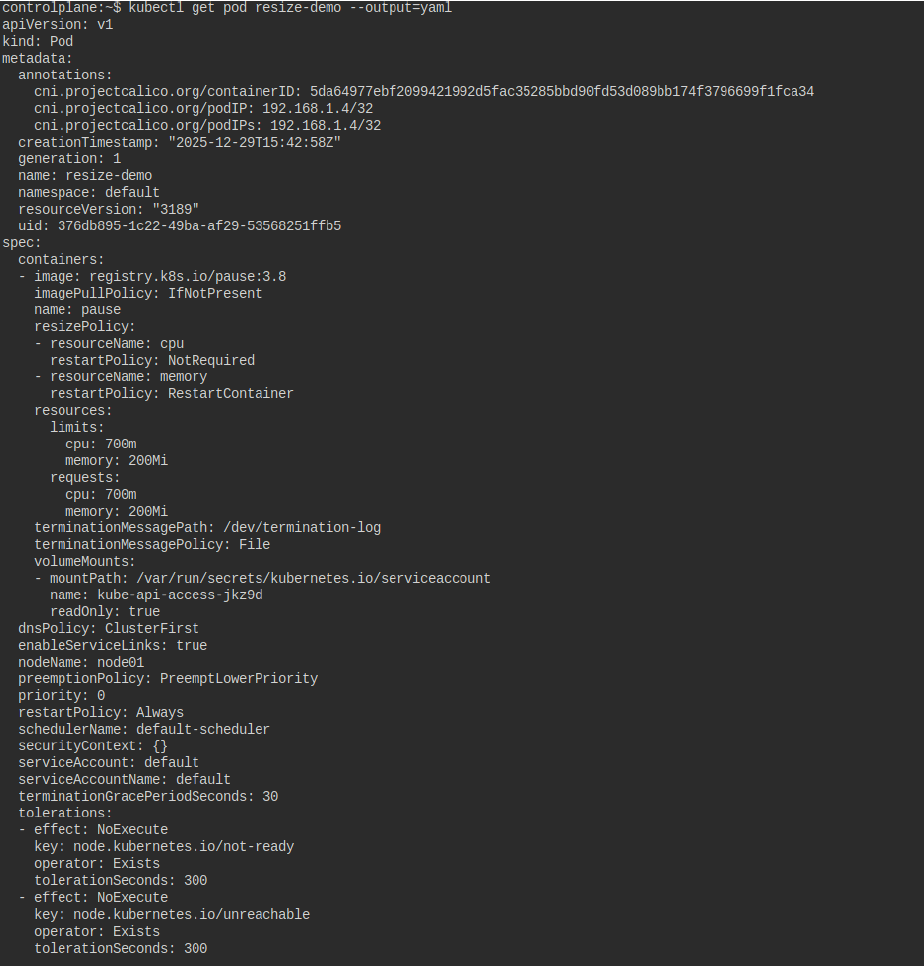
Command to increase the limit and request of cpu 
Output:

The CPU limit and request are increased to 800m
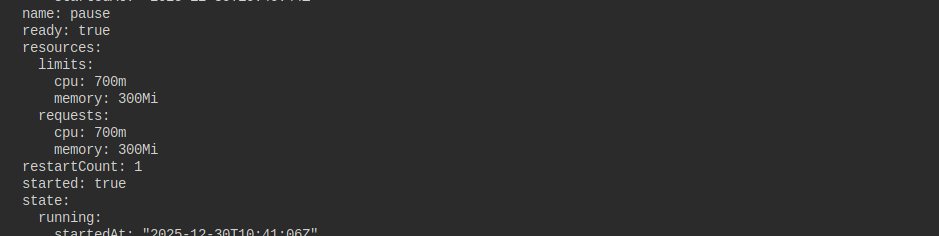
To increase the limit of the memory, use the command
Output:
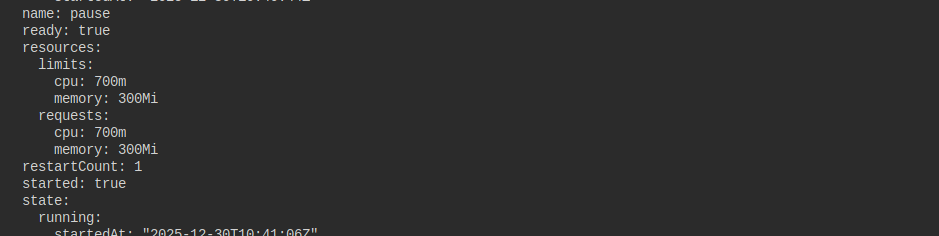
In the screenshot below, we can see that the memory has been increased to 300 Mi
There are significant restrictions and warnings associated with Pod In-Place Resizing. In-place scaling is not fully supported by all workloads, Kubernetes versions, or container runtimes. Memory reductions are especially limited because if the program is unable to safely release memory, container termination may result from memory reduction. Although CPU scaling is more adaptable in general, how well it works relies on how the application uses CPU resources. Furthermore, during resizing operations, some workloads can still encounter temporary throttling or OOM(Out of Memory) occurrences.
There are also operational considerations: resource changes may be subject to node capacity constraints, admission controllers, and policy enforcement. In-place resizing does not eliminate the need for proper capacity planning, monitoring, and testing. Applications should be designed to handle dynamic resource changes gracefully, and teams should validate resize behavior in non-production environments before relying on it at scale.
By enabling CPU and memory requests or limitations to be changed without restarting active pods, Pod In-Place Resizing significantly improves Kubernetes resource management. For stateful, long-running, and latency-sensitive applications, this functionality increases reliability, minimizes needless restarts, and maintains application state. It allows platform teams more freedom to respond to resource demands in real time while maintaining continuous application availability.
In-place resizing improves overall cluster usage and allows for more accurate resource tweaking from an operational perspective. Without depending exclusively on pod recreation, autoscaling, or redeployments, teams can quickly address under- or over-provisioned workloads, cut waste, and enhance performance consistency. It creates a more flexible and responsive resource management approach when used with autoscaling technologies like HPA or VPA.
In summary, while Pod In-Place Resizing is not a silver bullet, it is a powerful addition to the Kubernetes Management and Optimization toolbox. Used thoughtfully and with an understanding of its constraints, it enables more resilient, efficient, and flexible cluster operations—bringing Kubernetes closer to truly dynamic infrastructure management.

99% of companies saved up to 15% monthly with this plan & achieved peak performance.