DevOps Engineer
Priyanshi specializes in cloud cost optimisation, FinOps, and GCP, with a DevOps-driven approach to automating workflows and designing scalable systems that improve efficiency and business impact.


Find your cloud savings in under 5 minutes

Get a $100 reward on signup


For DevOps, SRE, and Security teams, the challenge is no longer ‘how to create resources’ - it’s ‘how to track, audit, and govern them continuously’.
As cloud environments grow, cloud cost visibility and governance become harder than provisioning. A single GCP organization can span hundreds of projects and folders, thousands of resources, multiple regions, and dozens of teams. In Google Cloud Platform (GCP), environments often grow organically: multiple teams, hundreds of projects, diverse services, and constant change. In such setups, visibility gaps quickly turn into security risks, compliance failures, and cost overruns.
This is where the Google Cloud Asset API plays a foundational role.
Cloud Asset API is a read-only inventory and analysis service that gives you a unified view of all your Google Cloud resources across:
Cloud Asset API provides a centralized and authoritative view of a Google Cloud environment by continuously aggregating metadata from individual services into a single, consistent interface. It captures both the current state and historical changes of resources across compute engine, storage, networking, IAM, and Kubernetes without performing any modifications itself.
By remaining strictly read-only, the API serves as a reliable source of truth for audits, governance, automation, and operational analysis, enabling teams to reason about their cloud environments with accuracy and confidence.
Asset Search: The asset search capability allows teams to query resources across projects, folders, or entire organizations using filters like resource type, location, and labels. Cloud Asset API queries can be executed from multiple entry points, including the gcloud CLI, Google Cloud Console (Cloud Asset Inventory), and programmatically via REST or client libraries.
For deeper analysis and reporting, asset data can also be exported to BigQuery, where teams can run SQL queries across their entire cloud estate. This flexibility allows engineers, security teams, and governance tools to access the same asset data in ways that best fit their workflows.
Step 1: Enable the API: In the Google Cloud Console, navigate to "APIs & Services" and enable the "Cloud Asset API."
Step 2: Assign Permission: Assign roles/cloudasset.viewer to a user or service account for read-only access to asset metadata and history.
Step 3: Quick CLI Tutorial:
Search all Compute Engine instances in a project:
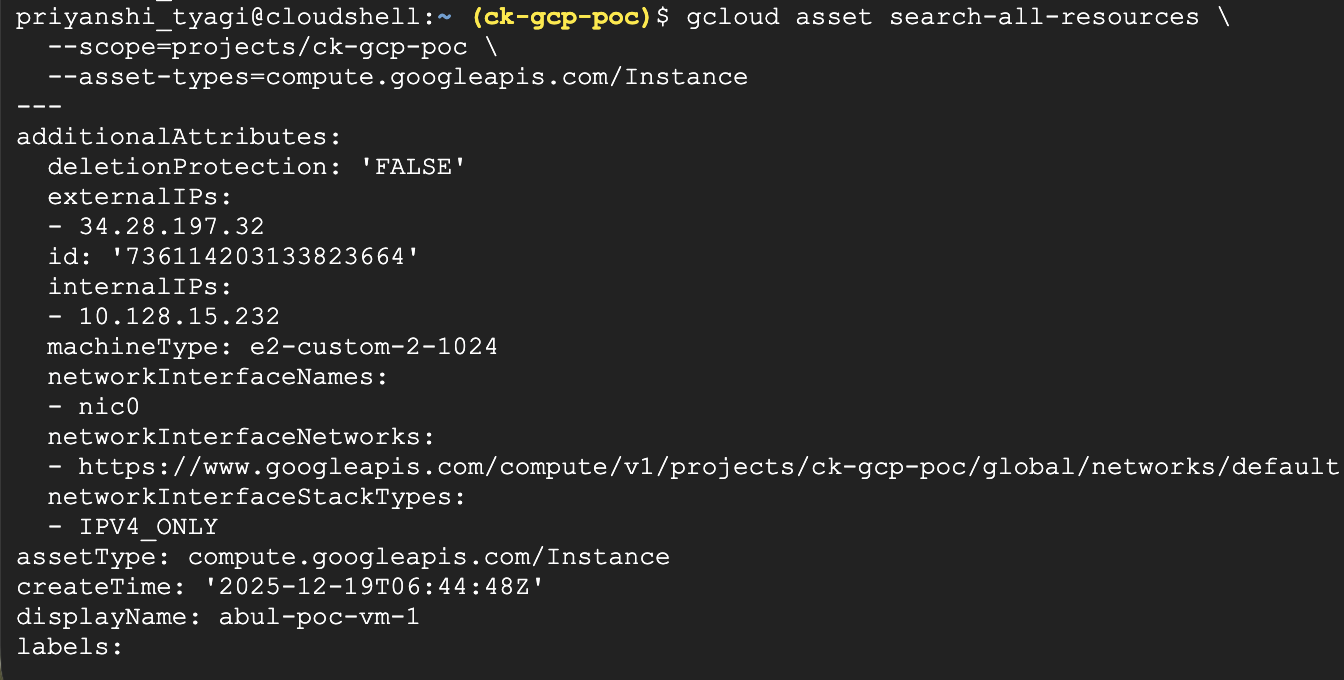
2. Export assets to Cloud Storage:
gcloud asset export \
--project=YOUR_PROJECT_ID \
--output-path=gs://YOUR_BUCKET_NAME/assets.json
One of the strengths of Cloud Asset API is that it does not belong to a single team. The same source of truth can be used differently by DevOps, security, data, and platform teams-each solving distinct problems while relying on the same underlying visibility.
DevOps Engineering: Enforcing Infrastructure Standards Automatically
How it operates: The Cloud Asset API generates change events whenever new infrastructure is added to GCP. Serverless automation that verifies whether newly produced resources adhere to organisational standards—like required labels, network location, or security metadata—can be triggered by these events.
For instance, an automatic check determines if ownership and security labels are present when a new Compute Engine instance is created. The system applies them right away or notifies the relevant team if they are absent.
Why it matters: Manual reviews and recurring audits are no longer necessary for DevOps teams. Even when infrastructure is built via various pipelines or the console, standards are consistently followed.
Impact: Without slowing down deployments or introducing human checkpoints, infrastructure consistency increases.
Security Engineering: IAM Visibility Across the Organisation
How it operates: IAM policies from several projects, folders, and the company are combined into a single, queryable inventory via the Cloud Asset API. To find dangerous access patterns like external identities, cross-project permissions, or unduly broad responsibilities, security teams examine this data.
Why it matters: One of the most frequent reasons for security problems is IAM sprawl. Risky permissions frequently go overlooked in the absence of centralised visibility. Checkout the best practices for IAM security here.
Impact: Security teams may confidently apply least-privilege rules and proactively limit excessive access.
Data & Analytics Teams: Governing Access to Sensitive Data
How it operates: BigQuery datasets and Cloud Storage bucket asset metadata are routinely exported to BigQuery. To make sure that sensitive datasets are not accessible to the public and that access policies comply with internal and legal requirements, data teams conduct cloud governance queries for improved business efficiency.
When a dataset's permissions change while experimenting or working together, the problem is found early on, before it becomes a violation of compliance.
Why it matters: Manual permission tracking becomes unfeasible as data environments expand. Sensitive data protection requires visibility into access setups.
Impact: Stronger adherence to privacy and compliance rules and a decreased chance of data leaks.
Platform Engineering: Governance at Scale
How it operates: Platform teams track infrastructure trends across hundreds of projects using the Cloud Asset API. They monitor unsupported services, configuration drift introduced outside of authorised workflows, and deviations from permitted architectures.
Platform engineers use visibility and automated correction to help teams get back into compliance rather than obstructing teams up front.
Why it matters: While free constraints lead to anarchy, rigid controls hinder innovation. A balanced governance approach is made possible via the Cloud Asset API.
Impact: Maintaining self-service infrastructure and developer autonomy while maintaining consistent platform standards.
All use of Cloud Asset Inventory is free of charge. However, you are responsible for any costs associated with storing data that Cloud Asset Inventory produces, such as any data written to buckets in Cloud Storage.
Cloud environments don’t fail because teams move too fast; rather, they fail because visibility doesn’t keep up with change.
A central source of visibility is provided by the Cloud Asset API, which displays what is there, how it changes, and who has access. It becomes an essential tool for large-scale cloud operations, whether you are enforcing compliance, securing IAM, safeguarding data, or handling incidents.
Cloud Asset API transforms the management, governance, and security of GCP environments when viewed as a shared control plane rather than merely another API.

99% of companies saved up to 15% monthly with this plan & achieved peak performance.