Modern Kubernetes environments commonly span multiple clusters, often across multiple cloud accounts, to support isolation, compliance, regional distribution, or workload segmentation. Managing such Kubernetes environments manually can be painful—this is where ArgoCD shines.
In this blog, we walk through:
- Multi-account cross-cluster GitOps fundamentals
- ArgoCD Hub–Spoke model architecture
- Setting up ArgoCD using CLI (easy, fast)
- Manually TLS/CA configuration (for deeper understanding)
- Recommended best practices
- Troubleshooting TLS and cluster authentication issues
Understanding Multi-Account Cross-Cluster GitOps
In a multi-account or multi-cluster environment, you typically have:
- Management (Hub) Account / Cluster: Runs the central ArgoCD control plane.
- Workload (Spoke) Accounts / Clusters: Run application workloads. ArgoCD manages deployments to these clusters via service accounts, AWS IAM roles, or kubeconfigs.
Why Use Multi-Cluster GitOps?
- Centralized control and cloud governance. Know how cloud governance impacts business efficiency.
- Separation of concerns (Hub is admin, spokes run workloads)
- Easier RBAC, audit, and policy management
- Unified multi-cluster observability
- Faster onboarding of new clusters
Hub–Spoke ArgoCD Architecture
In this model, a central hub cluster runs the ArgoCD control plane, and one or more spoke clusters run workloads.
- Hub Cluster Runs: ArgoCD API server, ArgoCD Repo server, ArgoCD Application Controller, ArgoCD Dex (optional, for SSO)
- Spoke Clusters Have: Only the ArgoCD-managed workload namespaces, Service accounts, RBAC roles/role bindings that allow ArgoCD to manage resources
The hub connects to spokes either by:
- Providing the spoke cluster’s kubeconfig, or
- Configuring OIDC / IAM roles (AWS IRSA)
Prerequisites
You will need:
- At least two Kubernetes clusters (one Hub, one or more Spokes)
- kubectl configured for all clusters
- Optional: domain/TLS certificates if you want to expose ArgoCD securely
- ArgoCD CLI installed
Install ArgoCD on the Hub Cluster
a) Create the namespace and install ArgoCD:

b) Expose the ArgoCD API server (example using LoadBalancer):

c) Get the initial admin password:

d) Login using the CLI:

Use --insecure only for testing if you do not have TLS. For production, configure proper TLS.
Register Spoke Clusters (CLI vs Manual)
There are two main ways to register a spoke cluster with ArgoCD:
- Easy: Using the ArgoCD CLI (recommended for most real-world use)
- Manual: Full TLS + CA + ServiceAccount setup (for deep understanding and strict environments)
Easy: Using ArgoCD CLI (Recommended)
Step 1 — Switch to the spoke cluster context:

Step 2 — Register the cluster with ArgoCD:

What this does:
- Creates a ServiceAccount in the spoke cluster
- Binds appropriate RBAC (e.g., cluster-admin or a restricted role)
- Creates and stores a kubeconfig as a Kubernetes Secret in the hub’s argocd namespace
- Enables ArgoCD to manage applications on that spoke cluster
Step 3 — Verify the registration:

Manual: Full TLS + CA + ServiceAccount Setup
This method is useful when:
- You need very fine-grained security control
- Clusters are in different cloud accounts without direct trust
- Compliance requires an explicit certificate and CA management
We will:
- Create a ServiceAccount + RBAC on the spoke cluster.
- Export the ServiceAccount token and CA.
- Build a dedicated kubeconfig for that cluster.
- Create a cluster Secret in the hub ArgoCD namespace referencing that kubeconfig.
Step 1: Service Account + RBAC on Spoke Cluster
On the spoke cluster, create a ServiceAccount and a ClusterRoleBinding:


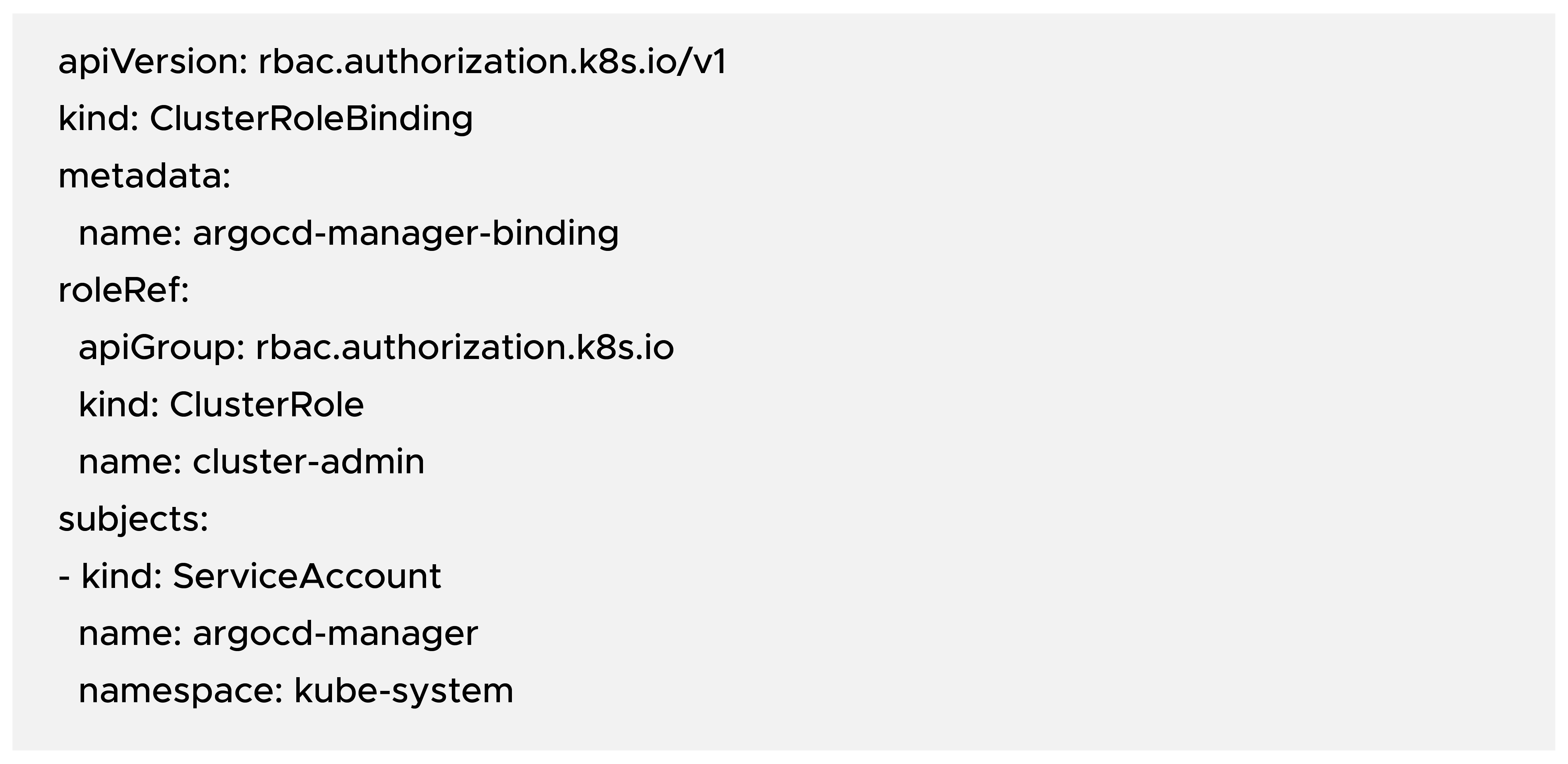

Note: For production, you should create a more restricted ClusterRole instead of using cluster-admin.
Step 2: Export ServiceAccount Token and CA Certificate
Get the Secret associated with the ServiceAccount:

Extract the token:

Extract the CA certificate:
CA=$(kubectl -n kube-system get secret $SECRET -o jsonpath="{.data['ca\.crt']}")
Get the spoke cluster API server endpoint:

Step 3: Create a Kubeconfig for the Spoke Cluster
Create a file named spoke1-kubeconfig:
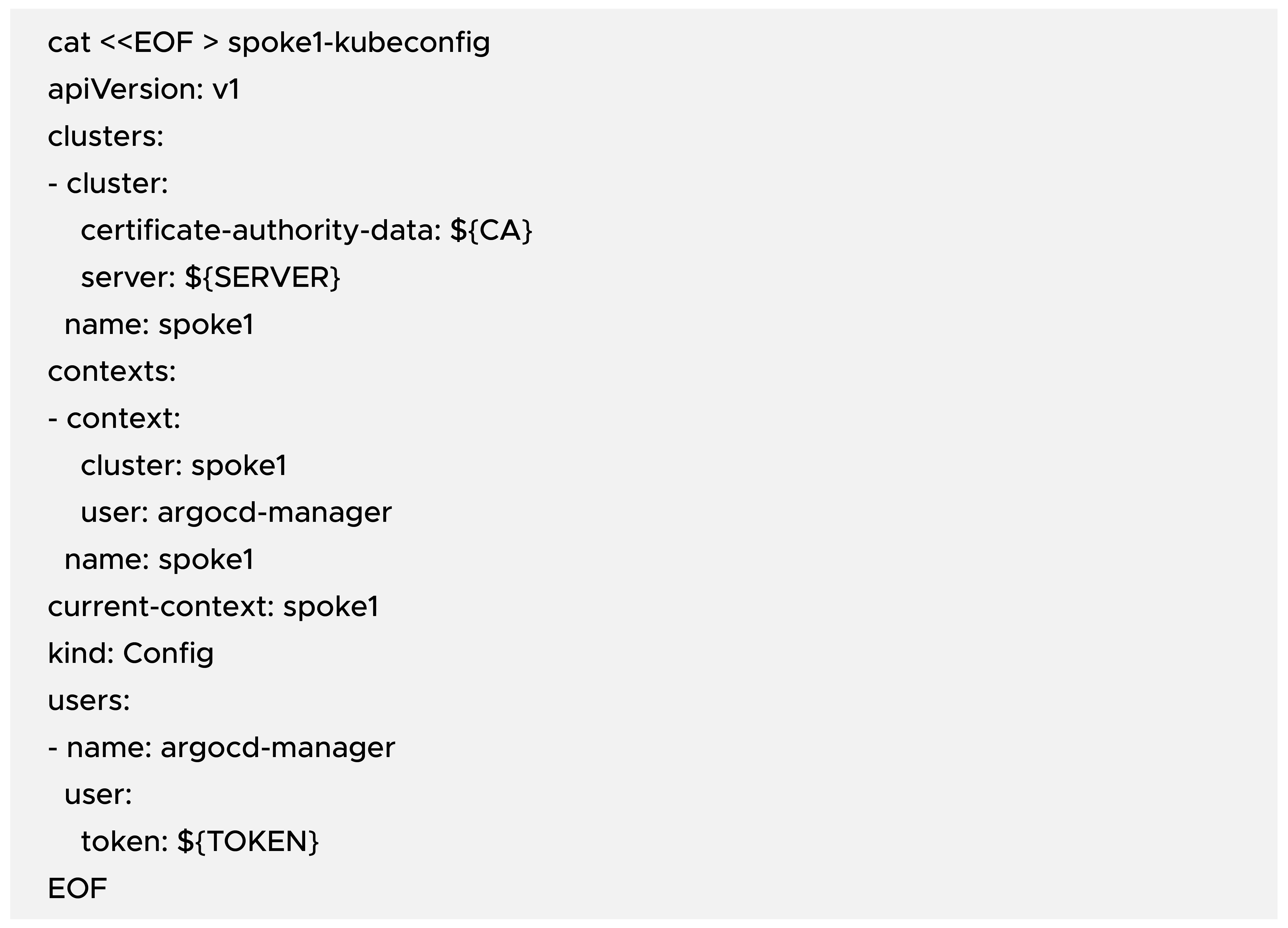
This kubeconfig tells ArgoCD how to talk to the spoke1 cluster using the argocd-manager ServiceAccount and the given CA.
Step 4: Create ArgoCD Cluster Secret in Hub Cluster
Example cluster secret manifest (on the hub cluster):
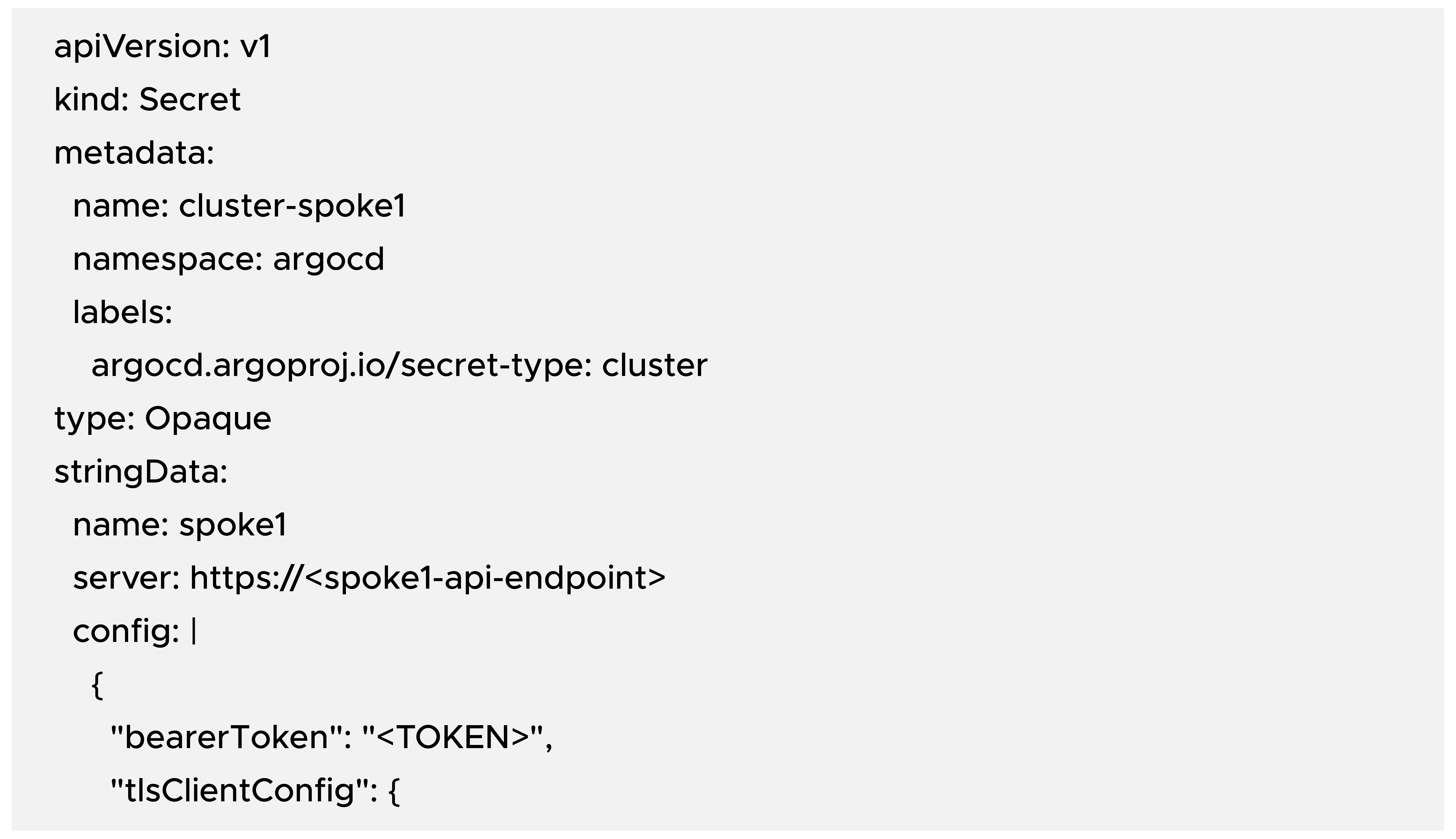

Replace:
- <spoke1-api-endpoint> with the actual SERVER value
- <TOKEN> with the ServiceAccount token
- <CA_CERT> with the CA certificate in base64 (same as CA variable above)
kubectl apply -f cluster-spoke1-secret.yaml
After this, ArgoCD should recognize spoke1 as a managed cluster.
Deploy an Application to the Spoke Cluster via ArgoCD Hub
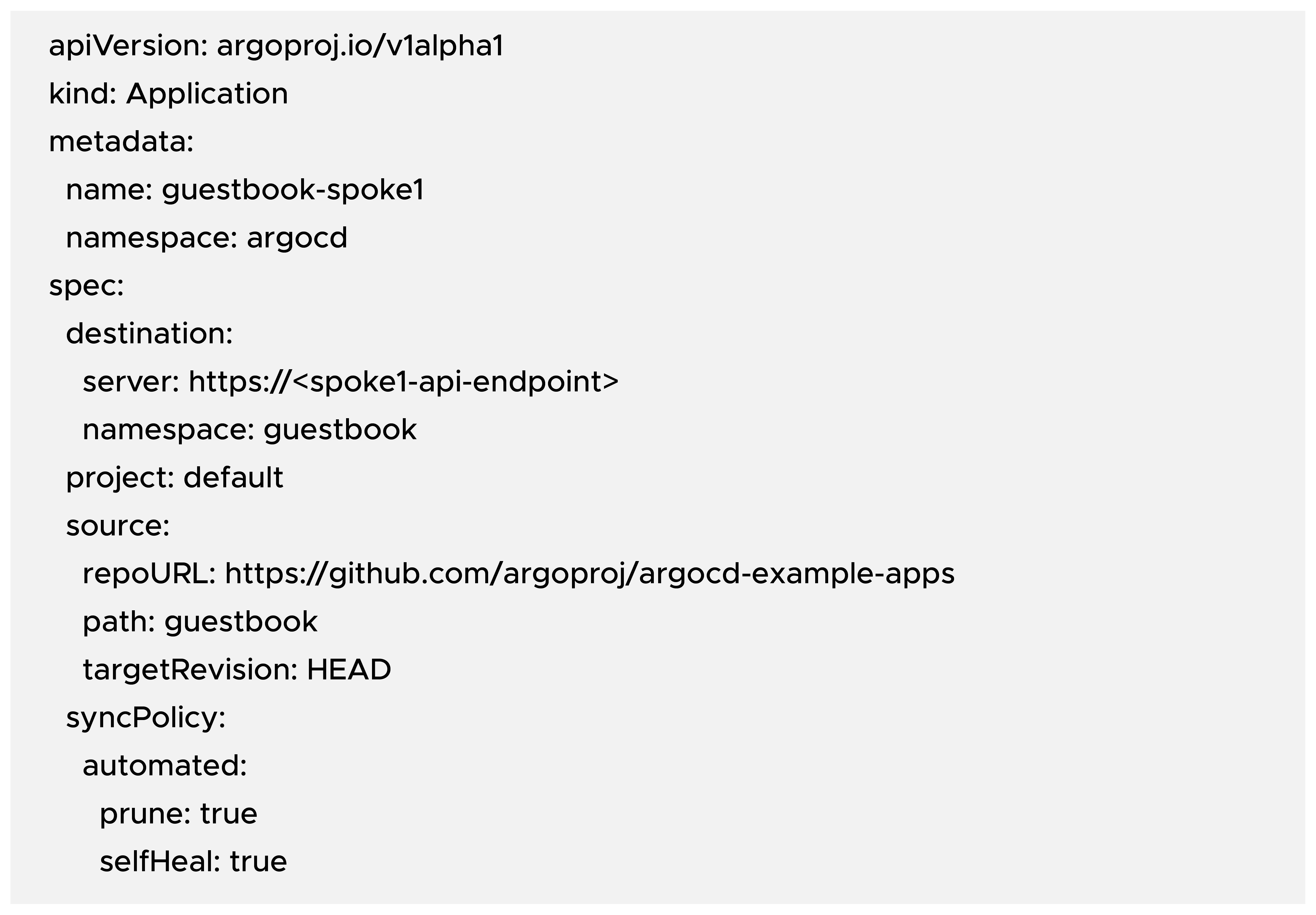
Now that ArgoCD can connect to spoke1, let us deploy a sample application (Guestbook).
Create an Application manifest on the hub cluster:
b) Apply the Application:

ArgoCD will:
- Create the guestbook namespace on the spoke cluster (if it does not already exist)
- Deploy the manifests from the Git repo
- Continuously reconcile the desired vs the actual state
Verifying TLS, CA, and Connectivity
From the ArgoCD hub side, you can verify cluster and app status.
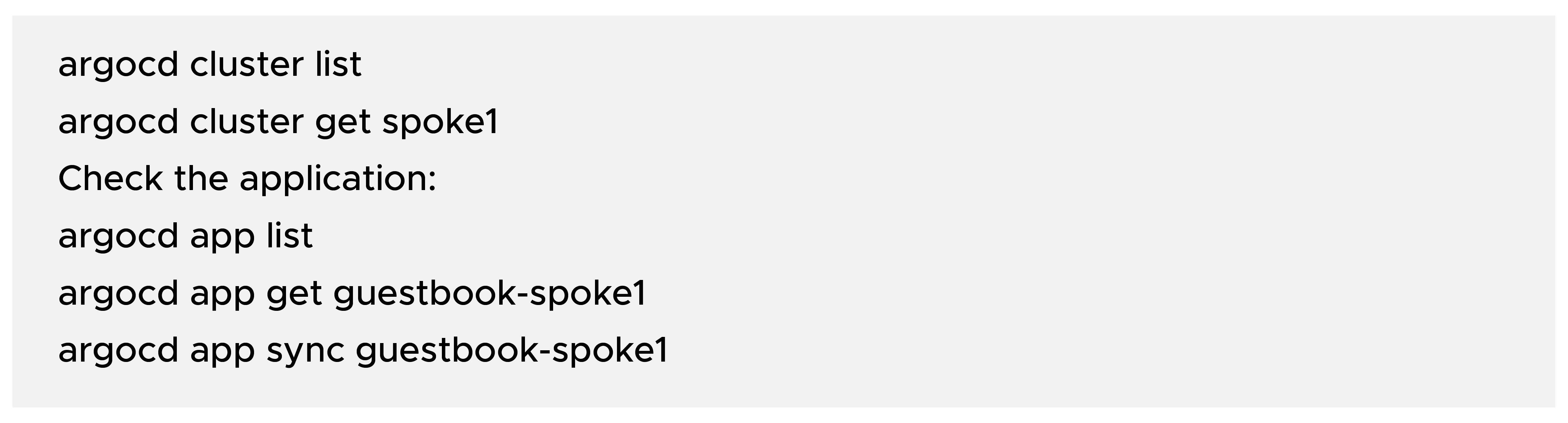
If something breaks, also check events on the hub cluster:

Best Practices for Multi-Cluster GitOps
a) Security:
- Prefer cloud-native identity mechanisms (IRSA) over static ServiceAccount tokens when possible.
- Rotate any tokens or credentials regularly.
- Use TLS everywhere; avoid --insecure in production.
- Restrict ArgoCD admin access via SSO and RBAC. Learn how to set up SSO with AWS VPN here.
b) Scalability:
- Use ApplicationSets to manage dozens or hundreds of clusters or cluster namespaces programmatically.
- Group applications logically by environment (dev, stage, prod) or region.
- Consider sharding ArgoCD instances if you manage a very large fleet.
c) Observability:
- Integrate ArgoCD metrics with Prometheus and Grafana.
- Use ArgoCD Notifications for Slack/Teams/Email alerts on sync and health.
- Combine with Argo Rollouts for progressive delivery (blue/green, canary).
Troubleshooting TLS/CA Issues
Common issues and how to think about them:
1) x509: certificate signed by unknown authority
Likely cause: ArgoCD is not using the correct CA, or the API server’s certificate does not match the CA.
Fix: Ensure caData in the cluster secret is the correct CA for the spoke cluster’s API server.
2) Unauthorized or Forbidden errors
Likely cause: The ServiceAccount does not have the necessary RBAC permissions.
Fix: Check ClusterRoleBinding and permissions. Verify that the token used in the secret is actually from the intended ServiceAccount.
3) Cluster shows “Unknown” or “Unreachable” in ArgoCD UI
Likely cause: Network connectivity issue (firewalls, private clusters, Virtual Private Cloud routing).
Fix: Make sure the hub cluster / ArgoCD has a network path to the spoke cluster’s API server (via VPC peering, VPN, or another secure tunnel).
Conclusion
In this blog, we covered:
- The fundamentals of multi-account, multi-cluster GitOps.
- The ArgoCD Hub–Spoke architecture for central control with distributed workloads.
- A quick, CLI-driven way to register clusters with ArgoCD.
- A manual, TLS/CA-focused approach that gives deeper insight into how ArgoCD authenticates and connects to remote clusters.
- Best practices and common troubleshooting tips.
Using these approaches, you can centralize governance and visibility, maintain strong security and separation between accounts, and onboard new clusters quickly and consistently using GitOps.
If you’re looking for a tool to complement the governance and visibility practices discussed above, look no further than CloudKeeper Lens.
In this blog, we discussed Multi-Cluster GitOps with ArgoCD and how it can be used to manage Kubernetes environments. For an even better understanding of this concept, it is important to have a deeper understanding of Kubernetes as well.
Check out our conversation with CloudKeeper’s top Kubernetes expert, where a smarter way to manage Kubernetes is discussed in detail, explained with real-world examples and practical applications.
Here’s what you should do next:
- Template your cluster secrets and Application manifests for repeatable onboarding.
- Explore ApplicationSets for managing many clusters.
- Integrate Argo Rollouts and progressive delivery strategies on top of this foundation.