



7
7When businesses mature on cloud adoption, what started as simple infrastructure migration evolve into distributed, containerised, multi-project, multi-team environments. Gaining better visibility through efficient cloud cost monitoring becomes operationally critical.
In the case of Google Cloud users, most organisations begin with GCP Cost Explorer and native billing tools. It is the logical first step for GCP cost monitoring. It provides structured access to billing data, service-level breakdowns, and budget tracking. For many teams, this works well in the initial stages.
But then your infrastructure grows. You've got GKE clusters running, serverless workloads scaling up and down, storage buckets multiplying, and suddenly you're managing multiple projects across different teams. And that's when the cracks start showing.
Seeing your spending is one thing. Actually controlling it is different.
What GCP Cost Explorer does well?
Let's give credit where it's due - GCP Cost Explorer handles the basics. You can analyze spend across services and projects, export data to BigQuery for deeper dives, and get some visibility into your Committed Usage Discounts and Sustained Usage Discounts.
It's a solid starting point for smaller setups or teams just getting their feet wet.
The problem is, it's mostly backward-looking. You're analyzing what already happened. And as your environment gets more complex, the questions you need to answer get way more specific:
- What's actually causing that cost spike? Like, the specific resource?
- Which of our GKE clusters is sitting there underutilized?
- Why is Team X creating resources without proper tags?
- What workloads are quietly eating up the budget every hour?
- Are we actually using those commitments we bought, or are they about to expire?
- How much are we really saving from CUDs, SUDs, spot instances, and credits?
GCP Cost Explorer wasn't built to answer these questions easily. That's not a knock on it - it's just not designed for that level of detail.
Why does hourly visibility actually matter?
This is where CloudKeeper Lens takes a different approach. Instead of waiting for daily summaries to roll in, you get hourly cost updates.
I know what you're thinking - do we really need to check costs every hour? Well, not exactly. But here's what changes: when your engineers can see cost impacts within hours instead of days, they make different decisions. That database someone spun up for testing at 2 PM? They'll shut it down before leaving instead of letting it run all weekend.
It's behavioral, really. Real-time feedback creates accountability in a way that monthly bills just don't.
Resource-level breakdown
GCP Cost Explorer shows you service-level costs. CloudKeeper Lens shows you every instance, volume, bucket, and resource for an in-depth GCP cost monitoring exercise. For containerized workloads, you can drill down to specific clusters, nodes, pods - even CPU and memory usage across regions.
You also get bucket-level breakdowns for Cloud Storage. This might sound overly detailed, but if you're running data-heavy workloads, storage costs can creep up without anyone noticing. Being able to pinpoint which buckets are the culprits makes a huge difference.
Instead of "Cloud Storage is expensive," you get "these three specific buckets are costing us $X per month, and here's why."
Comprehensive dashboards
Native tools give you cost reports. CloudKeeper Lens gives you dashboards designed for people who actually need to use them.
You get breakdowns across services, SKUs, resource families, compute, storage, networking - plus custom tags and groups. There's unified visibility at both the org level (for leadership) and project level (for individual teams).
These aren't just for finance folks preparing budget reviews. Cloud architects can use them to model unit costs, analyze regional differences, and spot hidden cost drivers that don't show up in basic billing views.
It bridges the gap between "Here's what we spent" and "Here's why we spent it, and what we should do about it."
The daily cost digest
One practical improvement: CloudKeeper Lens sends you a daily cost digest. Email, Slack, Teams - wherever your team already lives.
Major spending changes, anomalies, commitment utilization shifts - all summarized without you having to remember to check the console. It sounds simple, but it makes cost awareness part of your daily routine instead of a monthly fire drill.
Smarter cost alerts
Budget alerts exist in GCP Cost Explorer, but they can be... noisy. You get a lot of alerts, many of which turn out to be nothing.
Lens adds anomaly detection, predictive forecasting, and spike alerts. But here's the kicker: there's a human-assisted layer. Cloud experts review anomalies and recommendations before they hit your inbox.
This cuts down on false positives dramatically. If you're already drowning in alerts from your monitoring stack, you need to focus on cloud cost signals that actually matter.
Making Sense of Commitments and Savings
Commitment management is tricky. You want to commit enough to get discounts, but not so much that you're paying for capacity you don't use.
CloudKeeper Lens tracks both CUDs and SUDs with detailed utilization trends. It flags underutilized commitments, warns about upcoming expirations, and - this is important - shows you exactly how much you're saving from different strategies.
Not just "you're using commitments," but "here's your exact savings from CUDs, SUDs, spot instances, and credits."
That level of clarity doesn't exist in native GCP tools or any other tool available in the market.
Optimization Built In
Here's where things get interesting. Lens doesn't just show you costs - it also tells you how to reduce them.
Rightsizing recommendations, idle resource detection, underutilized GKE clusters, storage class transitions, network egress optimization. All surfaced automatically within the same interface you're using to monitor costs.
You don't need to export data to another tool, run analyses, and come back with recommendations. The recommendations are already there.
Monitoring and optimization become the same workflow.
Want custom reports in GCP Cost Explorer?
For custom reports in GCP Cost Explorer you're probably exporting to BigQuery and writing queries.
Lens lets you generate custom reports with one click. Projects, services, SKUs, resource types, tag groups - whatever cuts you need. No external pipelines required.
FinOps teams get clearer cloud cost allocation. Engineering teams get precise tracking. Product teams can factor costs into planning. Everyone gets what they need without waiting on someone else to run a query.
Tag Compliance
Tagging feels like busywork until you realize your cost allocation is completely wrong because nobody tagged their resources properly.
Lens highlights untagged and non-compliant resources along with their costs. It's a governance layer that enables proper resource tagging ensuring your monitoring data is actually accurate and useful.
GCP Cost Explorer gives you project-level breakdowns, but it won't tell you which team forgot to tag half their infrastructure.
Multi-project visibility
If you're running multiple GCP projects (and most enterprises are), you need consolidated views.
Lens gives you an org-wide dashboard plus detailed project-level breakdowns. Role-based access means teams only see their own project data, while leadership gets the full picture.
No more manually aggregating reports from different environments or building custom dashboards just to see everything in one place.
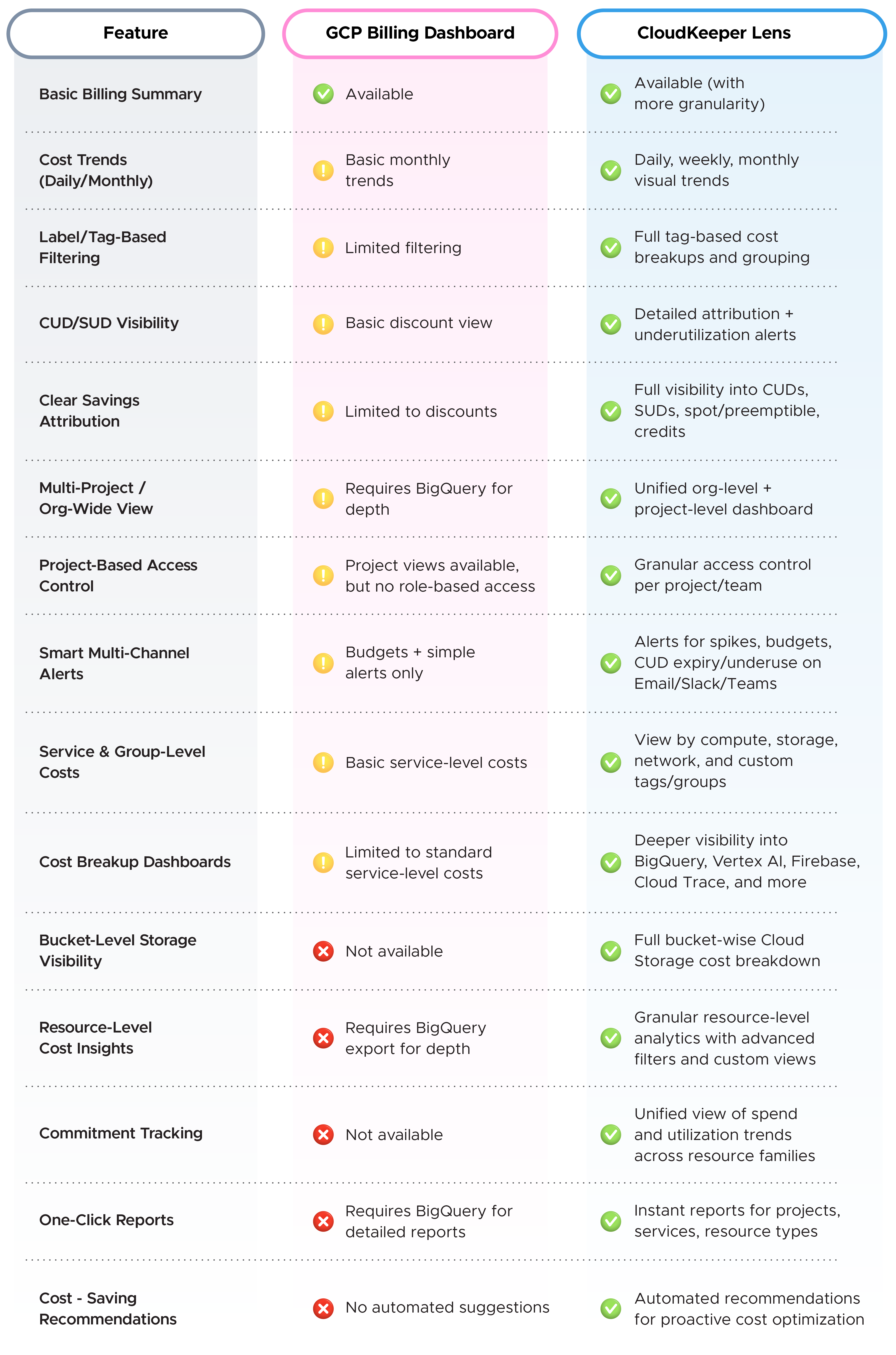
Quick Comparison Overview
Fast, secure onboarding
From an architectural standpoint, implementation simplicity matters.
CloudKeeper Lens requires only billing account read access. There are no agents to deploy, no infrastructure modifications, and no operational access to workloads.
The onboarding process is straightforward:
- Login to your Google Cloud account
- Provide billing account read access
- Receive Lens credentials
Within minutes, teams gain access to resource-level cloud cost monitoring, commitment tracking, savings attribution insights, and optimization intelligence across their entire GCP environment.
For organisations concerned about security exposure or operational disruption, this low-friction model is a strong advantage.
From mere cost visibility to Cloud Cost Intelligence
GCP Cost Explorer remains a reliable starting point for GCP cost monitoring. It delivers foundational visibility and budget tracking capabilities that every cloud environment needs.
However, with a mature and complicated infrastructure in place, teams require more than retrospective dashboards. They need hourly visibility, deep resource-level insights, unified organisational dashboards, structured custom reporting, proactive daily cost digests, and more, preferably with a human in the loop for expert cloud cost optimization recommendations.
That is the evolution from basic cloud cost monitoring to intelligent cloud cost optimization that CloudKeeper Lens offers.
Try out CloudKeeper Lens today and move towards a smarter way of keeping your cloud costs in check.
Frequently Asked Questions
Q1. Is GCP Cost Explorer enough for enterprise-level cloud cost governance?
GCP Cost Explorer is good for basic cloud cost monitoring. But for enterprise-level governance, teams need deeper visibility, better alerts, and stronger cloud cost optimization. It manages foundational needs, but advanced environments usually require more control and intelligence.
Q2. When should I move beyond GCP’s native cost tools?
You should move beyond GCP cost explorer when your cloud setup becomes complex. If you manage multiple projects, GKE clusters, or large CUD commitments, basic cloud cost monitoring may not be enough. Advanced cloud cost optimization tools help prevent spikes and improve cost control.
Q3. Does CloudKeeper Lens replace GCP Cost Explorer or work alongside it?
CloudKeeper Lens works alongside GCP cost explorer. GCP cost monitoring continues as usual, while Lens adds deeper visibility, optimization insights, and governance controls. It enhances native tools rather than replacing them.
Q4. Can GCP Cost Explorer manage committed use discounts effectively?
GCP cost explorer shows basic CUD and SUD data. However, it does not provide deep tracking or strong cloud cost optimization insights. For better commitment utilization and savings visibility, more advanced GCP cost monitoring tools are often required.
Q5. How does CloudKeeper Lens align cloud spending with business KPIs?
CloudKeeper Lens improves cloud cost monitoring by linking spend to projects, teams, and resources. With detailed reports and unit cost views, it supports better cloud cost optimization and helps align GCP costs with real business goals.
















