


12
12Google Cloud Platform offers every service you need to deploy your application, host it, and deliver it to customers globally. These services have their own pricing, but when paired with the right GCP discounts and pricing models, they can deliver the lowest possible spend without compromising system reliability and performance.
However, choosing the most appropriate pricing model for a given use case is easier said than done. With multiple pricing models, discount programs, and tiered structures available, the possible combinations can quickly run into the hundreds when used together.
That’s what this guide aims to simplify. Instead of offering a one-size-fits-all template, it equips you with the knowledge to choose the right pricing model for your specific service and workload requirements.
By the end, you’ll have a clear understanding of GCP pricing models, how to pair them with the right services, and which discounts to use to keep your cloud spend optimized.
Why Understanding GCP Pricing Matters
Different GCP pricing models and mechanisms, when applied to the right services, help optimize costs without compromising performance or efficiency.
For instance, if a workload is predictable and long-running, you’d opt for Committed Use Discounts instead of provisioning on-demand, with on-demand pricing being up to 70% more expensive compared to committed usage.
Conversely, for short-duration workloads, committing to a longer duration of 1 or 3 years won’t make sense, since their utility doesn't justify the commitment.
This ability to pair a service with the right pricing model for maximum efficiency comes from having a solid understanding of GCP pricing models, which we’ll discuss later in the blog.
How GCP Pricing Works
When provisioning any service within your GCP infrastructure, you’re likely to expect that you’ll be paying exactly what Google has listed as the price. For example, running an e2-standard-4 Google Compute Engine instance in a specific region may show a fixed hourly rate. However, your actual GCP bill might reflect otherwise.
In fact, there isn’t a single standard price when you choose a GCP service. Instead, the base price and your final cost depend on multiple factors and are determined based on the following:
Resource-based vs usage-based pricing
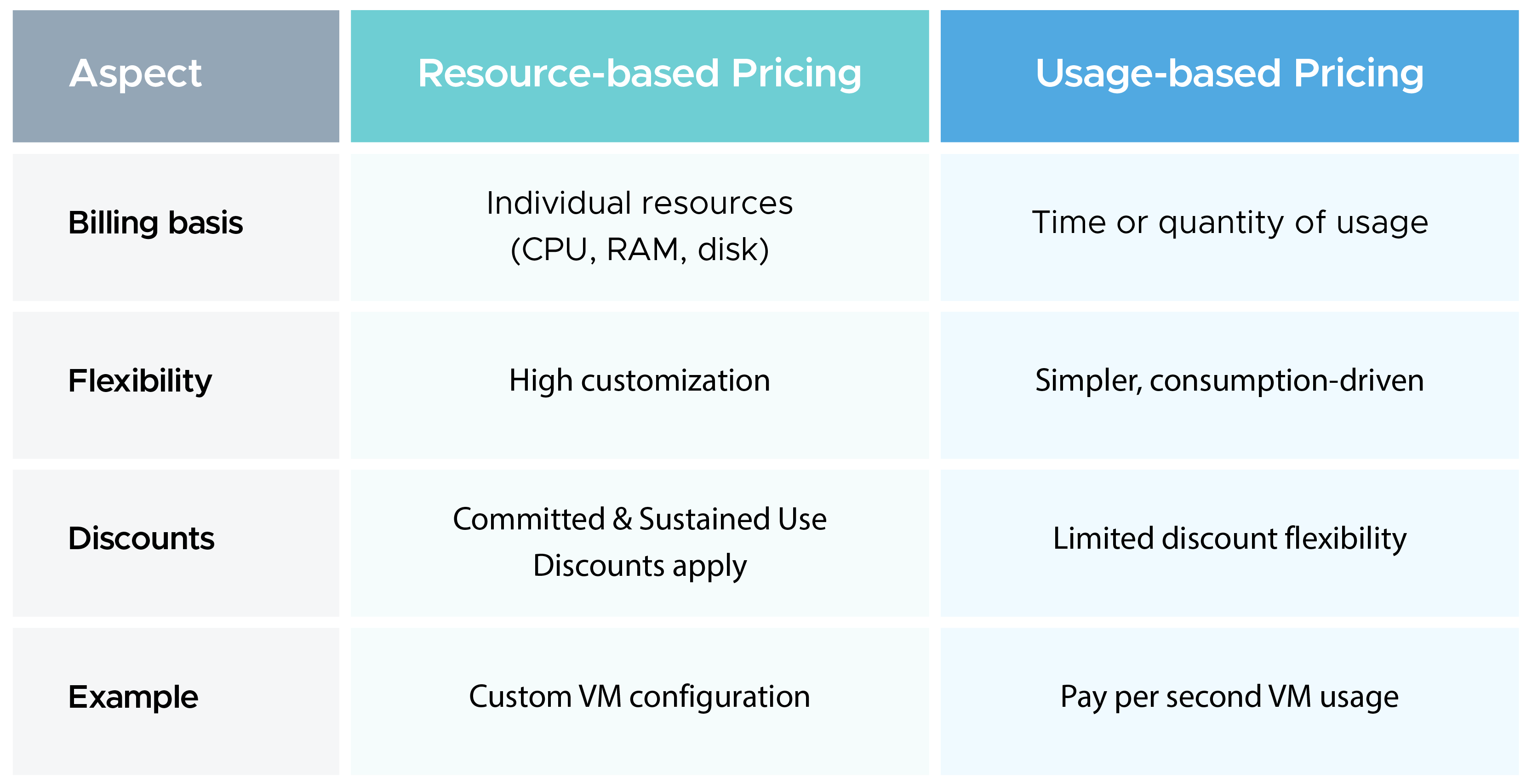
Resource-based and usage-based pricing are commonly seen in GCP Compute Engine instances. In resource-based pricing, you are charged for individual components of a machine, such as vCPU, RAM, and storage, rather than the entire instance bundle. Discounts like Committed Use Discounts and Sustained Use Discounts apply directly to these resources based on usage patterns.
In resource-based pricing, billing happens based on how much of each resource is consumed. For example, if a VM uses 4 vCPUs and 16 GB RAM, you are billed for those exact resources instead of a predefined machine package.
Whereas in usage-based pricing, you pay based on the duration and extent of usage of a resource. Similar to on-demand pricing, compute is billed per second (with a minimum of 60 seconds), storage is billed based on the amount of data stored (per GB per month), and network usage is billed based on data transfer (ingress/egress).
Difference between Resource-based and Usage-based Pricing:
Billing accounts and project hierarchy
Every GCP resource sits inside a project, and every project is linked to a billing account. The billing account is where charges accumulate and where you set budgets and payment methods.
A single billing account can cover multiple projects, which is useful for organizations that separate environments like production, staging, and development into different projects but want unified billing visibility.
Understanding this hierarchy is important for cost allocation because charges in GCP are tracked at the project level, and without a clear project structure, attributing costs to the right team or product becomes difficult.
Region-based GCP pricing variations
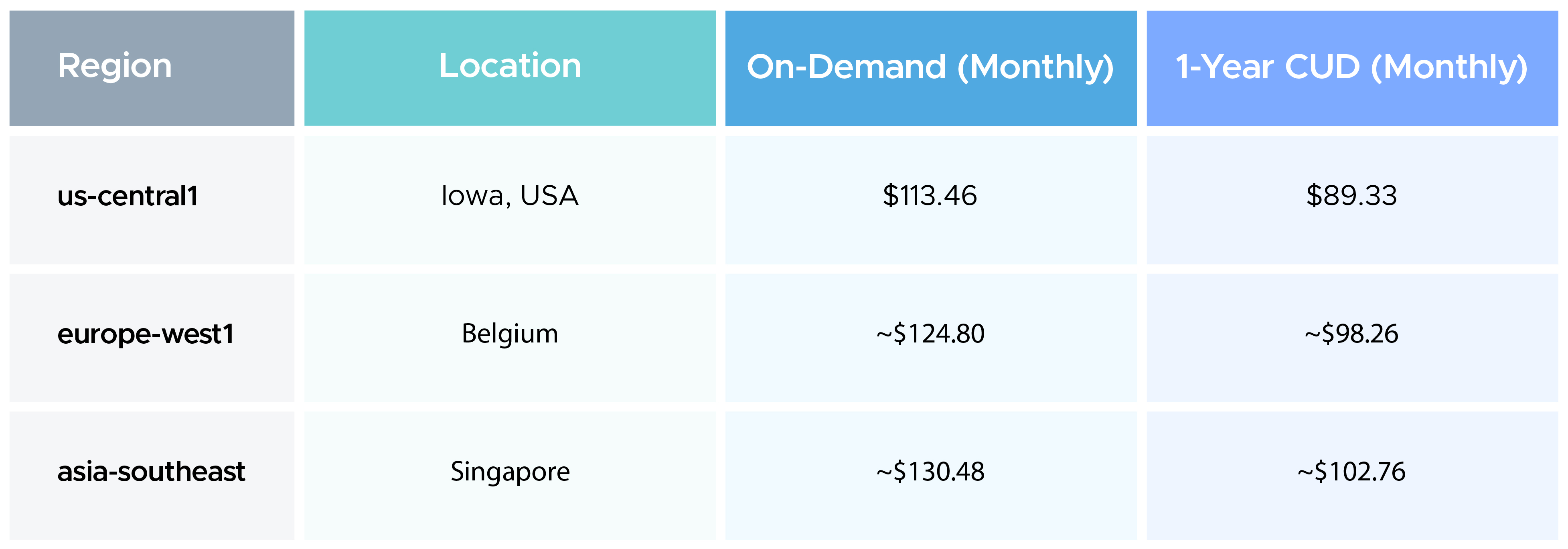
When you look up the same GCP VM or storage class across two different regions, say us-central1 (Iowa) and asia-southeast1 (Singapore), you'll find the pricing to be different, even for the same service. The difference comes down to operational factors such as:
- Data center costs,
- Power costs,
- Labour cost
- Infrastructure overhead,
All these vary from region to region. Some regions are also newer or carry higher reliability infrastructure, which is reflected in the price.
Here's the n2-standard-4 (4 vCPUs, 16 GB RAM) on-demand pricing across three regions to illustrate the contrast:
One thing to bear in mind: if you later decide to move data out of one region to another, there are data transfer costs associated with that move. Inter-region egress between the US and Europe, for instance, runs at approximately $0.08/GB. Those costs add up quickly at scale, so region selection is a decision worth getting right early.
Currency and tax considerations
GCP bills are generated in USD, which means every customer paying in a local currency is subject to exchange rate fluctuations.
GCP does provide some protection here: exchange rates are locked at the beginning of each month, and for select currencies, GCP limits the month-to-month rate change to a maximum of 2%, giving customers a degree of predictability even in volatile currency environments.
GCP collects applicable taxes (VAT, GST, etc.) based on your billing address, but your organization remains responsible for tax compliance reporting.
Therefore, teams need to factor in applicable local taxes when budgeting for the cloud.
What are the GCP Pricing Models
Depending on your workload type, commitment level, and usage patterns, there are multiple GCP pricing models to choose from, each with a different cost-to-flexibility trade-off.
Here are the different GCP pricing models available:
On-Demand Pricing
On-demand pricing is the default GCP pricing model. You pay for compute, storage, or services as you use them, with no upfront commitment. It's the most flexible option and works well for unpredictable or short-lived workloads.
The trade-off is cost: on-demand rates are the highest of all GCP pricing models. For teams running consistent workloads without a defined plan, opting for on-demand pricing results in a bill that's much higher than it would be with a commitment-based discount plan.
Committed Use Discounts (CUDs)
By committing to a specific resource configuration for 1 or 3 years, you get up to 57% off on general-purpose machine types and up to 70% off on memory-optimized instances compared to on-demand pricing.
CUDs are ideal GCP discounts for steady and predictable workloads. The commitment is to spend, instead of a specific instance, which gives teams some flexibility to shift across machine types while retaining the GCP discount.
Sustained Use Discounts (SUDs)
Sustained Use Discounts are GCP discounts that apply automatically. When a resource, such as a Virtual Machine, runs for more than 25% of a billing month, GCP monitoring begins applying incremental discounts. The discounts can be up to 30% off the on-demand rate.
SUDs are available for most N-series and custom machine types and cannot be combined with CUDs on the same resource.
Spot and Preemptible VMs
Spot VMs offer the highest GCP discounts available, up to 91% off the on-demand rate.
The trade-off is availability: GCP can reclaim these instances at any time when capacity is needed elsewhere. Preemptible VMs work on a similar model with a maximum lifetime of 24 hours.
Both are well-suited for batch jobs, data pipelines, CI/CD runs, and any fault-tolerant workload that can handle interruptions.
Custom Machine Types
Custom machine types let you specify the exact number of vCPUs and memory you need, rather than choosing from predefined instance configurations. This directly affects GCP pricing because you're not paying for resources you don't use.
A workload that requires 6 vCPUs and 20 GB of RAM no longer needs to be rounded up to the nearest predefined type. Custom configurations are subject to the same GCP discounts as standard machine types.
What are GCP Pricing Tiers
The costs you incur while using GCP services depend heavily on factors such as your total usage volume. This is often structured through pricing tiers or specific thresholds.
For example, if your usage of a service is below a threshold, such as the first 240,000 vCPU-seconds per month for Cloud Run services, then the Free Tier will apply, and you would pay a lower rate (or nothing at all)
Conversely, for the same instance type, such as an n1-standard-1 VM on Compute Engine, if your usage goes above these initial thresholds, you would pay more as you transition into standard paid tiers.
Understanding GCP Pricing Tiers
GCP offers pricing tiers, wherein pricing may vary based on usage thresholds, time duration, or a combination of both:
- Free usage up to a defined limit (e.g., limited GB, requests, or compute time)
- Free for a specific time duration (e.g., 12-month free tier)
- Tiered pricing based on increasing usage levels
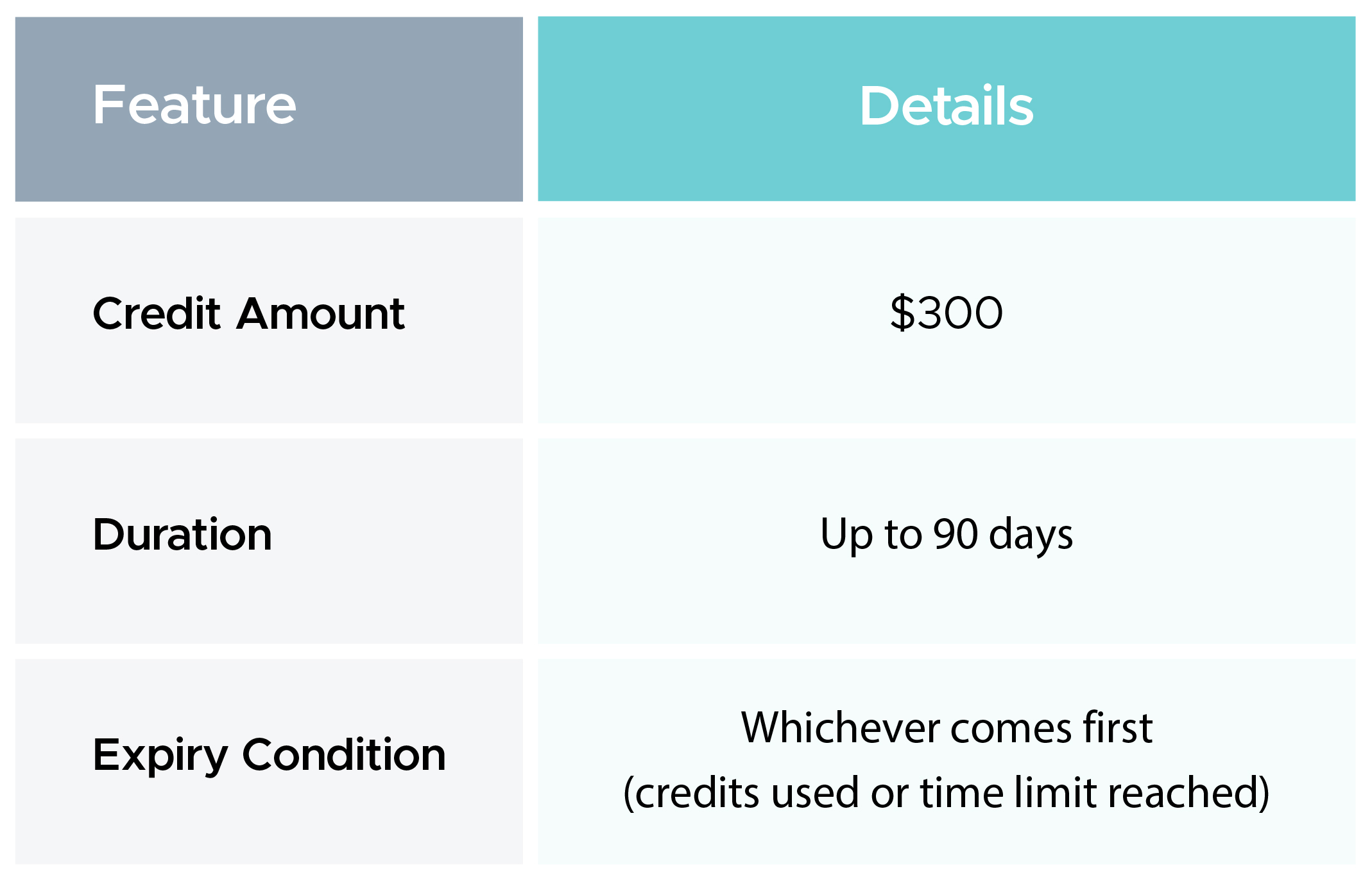
The most common example is the GCP free trial:
Internet Egress Pricing (Example)
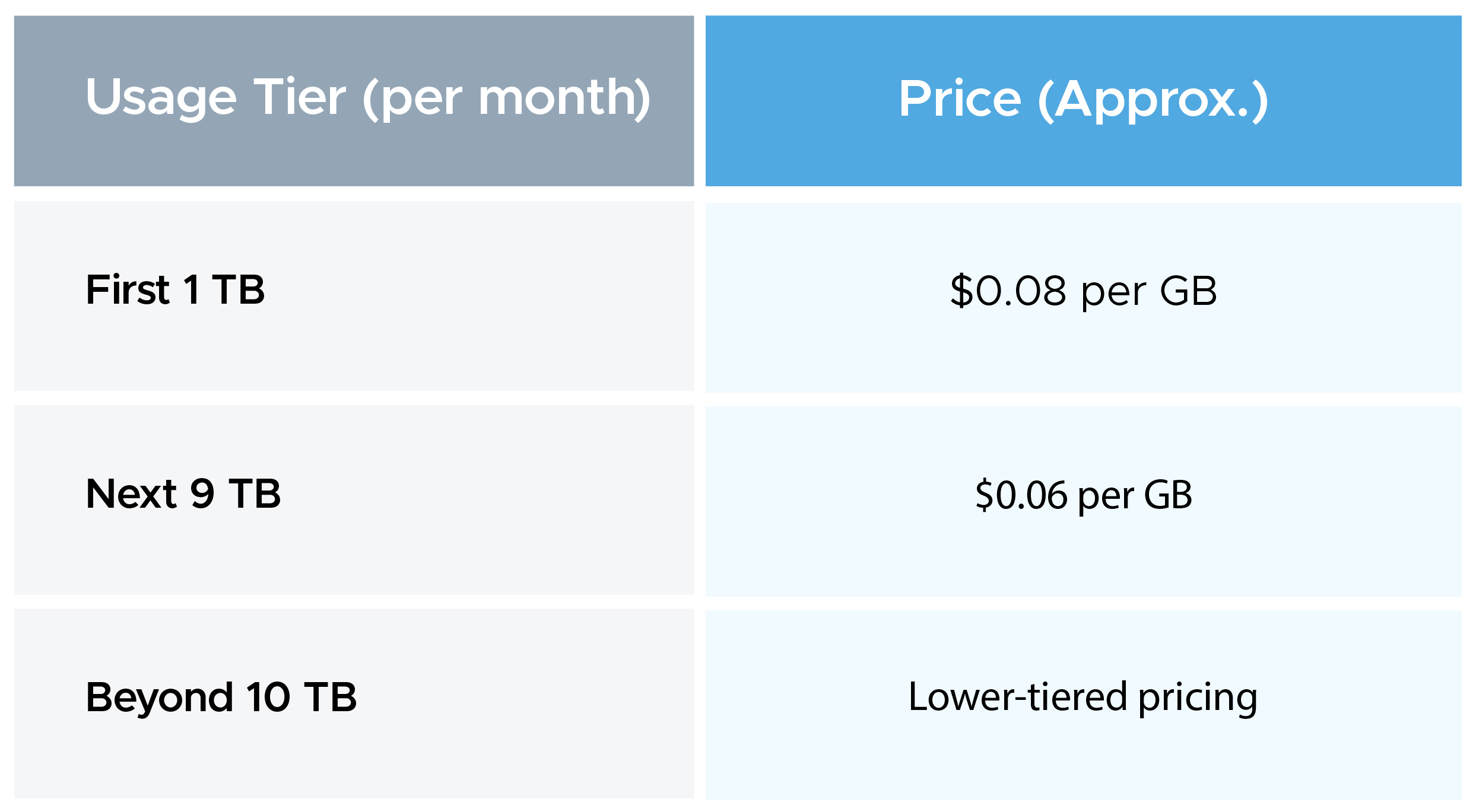
GCP follows a tiered pricing model for internet egress:
Regional Pricing Tiers
GCP pricing also varies by region, categorized into Tier 1 and Tier 2 regions:
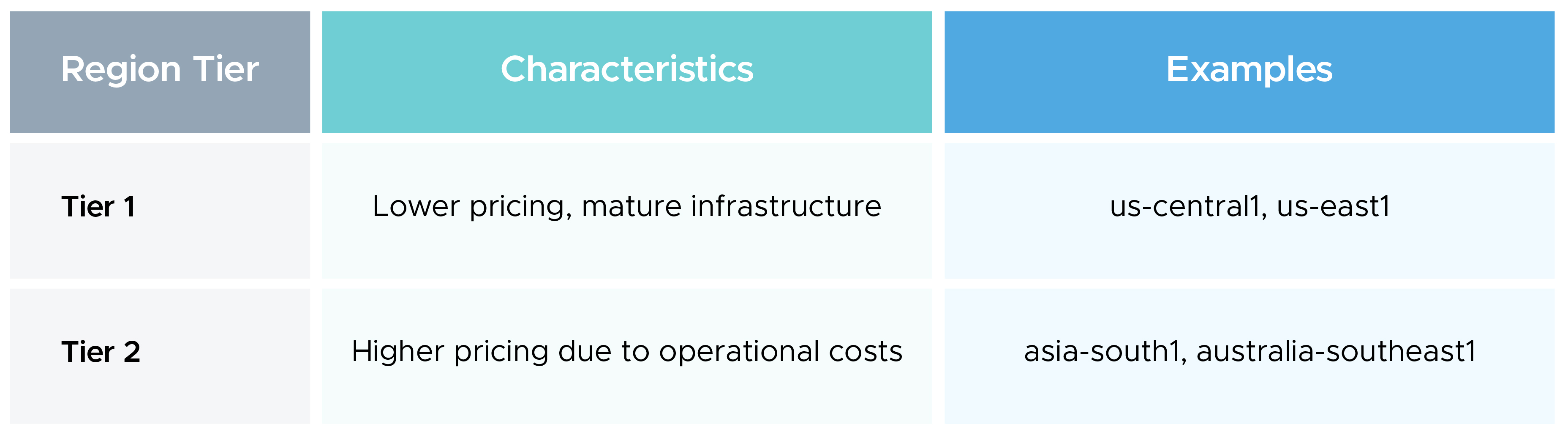
- Tier 1 regions generally offer lower costs due to scale and infrastructure maturity
- Tier 2 regions are priced higher due to factors like data center costs, power, and local demand
- The same workload can cost more or less, depending on the region selected
GCP Pricing: Service-based Breakdown
GCP pricing is highly variable across different offerings. In fact, it is so variable that GCP discounts apply differently based on the tier, usage, and volume you’ve provisioned.
All this goes to show that the list price of a resource is merely an indication, while the final cost depends on several factors.
Out of these, we’ve discussed service-based GCP pricing in this section.
GCP Compute Engine Pricing
Typically, it's the largest driver of GCP spend. Key pricing points:
- e2-standard-4 (4 vCPUs, 16 GB RAM): $97.84/month on-demand in us-central1
- n2-standard-4 (4 vCPUs, 16 GB RAM): $141.79/month on-demand in us-central1
- Spot VMs of the same type can reduce costs by up to 91%
SUDs apply automatically for instances running more than 25% of the month
Google Kubernetes Engine Pricing
There are three components to GKE pricing:
Node pools: Committed Use Discounts (CUDs) and Sustained Use Discounts (SUDs) apply to the underlying VMs
Autoscaling: Automatically adjusts the number of nodes based on workload demand, which helps to maintain performance without overprovisioning
Autoscaler costs: While the autoscaler itself doesn’t incur a separate charge, the cost depends on the underlying Compute Engine resources.GKE adds a cluster management fee of $0.10 per cluster per hour, which is separate from node costs.
Google Compute Engine offers similar performance capabilities to Google Kubernetes Engine; however, its setup and pricing differ. You can check out a comprehensive GKE vs GCE breakdown here.
Cloud Functions and Cloud Run:
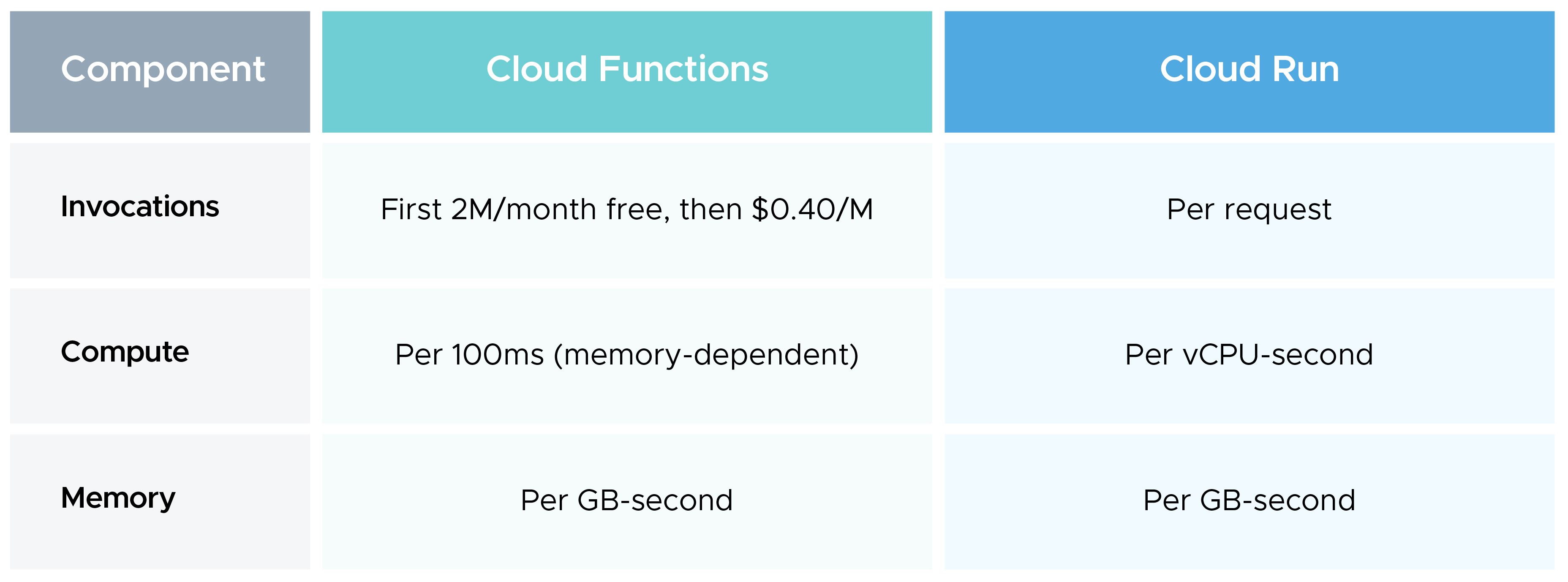
Both Cloud Functions and Cloud Run use usage-based GCP pricing:
Google Cloud Storage Pricing:
Google Cloud Storage follows a consumption-based pricing model, in which the cost is based solely on the storage capacity of the selected type. A key point to note for storage is that network ingress and egress are calculated outside storage, with ingress generally free and egress chargeable.
Therefore, when billing, egress charges show up separately, even though they are associated with the same storage bucket.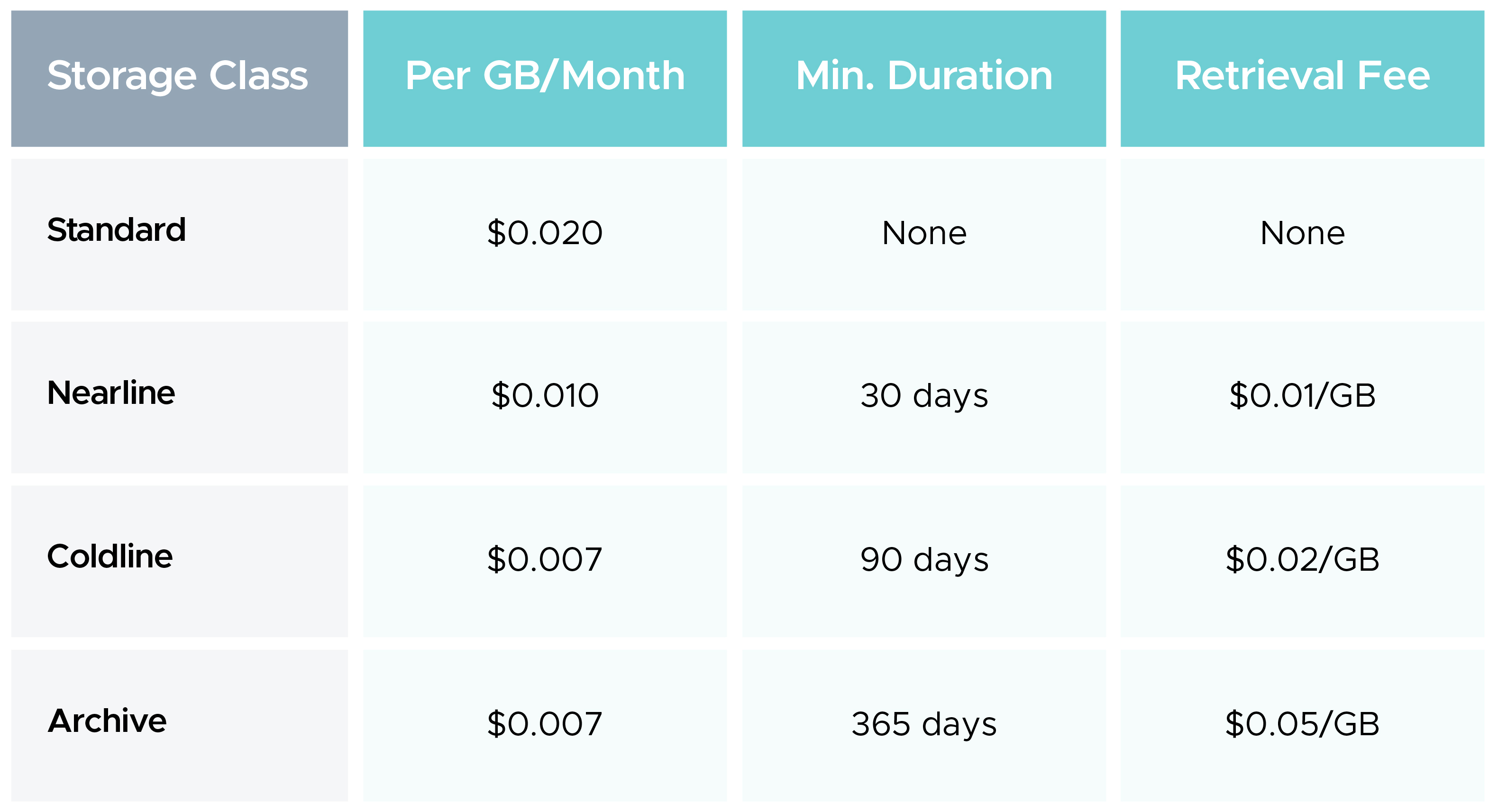
Big Data & Analytics Pricing:
Big data and analytics offer great utility for a variety of use cases, such as real-time analytics and business intelligence reporting, for which Google offers dedicated services like BigQuery, Dataflow, Dataproc, and Looker, among many others.
Pricing models for all these do not follow a single standard rate, since the factors influencing pricing differ across services, with the base pricing model and consumption patterns being the key differences.
Here’s how GCP pricing across Big Data and Analytics services works:
BigQuery on-demand vs flat-rate reservations:
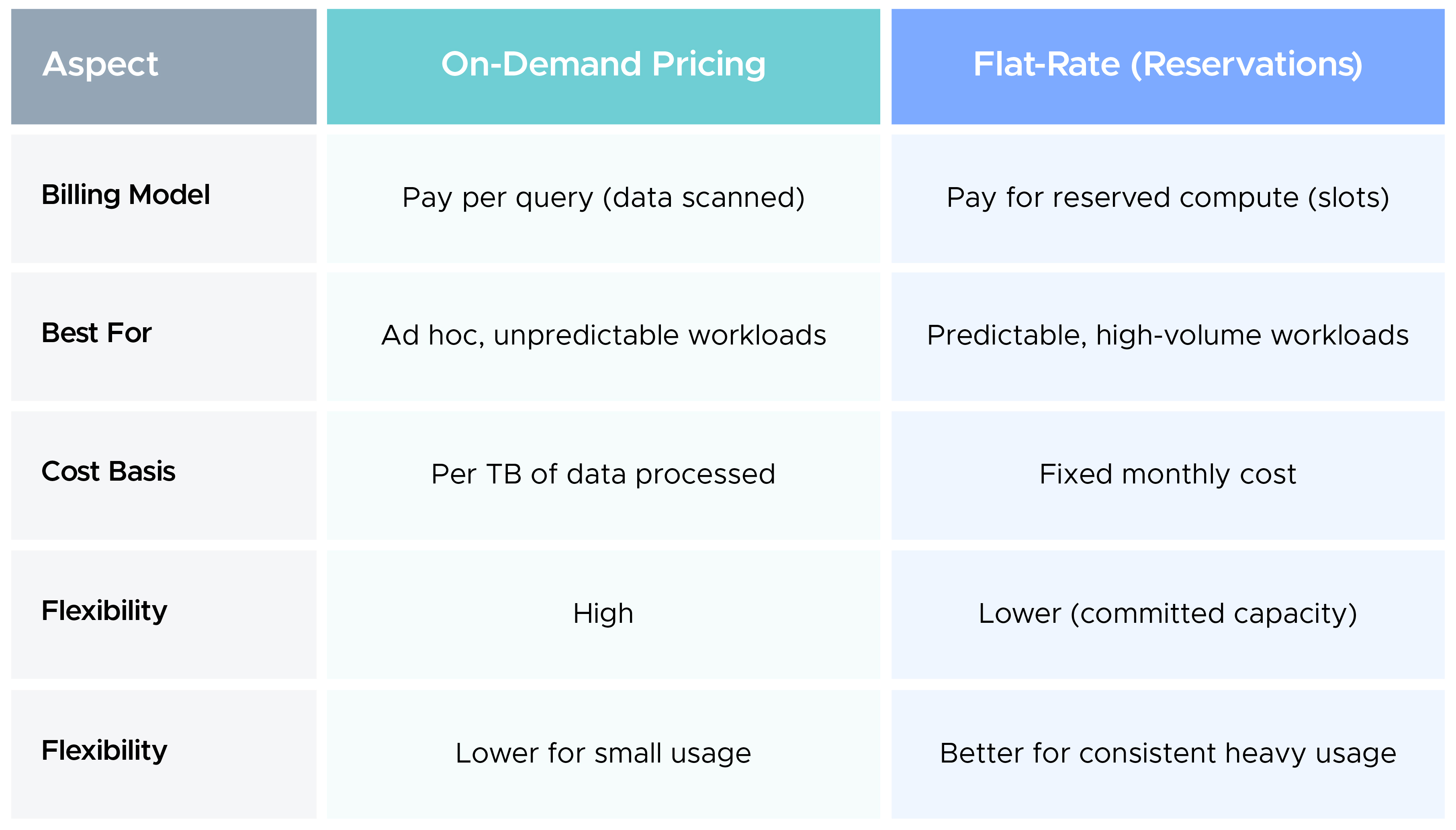
- Data ingestion: Data ingestion is free when loading data into BigQuery using batch loads, but streaming inserts are charged per GB of data ingested
- Storage: Storage in BigQuery is billed separately based on the amount of data stored per month. Long-term storage is 50% cheaper ($0.01/GB vs $0.02/GB in US regions). The 90-day clock resets on any modification (INSERT, UPDATE, DELETE, MERGE).
Databases
- Cloud SQL: Priced by instance type, storage, and egress. A db-n1-standard-1 in us-central1 runs at approximately $50/month before storage costs.
- Cloud Spanner: ~$0.90 per node per hour for multi-region configurations; designed for globally distributed workloads where consistency is non-negotiable.
- Firestore: $0.06 per 100,000 document writes, $0.06 per 100,000 reads, $0.02 per 100,000 deletes, plus $0.18/GB per month for storage.
- Backups, I/O operations, and storage all carry separate charges across database services.
Networking
GCP pricing for networking follows a clear rule: ingress is free, egress is not.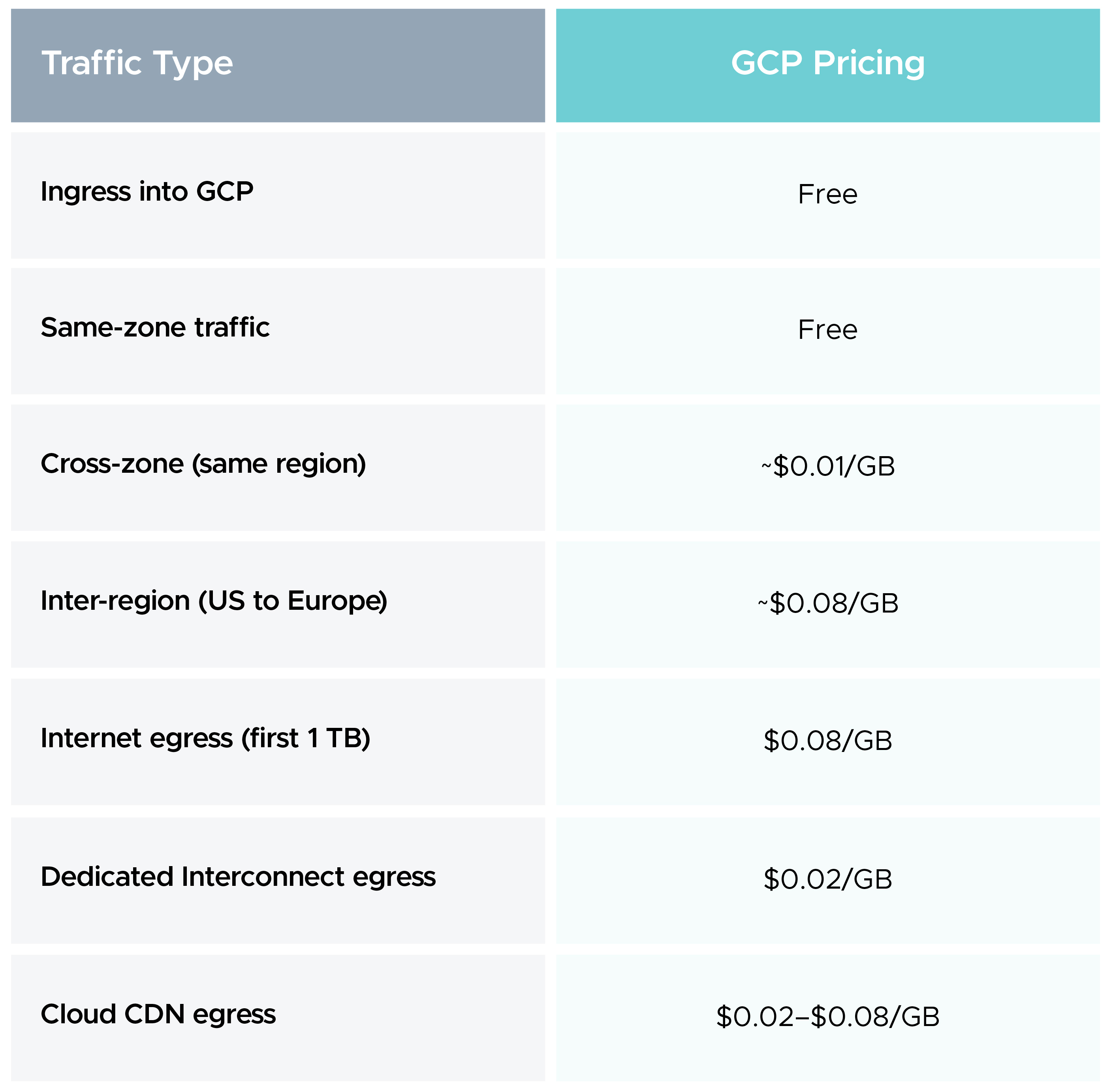
AI/ML services
- Vertex AI pricing: Vertex AI GCP pricing has two main components: training and model hosting. Training jobs are billed per machine hour based on the machine type and accelerator selected.
- An NVIDIA A100 GPU on a training job runs at approximately $3.67/hour.
- Model hosting vs Training: Model hosting is charged per node hour for deployed endpoints. CUDs apply to Vertex AI but offer lower discounts than compute-optimized instances, typically 20-40% off.
Billing, Invoicing, and GCP Cost Management Tools
GCP provides a native set of tools for cost visibility:
- Cloud Billing reports: Through Cloud Billing reports, teams can see separate project- and service-based cost breakdowns.
- Budget Alerts: For a set spend or while crossing a threshold, for example, $1,000 or 80% of the budget, you can configure Google Budget Alerts, which can alert you on channels such as email, Pub/Sub, or webhooks.
- Billing Export to BigQuery: BigQuery, being a data analytics service, allows you to export the raw billing report to it, and you can track the bill in detail.
CloudKeeper Lens acts as a complete GCP infrastructure visibility solution, offering real-time insights, rightsizing recommendations, and deeper cost visibility. It gives FinOps and engineering teams a single, standardized view instead of manually piecing together insights from multiple sources.
Lens goes a step ahead when compared with GCP cost explorer by providing enterprise-level governance, enhanced visibility, smarter alerting, and a more comprehensive approach to cloud cost optimization as business complexity grows.
Common Cost Traps and Hidden Charges
Several GCP pricing line items catch teams off guard, and most of them live outside compute.
Egress is the most common trap. Inter-region transfers, cross-zone VM traffic at $0.01/GB, and internet egress all add up fast at volume.
Idle resources continue to generate GCP charges even when stopped. Attached persistent disks and reserved static IP addresses keep billing regardless of VM state.
Early deletion from cold storage tiers. Removing an object from Coldline before 90 days or Archive before 365 days triggers an early deletion fee equivalent to the remaining minimum duration.
Cloud NAT data processing at $0.045/GB applies to both directions of traffic. GKE clusters pulling container images through Cloud NAT at scale can generate significant charges entirely separate from egress.
BigQuery SELECT * queries. Scanning full tables instead of specific columns is one of the fastest ways to generate unexpected GCP costs in analytics workloads.
GCP monitoring of these specific SKUs through the billing export to BigQuery is the most reliable way to surface them before they compound.
You can learn more about BigQuery cost optimization here.
Forecasting, Budgeting, and Financial Planning
Getting GCP pricing under control requires building a forecasting and budgeting practice around how your organization actually uses GCP.
- Start with the billing export to BigQuery: It's free to enable and gives you a complete, queryable record of every cost by service, project, region, and SKU.
- Set budget alerts at multiple thresholds: 50%, 80%, and 100% are some examples of potential intervals you can set. GCP monitoring at these intervals gives teams time to investigate before a bill shock incident.
- Run a 30-day GCP monitoring analysis: Before committing to a discount program, you should first gauge your usage because simply committing to a spend and then underutilizing that resource makes the discount counterproductive, and you could end up spending more than the reduced costs that come with CUD.
- Layer your GCP discounts. Use resource-based CUDs for your most stable, long-running workloads. Use Flexible CUDs for workloads that shift across machine families or regions.
To Sum Up
GCP pricing is tricky to navigate, but essential to understand for maximizing cloud cost savings. By pairing the right discount programs, commitments, and instance types with the appropriate resources, you can avoid cost overruns while maintaining performance and adhering to FinOps best practices.
GCP monitoring needs to be maintained continuously, as it provides real-time visibility into your infrastructure and helps determine whether the pricing model you’ve chosen is actually the right fit for the use case.
Need GCP experts? Reach out to CloudKeeper’s team of 100+ GCP specialists, and we’ll simplify GCP pricing and help you maximize ROI from your cloud investment.
















