8
8Someone updates an AWS ECS service in production on a Tuesday afternoon. On Wednesday, you want to know who did it.
AWS CloudTrail has the event. This is what it says about who made the call:
So Jenkins did it. You knew that already. What you wanted was the job name and the build number, and neither is in the event. The Jenkins controller runs 806 jobs, every one of them authenticates the same way, and in AWS CloudTrail they all look identical.
This post is about ck-aws, a Jenkins plugin we built from scratch to change what that event says, without touching any of the pipelines:
From:

To:

The Problem: Attribution, Not Access
This was never an access problem. The calls went through, and the roles had the right permissions. The gap was that the audit trail stopped at the controller.
That cost us three things. We couldn't narrow an incident down to a build. We couldn't see which jobs used which permissions, so trimming the controller's role was guesswork. And we couldn't write a policy that says "only builds may do this", because AWS IAM has no idea what a build is.
The reason it's hard comes from AWS, not Jenkins. Every AWS call is made with a set of credentials, and every set of credentials carries a session name. That name is chosen at one moment only: when a role is assumed. If the credentials come straight from the AWS EC2 instance, AWS has already named the session after the instance (i-…), and nothing running on it can change that. If a tool assumed a role through a profile, the SDK picked a name like botocore-session-<timestamp>, which tells you nothing. Put simply, attribution is a side effect of assuming a role: a build can only be named if something assumes a role on its behalf and picks the name. Roughly 98% of the AWS calls our builds make never assume one.
The Reframe: Decorate the Config, Don't Replace It
The obvious answers already exist as Jenkins plugins, and we tried them.
Pipeline: AWS Steps gives you a block:

The AWS Credentials plugin does the same through a binding:
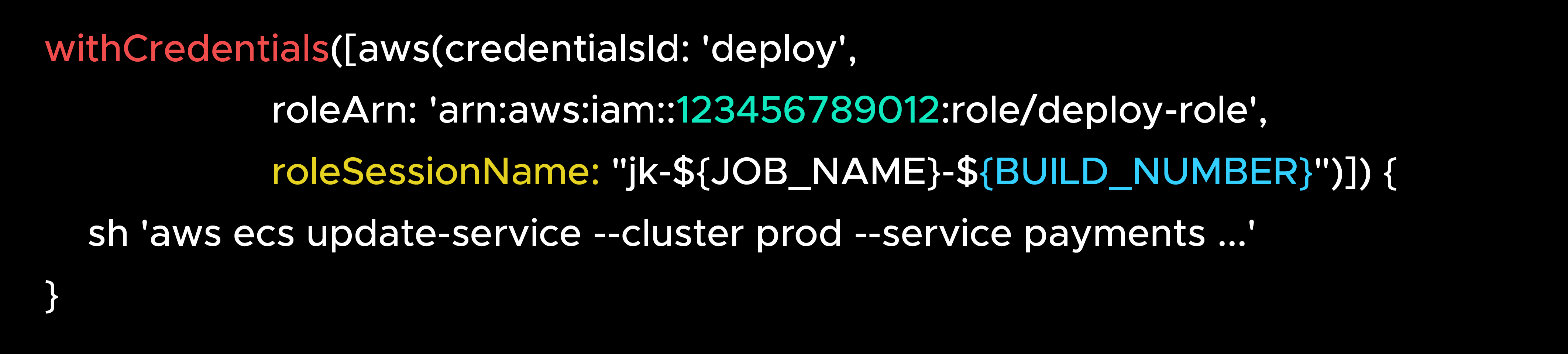
Both work as advertised. The trouble is that they only attribute the calls you wrap. Every AWS call in every Jenkinsfile has to sit inside a block, and 637 of our 806 jobs live in application repositories owned by other teams. A plain sh "aws ..." outside the block goes to the instance role unnamed, and nothing warns you. We needed something that works below the pipeline, at the point where the tools pick up their credentials.
The Solution: put the build's name where every tool already looks
That point is a file. Every AWS tool, whether the CLI, boto3, Terraform, the SDKs or docker login, reads the same ~/.aws/config to work out which role to use. A profile in it looks like this:

A profile can carry one more setting: role_session_name. Whatever name is written there becomes the session name whenever that role is assumed, and every AWS tool respects it. So if we put the build's name in the file, every tool ends up using it without knowing anything has changed.
So at the start of each build, the plugin does three things:
- Copies the agent's ~/.aws/config into a temporary directory that belongs to the build.
- Adds one line to every profile that assumes a role: role_session_name = jk-<job>-<build>.
- Points the build at the copy, by exporting AWS_CONFIG_FILE.
This is the entire difference between the file on the agent and the file the build sees:
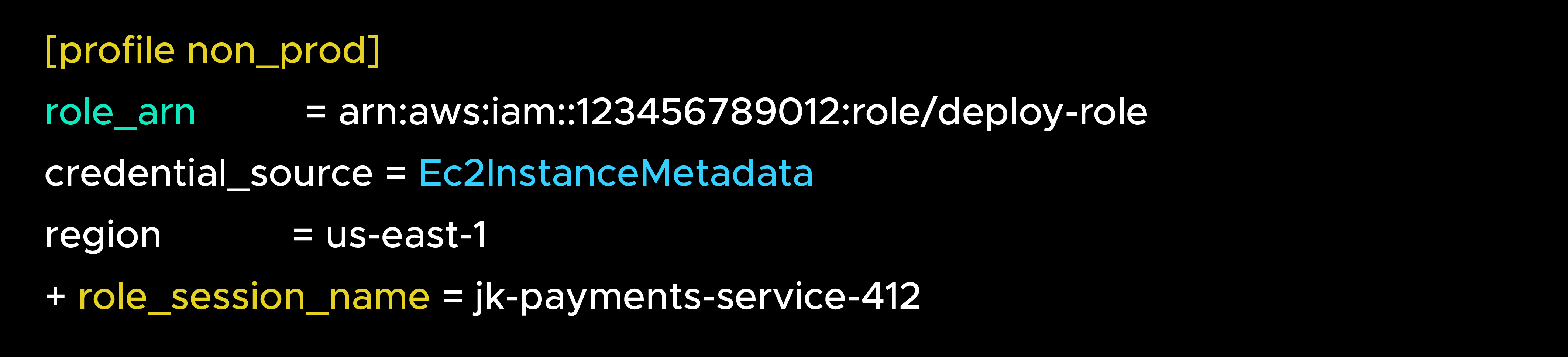
From then on, the first AWS call in the build assumes the role under the build's name, and every call after it, whether CLI, boto3, Terraform or Docker, reuses that session. One AssumeRole per build per profile, and CloudTrail carries jk-payments-service-412 on every call made with those credentials.
Most calls, about 98%, don't use a profile at all; they simply run as the agent's own role. For those, the plugin adds a [default] profile that tells the agent's role to assume itself, so the call runs with exactly the permissions it had before, just under the build's name:
The role, and with it the permissions, stays exactly the same. Only the session name is new.
The idea in one line. Copy the agent's own AWS config into the build, add role_session_name = jk-<job>-<build> to every profile that assumes a role, and point the build at the copy. Every tool inherits the name.
Design Principles
Attribution never comes at the cost of a deployment.
1. It attributes; it does not gate
Everything the plugin does is wrapped in a safety net. If anything goes wrong inside it, a missing config file, a directory it can't read, an error in the plugin itself, the plugin steps aside and the build runs exactly as it would have without it. We settled that rule before writing any code, and every other safeguard follows from it.
2. Copy the agent's configuration; never enumerate it
The agent's ~/.aws/config is the source of truth. The plugin never replaces it, only copies and adds to it, so a profile added to an agent tomorrow is attributed on its next build with no change in Jenkins.
3. Additions only, verified before use
A bug can produce a wrong file without throwing anything, so before the build uses the generated file, the plugin compares it with the original: every original line must still be there, and the only additions may be role_session_name lines. Anything else, and it contributes nothing. This is what protects pipelines nobody has written yet.
4. Prove the role can assume itself before writing anything
The [default] profile above only helps if AWS actually lets the agent's role assume itself. If AWS refused, "unattributed" would turn into "broken". So the plugin checks first, with one sts:AssumeRole probe per agent, cached. If it succeeds, [default] is written; if not, nothing is, and that agent's calls keep working as before.
The Attribution Layer: What a Build Sees
From inside a build, nothing changes. A pipeline that ran aws ecs update-service --profile non_prod last month still runs exactly that, and its console output looks the same too. The plugin only writes to the console if you switch on its diagnostics, and then it just lists what it found and what it added.
The difference shows up in AWS CloudTrail. The same event now carries the build's name, on the AssumeRole call and on every API call made with those credentials:
From:
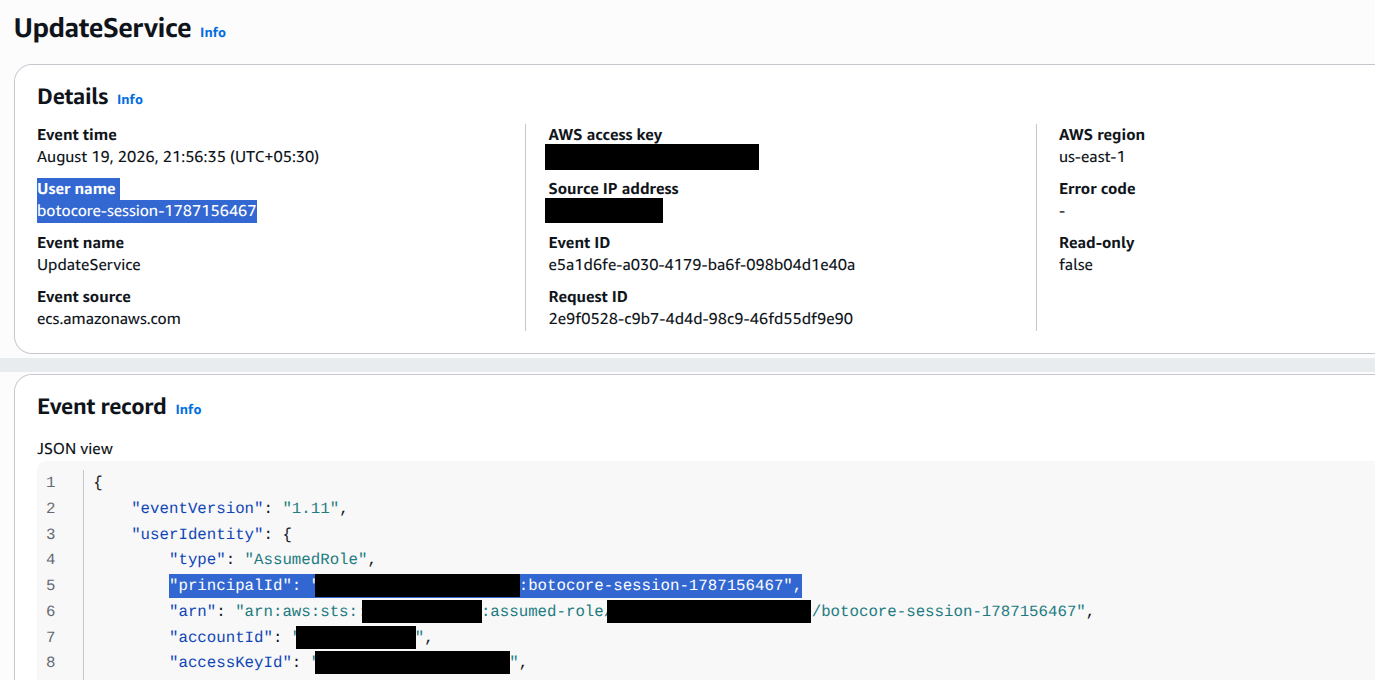
To:
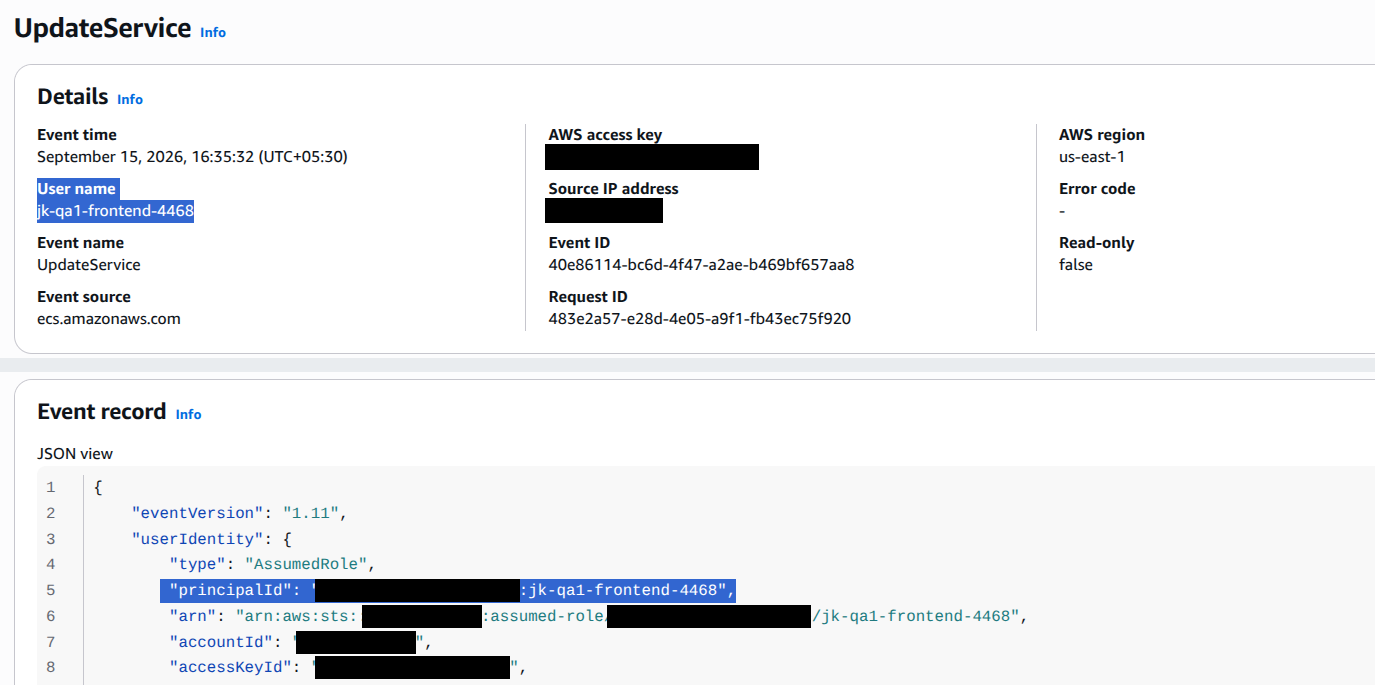
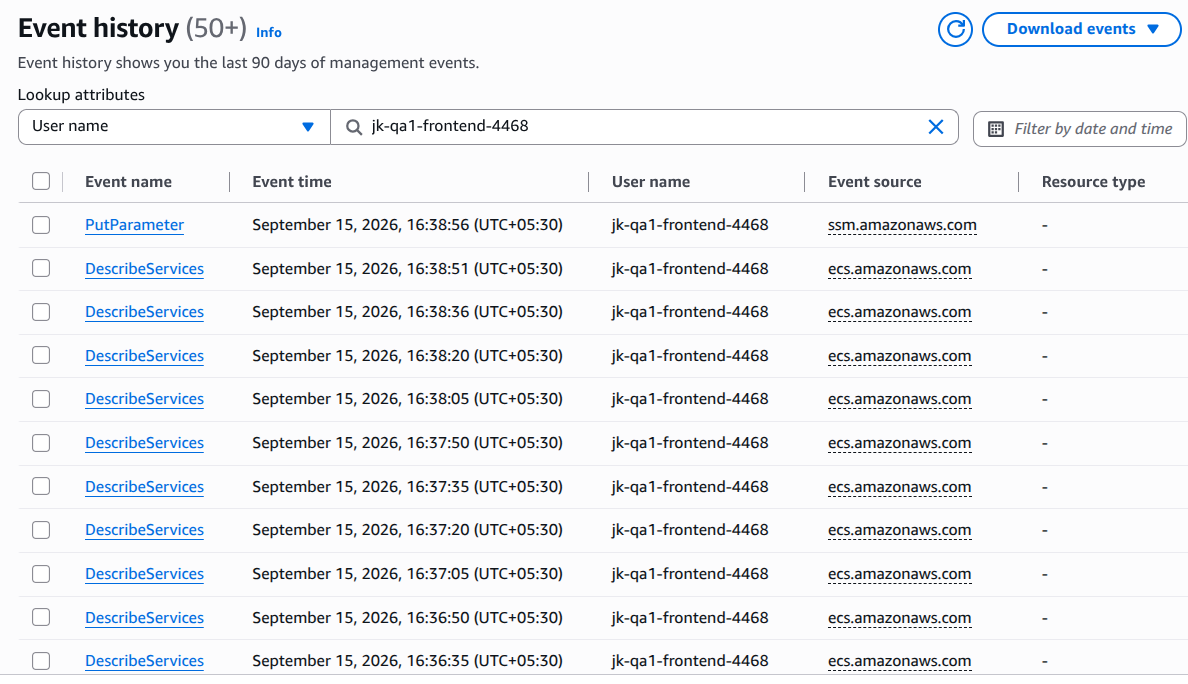
It works from the other side too. Filter Event history by user name and you get every AWS call one build made, in order. So the audit question can be asked either way round: who changed this, and what did this build touch.
One build, every call it made:
Pipeline and Freestyle jobs go through the same implementation. And the plugin is off by default: with the switch off it writes, exports and calls nothing, so a controller with it installed behaves exactly like one without.
Architecture: A Temp Directory, a Checkbox, and a Session Name
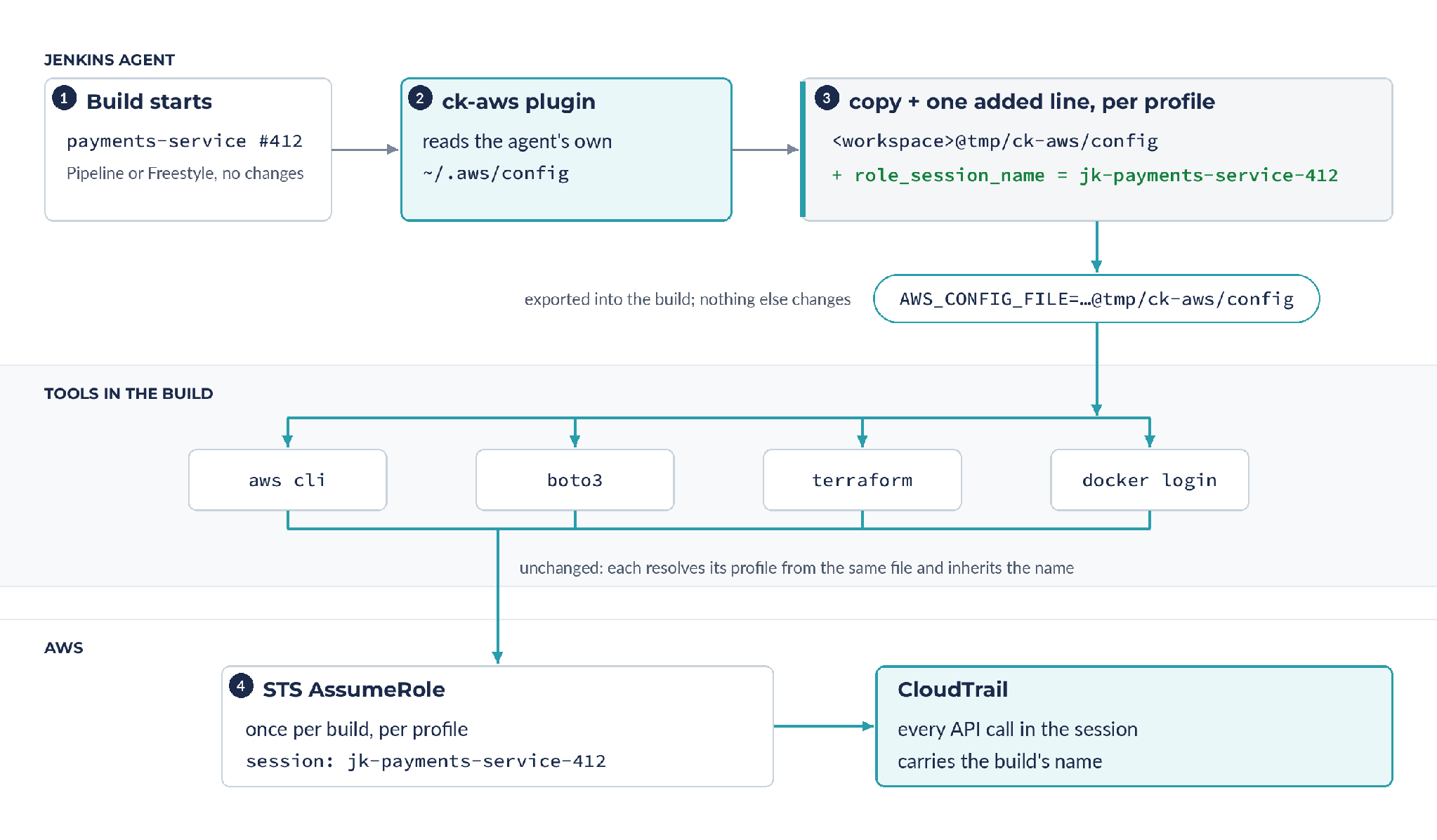
The copied config file lives in the build's own temp folder, <workspace>@tmp/ck-aws/config. It's written fresh for every build and deleted when the build ends. Builds that run inside Docker or Kubernetes see it too, because that folder is mounted alongside the workspace.
Everything is configured from one screen in Jenkins: an on/off switch, a pattern for which jobs are in scope, a switch for calls that don't use a profile, and an observe-only mode that does everything except the final step, so you can watch what the plugin would do before letting it do it. Nothing needs a restart.
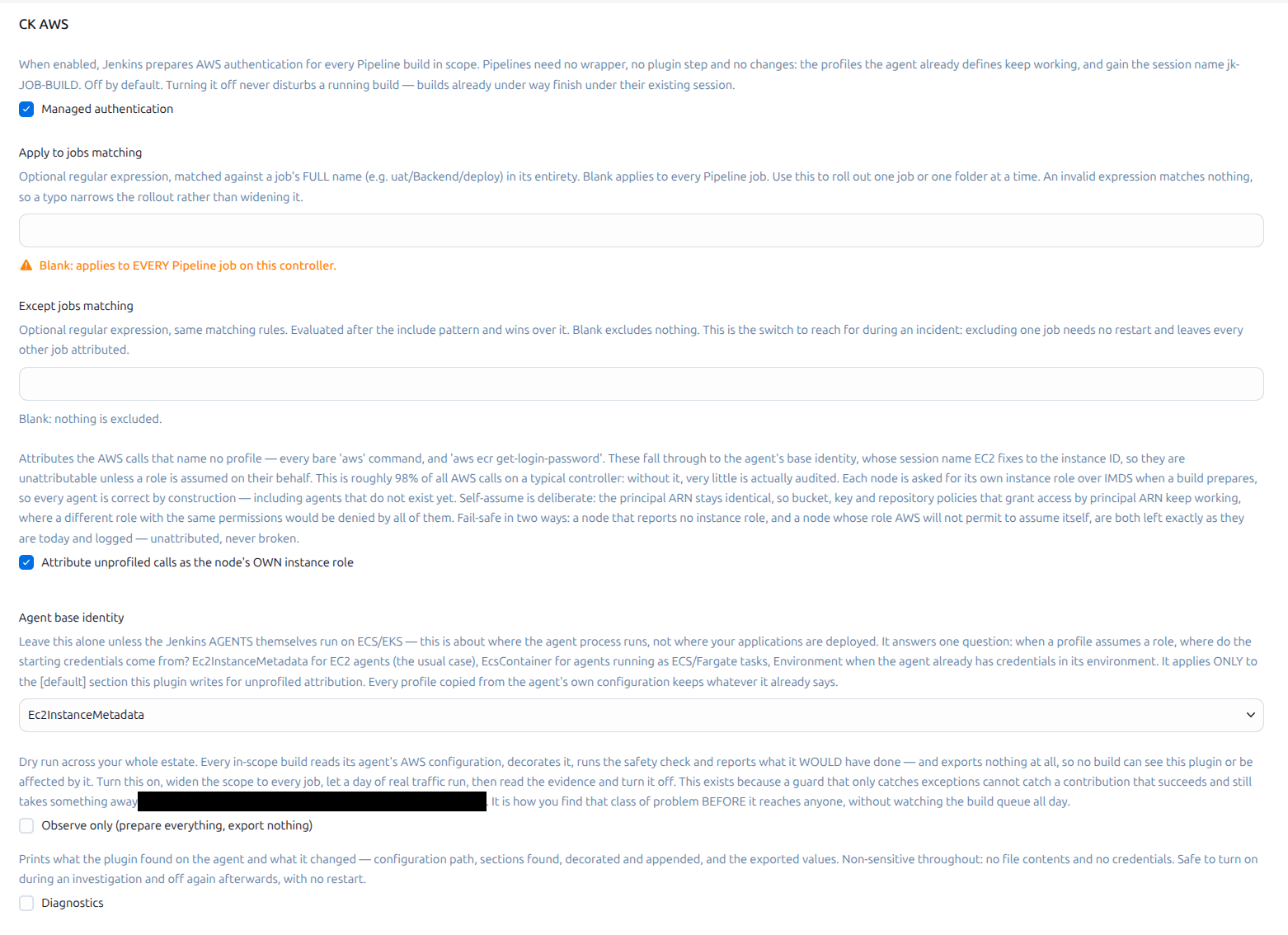
Why the Unprofiled Role Has to Be the Agent's Own
For the calls that don't use a profile, we had to pick which role the build should assume. The obvious choice was a new role made just for auditing: give it the same permissions as the agent's role, and assume it under the build's name.
That would have broken things quietly. A lot of AWS permissions don't live in the role at all. AWS S3 buckets, KMS keys and ECR repositories carry their own policies, and those policies grant access to a specific role by name. A new role with identical permissions is still a different name, so every one of those policies would turn it away. We checked three buckets, and two of them named the agent's role directly, one from another account. There was no safe way to find and fix every policy like that across every account.
So the plugin does something simpler:
The agent's role assumes itself. The role, and every permission it already has, stays exactly the same. The only thing that changes is the session name. AWS has to allow a role to assume itself, which is one line in the role's trust policy, and for us it was already there.
Put another way, the role is the authorization identity and the session name is the attribution identity, and we only ever needed to change the second. Each agent is asked for its own role at the start of a build, so agents with different roles are handled correctly, and an agent with no role is simply left alone.
Results: Every Call Accounted For
The rollout took four days, in the one order that never risks a build: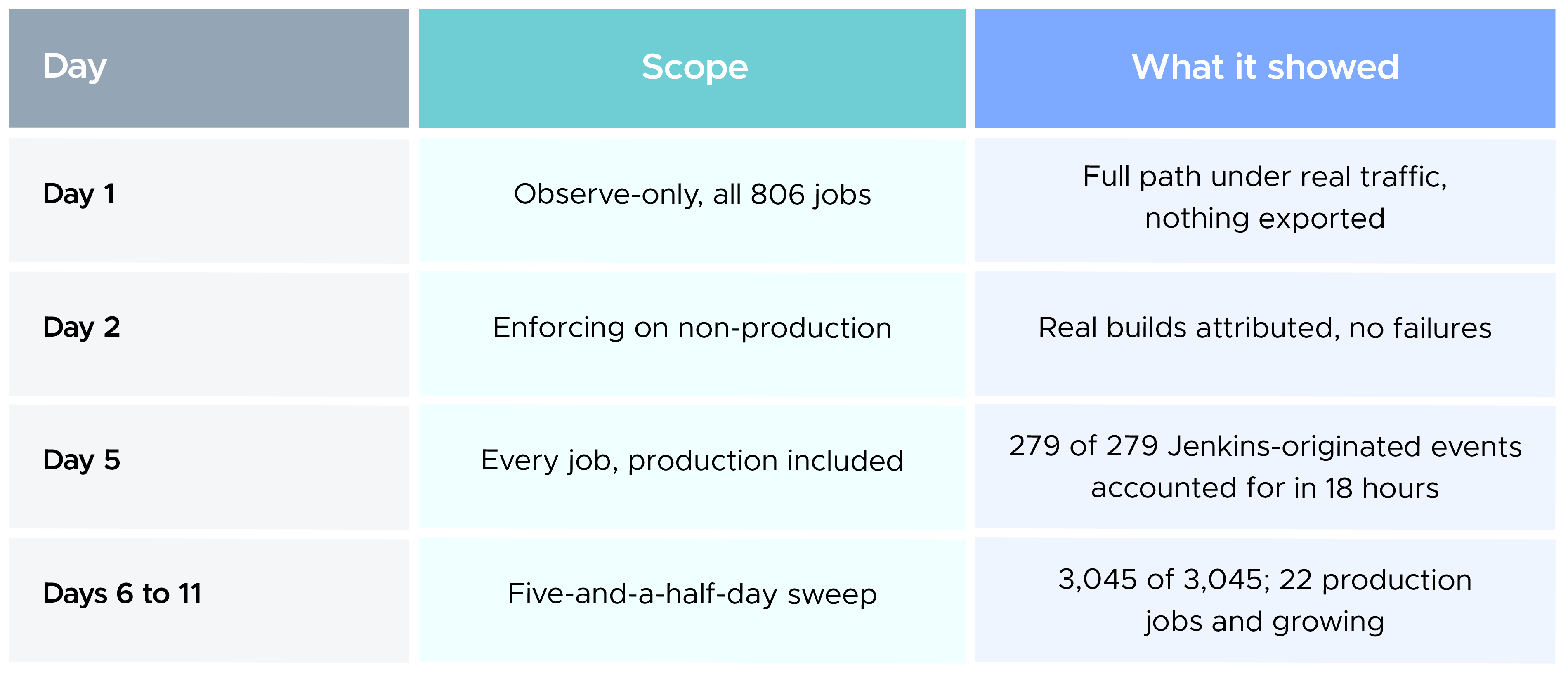
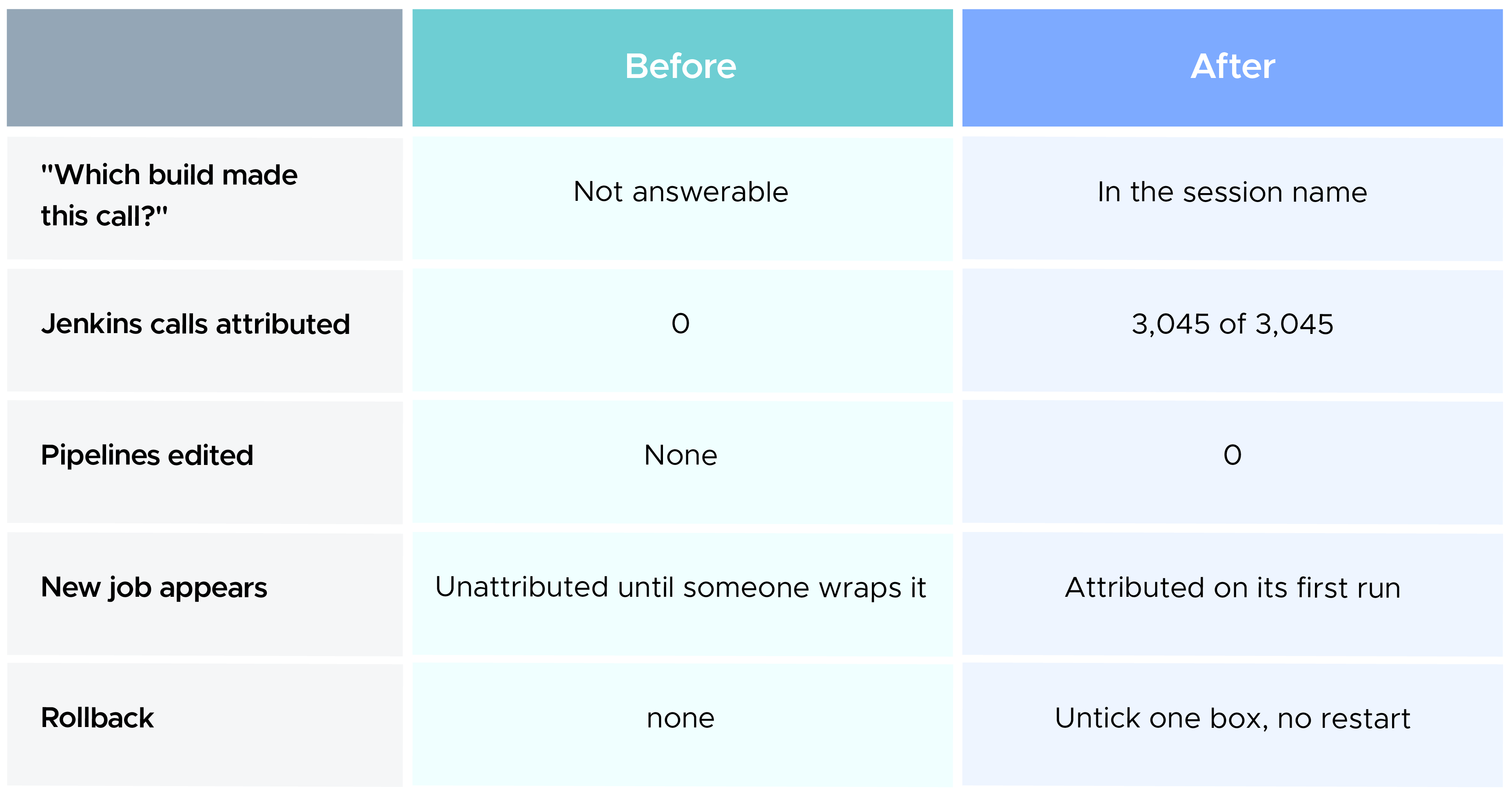
To check that nothing was missed, we pulled every AssumeRole event the Jenkins instance role made over the next five and a half days, 3,045 in all, and every one of them was accounted for and the plugin caused zero build failures and zero changes to any pipeline, shared library or Terraform file.
Lessons Learned
1. Attribution is a side effect of assuming a role
If nothing assumes a role, nothing can be named. That's how AWS works, and no plugin changes it. Designing around it is what moved us from "wrap every call" to "make every call assume a role on the way out".
2. The agent's configuration is the source of truth
Anything you enumerate, you maintain forever. Anything you copy stays correct on its own.
3. Decide the failure ordering before you write code
We fixed that order before writing any code, and everything else followed from it. Deciding that early is why the plugin steps aside on any error instead of failing the build, and why it has never failed a production deployment.
Conclusion: From One Identity to Every Build
We didn't change a single pipeline. We added one line to a file every AWS tool already reads, and let the tools do what they always do. Wednesday's question now has a job name and a build number in the answer.
That opens more than forensics. Per-job AWS usage is visible, so the controller's role can be trimmed on evidence. An incident narrows to a build in one query. And because every session name now follows the same jk-<job>-<build> pattern, an IAM trust policy can require that pattern, so the rule is enforced by AWS itself rather than by anything inside Jenkins.