Senior DevOps Engineer
Gourav specializes in helping organizations design secure and scalable Kubernetes infrastructures on AWS.
 Webinar
06 Jan, 2026 | 7 Min read

When you deploy an application in Kubernetes, your pods usually run on multiple nodes, often spread across different availability zones. When traffic comes in through a Service, Kubernetes has to decide which pod should handle that request.
By default, Kubernetes distributes traffic across all healthy endpoints. That works in many cases, but it can cause a couple of real problems once clusters grow, making Kubernetes Management and Optimization a bit challenging.
Problem 1: Unnecessary Network Latency. If a request arrives at Node A but gets routed to a pod running on Node B in a different zone, the traffic has to travel across the network. That extra hop adds latency and can even cause pods to remain stuck in Pending, despite local capacity being available.
Problem 2: Cross-Zone Data Transfer Costs . Most cloud providers charge for traffic that crosses availability zones. At scale, this adds up quickly. Services handling large volumes of traffic can end up paying more than expected simply because traffic is bouncing between zones.
Beyond cross-zone data transfer costs, several pitfalls can lead to an unexpected Amazon EKS bill shock at the end of your billing cycle. Here’s your guide to optimizing Amazon EKS costs.
Kubernetes didn’t solve this problem overnight. The current approach is the result of a few iterations.
externalTrafficPolicy and internalTrafficPolicy
Before trafficDistribution existed, Kubernetes provided two related options:
Setting these to Local forced traffic to stay on the same node. If no local endpoints were available, traffic would fail instead of falling back to remote pods.
This behavior was sometimes useful, but risky. A node without a local pod would simply drop traffic, which made these settings hard to use safely in production.
The trafficDistribution field was introduced to provide a softer, safer approach. Instead of enforcing strict rules, it lets you express preferences, while still allowing fallback when local endpoints are unavailable.
This small change makes a big difference operationally.
In Kubernetes 1.35, the trafficDistribution feature becomes stable, and two important updates come with it. To get a better understanding of the change, read about Kubernetes 1.34.
PreferSameNode tells Kubernetes to try to keep traffic on the same node when possible.
If traffic arrives on a node and a healthy pod exists on that same node, Kubernetes will send traffic there. If not, it simply falls back to any other healthy pod.
The key thing to remember is that this is a preference, not a hard rule. Traffic will not fail if local pods are missing.
Note: trafficDistribution expresses a preference, not a guarantee.
The exact behavior depends on the cluster’s networking implementation (iptables, IPVS, or eBPF-based proxies).
The older option PreferClose, has been renamed to PreferSameZone. The behavior is the same, but the new name makes it much clearer what Kubernetes is actually doing.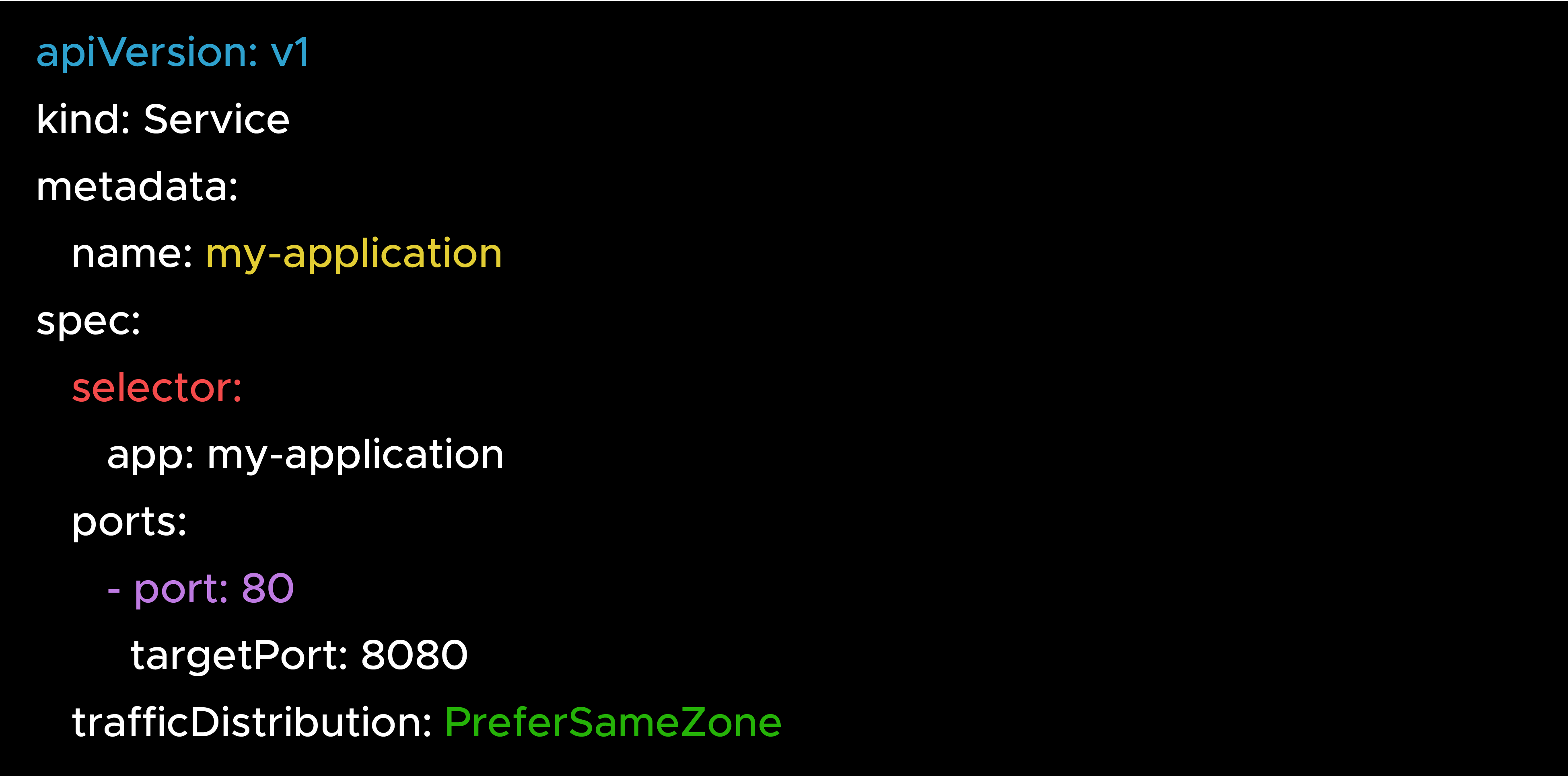
PreferClose still works for backward compatibility, but PreferSameZone is the recommended option going forward.
The difference between these two options becomes clearer with an example.
Assume a cluster with:
Scenario: Traffic arrives at Node-1 in Zone-A
a) With PreferSameNode
b) With PreferSameZone
Choose PreferSameNode when:
Choose PreferSameZone when:
When you set trafficDistribution, the control plane (for AWS, EKS Provisioned Control Plane) passes this preference to the network proxy (kube-proxy or an equivalent dataplane).
The proxy uses EndpointSlices to understand where endpoints live. EndpointSlices include topology information such as node and zone. Based on this data, the proxy programs' routing rules that prefer local endpoints when possible.
You normally don’t need to interact with EndpointSlices directly, but knowing what’s inside them helps a lot when debugging traffic behavior.
EndpointSlice Example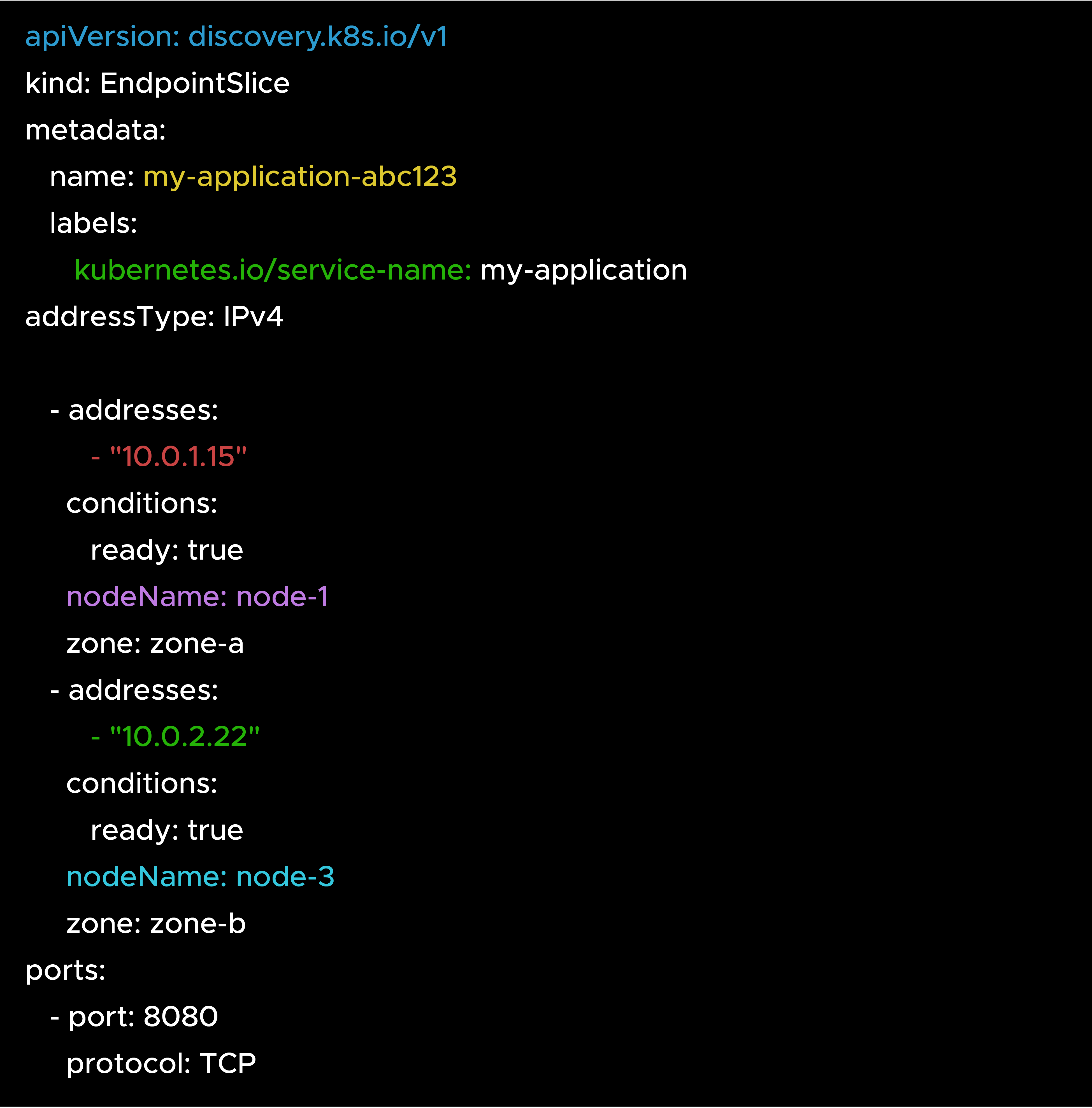
The proxy reads the nodeName and zone fields to decide which endpoints to prefer based on your configuration.
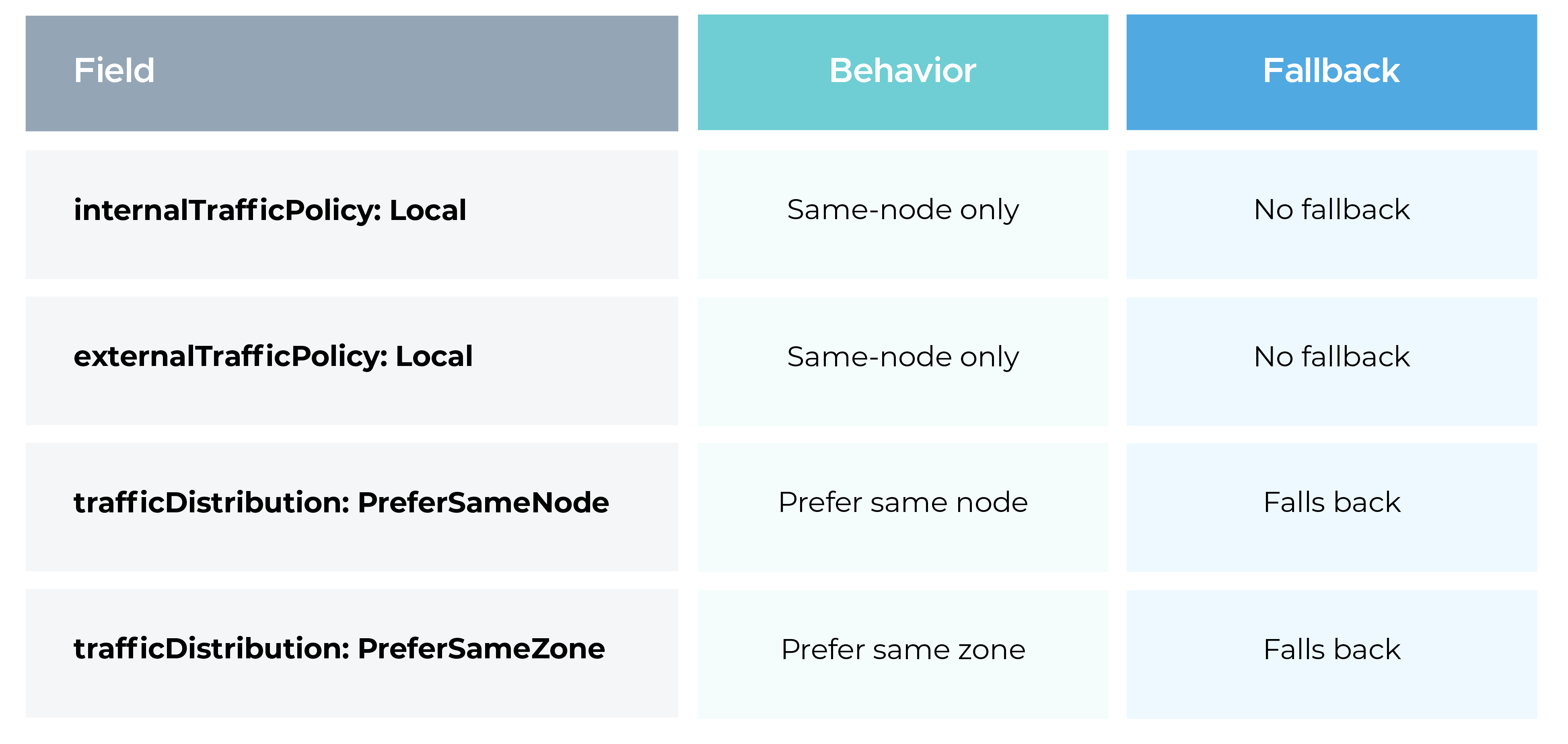
Because of the fallback behavior, trafficDistribution is much safer for production workloads.
PreferSameNode only helps if pods actually exist on most nodes. If pods are concentrated on a few nodes, traffic will frequently fall back to remote endpoints and you won’t see much benefit.
DaemonSets work especially well here. Deployments can also work, but they need enough replicas and proper scheduling.
Preferences only apply to healthy endpoints. If a local pod is failing readiness checks, traffic will be routed elsewhere. Make sure readiness probes are accurate.
With PreferSameNode, traffic depends on where requests arrive. Some nodes may receive more traffic than others, which can lead to uneven load.
HPA can help, but it won’t guarantee pods land on the busiest nodes. This is something to keep in mind for latency-sensitive services.
These patterns already exist today. trafficDistribution simply makes them easier and safer to implement.
At the time of writing, Amazon EKS does not yet support Kubernetes 1.35.
Once Amazon EKS adds support, the trafficDistribution field with PreferSameNode and PreferSameZone will be available without any API changes.
Until then, you can:
With trafficDistribution now marked stable, Kubernetes considers this feature ready for production use. The API is stable and not expected to change in future releases.
The addition of PreferSameNode fills an important gap. Earlier releases allowed zone-level preferences, but node-level locality with safe fallback was missing. Kubernetes 1.35 finally addresses that.
This work was delivered as part of KEP 3015 by the SIG Network team, after several release cycles of iteration and feedback.
Kubernetes 1.35 improves service traffic routing with a stable trafficDistribution API:
These options reduce latency and cross-zone costs without the failure risks of older policies.
When managed Kubernetes platforms like Amazon EKS roll out support for 1.35, these features can be used to fine-tune traffic behavior in real production clusters.
For more tips, check out this conversation on smarter Kubernetes management optimized for performance and cost with our expert.

99% of companies saved up to 15% monthly with this plan & achieved peak performance.