


12
12Cloud FinOps has been the standard approach to managing cloud costs ever since organizations started focusing on cloud cost optimization. Now that artificial intelligence workloads are part of cloud environments, organizations are realizing that traditional FinOps alone won't suffice.
If you already understand cost allocation, showback, and rightsizing, you are ahead of most teams here. However, when discussing FinOps in the context of AI, teams struggle to identify how the cloud budget is being spent.
In this blog, we’ve added practical strategies to help you start applying FinOps to AI and GPU workloads that drive up your team's cloud bills, with the goal of getting costs under control without impacting productivity or day-to-day workflow.
Why Does AI Require a New FinOps Approach?
The primary reason for an AI-dedicated FinOps approach is the specialized infrastructure AI workloads run on. GPUs sit in a much higher cost bracket than CPUs. As a result, hyperscalers shift much of the high CAPEX to customers using the service.
Below are the top three reasons why existing FinOps practices don’t work for AI-specific workloads on the cloud:
1. Higher and different pricing model of GPU-intensive workloads:
For example, a 10% increase in CPU utilization on a CPU instance barely registers on the monthly bill. However, if the same happened with GPU-based workloads, it could easily add a couple of thousand dollars to your cloud bill.
This is because GPUs have a much higher hourly rate, so GPU utilization should be the starting point for most AI cost-optimization efforts.
2. Generative AI workloads are often billed based on usage rather than infrastructure uptime
LLMs like ChatGPT and Claude typically use token-based pricing. (For those who don't know, tokens are units of text that roughly correspond to three-quarters of an English word on average.) Since the cost depends on the number of input and output tokens processed, AI spend can change significantly with a single feature update or a sudden spike in usage. This makes FinOps for Generative AI cost optimization much harder if you approach it with legacy FinOps practices.
Check out the detailed LLM pricing table we’ve curated here.
3. Training and inference behave like opposite workloads
Training an AI model happens in bursts, whereas inference runs around the clock. Treating both the same way guarantees overpaying on one side or the other, especially as teams try to scale AI workloads without rethinking how each lifecycle stage is billed.
Together, these factors are why FinOps practices built for CPU workloads don't transfer as-is to AI-based workloads in the cloud. Dedicated FinOps for AI practices and techniques close that gap.
What Are the Key AI Cost Drivers?
In this section, we’ve talked about the four prominent categories that drive most AI infrastructure spend, and understanding them is the starting point for any AI cost optimization effort.
GPU Provisioning
The dollar spread across GPU instance types is enormous, and it's the single biggest line item for most AI workloads.
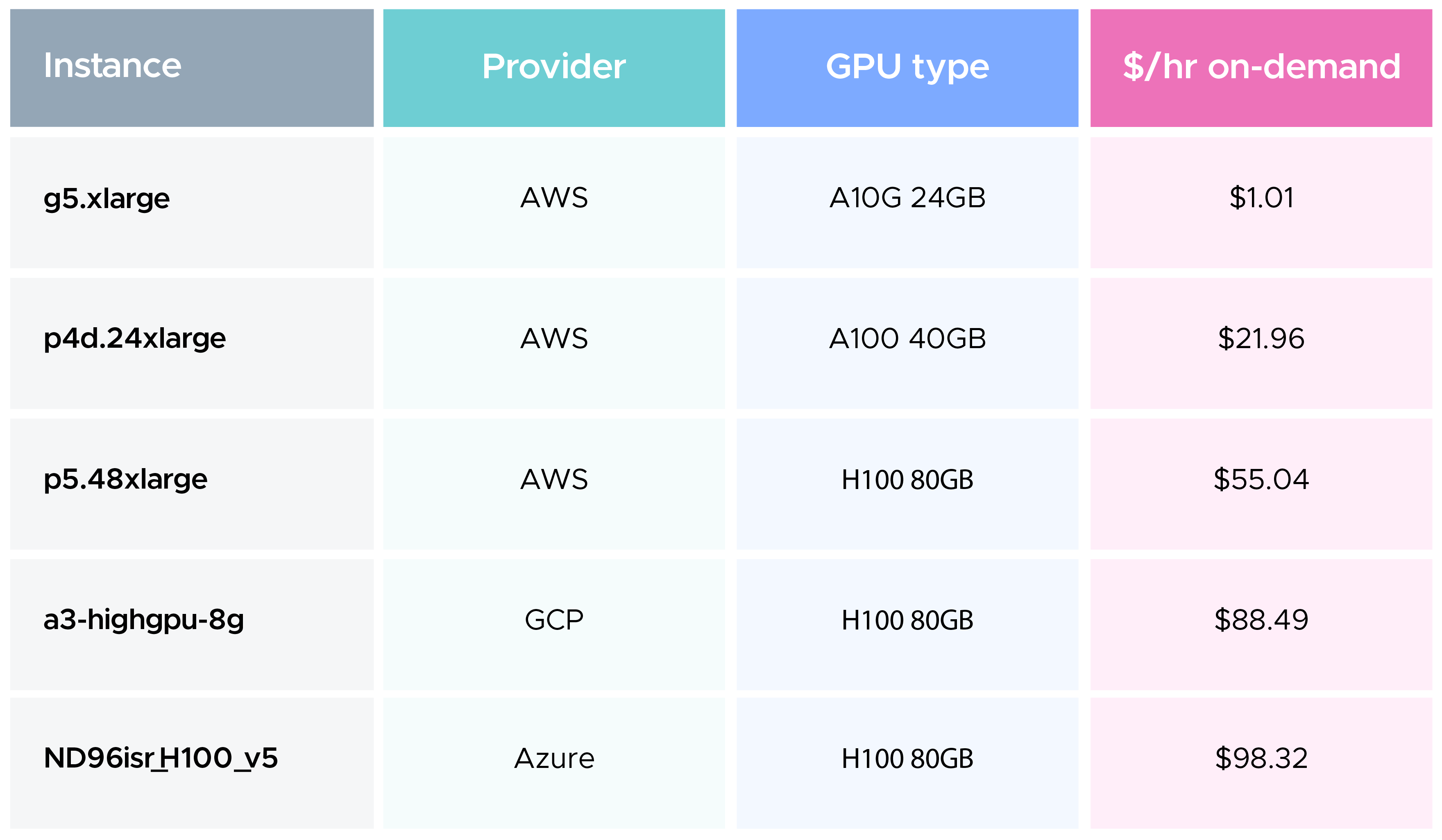
An oversized cluster running the wrong instance type for weeks quietly becomes one of the highest costs on the bill. This is usually where AI cost optimization shows its first measurable results, since GPU cost dwarfs almost every other line item on a cloud cost statement.
Large Language Models (LLMs)
The spread between models is as wide as the spread between GPUs. A smaller model can cost a fraction of a cent per request; a frontier model handling the same request costs far more. Routing through a cloud marketplace instead of a direct API can add another 10 to 20%.
Storage
Training datasets, checkpoints, and fine-tuning artifacts accumulate storage costs that rarely get billed under a clean "AI" line item, so they get missed in most reviews.
Inference
Because inference runs continuously, even a small per-request inefficiency compounds into a real number by month-end. It's the least visible driver here, since no single inference workload looks expensive on its own.
What Are the Most Common AI Cost Challenges?
While the cloud ecosystem has matured enough to offer plenty of resources for optimizing cloud spend, techniques specifically designed for AI workloads are still relatively limited. Because AI FinOps is still new, many of these practices are evolving or considered experimental. If you're facing these challenges, you're not alone.
We’ve listed some common challenges teams go through while trying to tackle AI spend:
- Unpredictable, usage-based pricing: Token-based billing doesn't behave like a fixed invoice item
- Idle and oversized GPU resources: A forgotten notebook or an oversized GPU cluster can continue running for days without anyone noticing. By the time the cloud bill arrives, you may have already spent thousands of dollars.
- Limited cost visibility: Spend often sits at the account level with no connection to the model, team, or feature behind it. For this use case, CloudKeeper built CloudKeeper Lens for AWS, a comprehensive cloud infrastructure visibility tool.
- Growing infrastructure complexity: AI workloads run across GPUs, containers, Kubernetes, storage, and networking. Tracking each layer separately makes it difficult to get a complete picture of AI costs.
- Experimentation without guardrails: Rapid iteration is valuable, but without spend thresholds, costs escalate fast.
- Fragmented environments: AI workloads spread across clouds without a unified view of governance or cost control.
AI adoption isn't slowing down anytime soon, and neither are the cost challenges that come with it. The techniques we'll cover will help you stay ahead of the curve, so as your AI spend grows, your cloud bill doesn't grow faster than it should.
What Are the Core Principles of FinOps for AI?
When approaching FinOps for AI, you should know the practice isn't far from traditional Cloud FinOps. By and large, it uses the same principles as its foundation. The FinOps Foundation's definition centers on allocation, forecasting, optimization, and governance applied to AI spend and the value it creates.
These are the FinOps principles that carry the most weight in the context of FinOps for AI workloads:
- Ownership before optimization: Every dollar of AI spend needs attribution; only then is any optimization conversation useful.
- Cloud Unit Economics over a cumulative number: Cost per inference or per token ties spend to actual output, unlike a lump-sum total.
- Iterative maturity, not a finish line: The Crawl, Walk, Run model treats maturity as workload-specific, so different workloads can sit at different stages at once.
- Governance that flexes with risk: A one-size approval process either slows experimentation or lets production spend run unchecked.
These principles are what separate FinOps for AI as a genuine discipline from simply applying old cloud cost habits to a new kind of infrastructure.
How Can You Implement FinOps for AI?
AI cost optimization is where FinOps for AI shows up on next month's invoice. Two areas deliver most of the savings: GPU utilization and LLM token spend, and both respond quickly to attention.
1) Establish AI Cost Visibility
Before making cost-optimization decisions, establish granular visibility into AI spending across GPUs, Kubernetes clusters, storage, networking, and AI services.
Tag AI workloads by team, project, environment, and business unit to enable spend ownership. This practice will make cost allocation, budgeting, and accountability much easier as AI adoption scales.
2) Improve GPU Utilization and Resource Management
Rightsizing is the fastest optimization lever. Running a workload that only needs a single GPU on an eight-GPU instance is a common and expensive mistake, and it rarely gets caught without granular visibility into GPU utilization.
GPU sharing closes the gap between allocated and actual usage by allowing multiple smaller workloads to run on the same GPU instead of reserving dedicated hardware for each workload. This alone can significantly reduce infrastructure costs for organizations running multiple inference workloads.
Spot instances are worth considering for training jobs that support checkpointing. Since interrupted jobs resume from the last saved checkpoint, teams can take advantage of significantly lower pricing without restarting the entire training process.
Monitor GPU utilization continuously. Waiting for a monthly cost review often means weeks of unnecessary GPU spending have already accumulated.
3) Optimize LLM and Token Consumption
Token costs increase directly with prompt size, making prompt optimization one of the simplest ways to reduce AI spending. Even small improvements in prompt design can significantly lower token consumption across thousands or millions of requests.
Caching system prompts prevents paying for the same context repeatedly and can substantially reduce costs for applications with recurring prompts.
Model routing is another effective optimization technique. Smaller, lower-cost models can handle simple requests, while complex reasoning tasks can be routed to larger models only when necessary.
Teams should also review prompt templates regularly to remove unnecessary context and monitor token consumption trends across applications to identify unexpected usage increases.
4) Schedule and Lifecycle Management
AI infrastructure shouldn't run longer than necessary. Development notebooks, experimentation environments, and temporary GPU clusters often run after work is complete, quietly accumulating cloud costs.
Workload rightsizing and automated scheduling, idle resource detection, and automatic shutdown policies help ensure expensive GPU resources are only running when they're actively being used.
CloudKeeper Tuner's Scheduler simplifies resource lifecycle management by automatically shutting down idle resources based on schedules you define, across both production and non-production environments.
5) Build AI Cost Governance
Optimization becomes much easier when ownership is clearly defined. Assign budgets to AI teams, allocate costs consistently, establish spending alerts, and review AI workloads regularly.
Cloud Cost governance in the context of AI creates accountability while helping engineering, finance, and platform teams make informed trade-offs between cost, performance, and business value.
How Should You Govern and Budget AI Costs?
AI FinOps governance needs to adjust based on where a workload sits in its lifecycle. A research notebook doesn't need the same approval chain as a production endpoint serving live traffic, and treating them the same either slows experimentation or lets real spend run unmonitored.
- Set spend thresholds tied to business outcomes
- Use showback before chargeback. Letting engineering see their own AI spend first builds cost awareness without friction.
- Review training and inference GPU workloads separately; their cost behavior differs enough that a shared threshold ends up wrong for one.
- Build an escalation path for anomalies. A launch-driven spike is a different problem than a runaway experiment.
- Cost control works best close to the decision, not buried in a monthly finance report nobody on engineering ever sees.
How Do You Measure AI ROI and FinOps Success?
A successful AI FinOps practice is one where AI spending grows alongside business value. When all is said and done, if your team aligns with the following three principles, you can consider it a job well done:
- Costs are predictable.
- Infrastructure is well utilized.
- Teams can clearly explain where every dollar is going and what value it is delivering.
This is a simplified view of AI FinOps success. The metrics and considerations behind each of these are discussed in more detail below.
Some of the strongest indicators of success include:
- Efficient inference costs: The cost of serving each inference request remains consistent and aligns with the value it delivers.
- Controlled token consumption: Input and output token usage is monitored and optimized, helping teams forecast AI spending with greater confidence.
- High GPU utilization: Expensive GPU resources are actively used instead of sitting idle or being overprovisioned.
- Predictable AI budgets: AI spending stays within expected ranges, even as workloads and user demand grow.
- Clear business outcomes: AI investments can be tied to measurable results such as faster support resolution, increased developer productivity, improved customer experience, or revenue growth.
These metrics are most useful when viewed together. Looking at costs alongside utilization and business outcomes gives teams a much clearer picture of whether their AI investments are delivering the expected return.
What Are the Essential Tools for FinOps for AI?
A handful of official and open-source tools cover most fundamentals of AI cost optimization.
- FOCUS: the FinOps Foundation's open standard for normalizing billing data across providers.
- Native cloud cost tools: AWS Cost Explorer, Azure Cost Management, and Google Cloud billing tools provide cost visibility and anomaly detection to help identify unexpected AI spend and its drivers.
- OpenCost: A CNCF project built for Kubernetes cost allocation, helping teams understand and allocate the cost of AI workloads running on Kubernetes.
- NVIDIA DCGM: Monitor GPU utilization and performance to identify underused capacity and improve the efficiency of AI infrastructure.
- NVIDIA Run:ai: Orchestrate AI workloads and dynamically allocate GPUs to maximize utilization and reduce infrastructure waste.
- CloudKeeper Full-Stack FinOps for AI: We optimize your entire stack - AI workloads + cloud services that power them.
However, tools are only one part of AI FinOps. The FinOps Foundation's Operating Model and Crawl, Walk, Run maturity model provide a practical roadmap for building a mature FinOps practice.
What Is the Future of FinOps for AI?
The next stage of AI FinOps leans more on automation while maintaining the same level of discipline. Agentic FinOps, where an AI agent investigates a cost anomaly, identifies the owner, and proposes a fix within approved boundaries, is already moving from experimentation to early production.
This changes how teams spend their time. Instead of manually joining billing files, they review AI-generated recommendations that already include the required context.
Organizations that treated FinOps for AI as foundational early will have the visibility to act quickly as they continue to scale AI investments. The ones that treated it as an afterthought will spend 2027 catching up on data they should have been collecting in 2026.
How Does CloudKeeper Help with FinOps for AI?
CloudKeeper helps with full-stack FinOps for AI - wherever you are in your journey. We optimize AI/LLM spend across models, workloads, and the cloud infrastructure powering them.
CloudKeeper's approach rests on three pillars:
1. AI Visibility
See exactly where your AI spend is going - licensing, inference, token usage, and GPU utilization — in one unified dashboard across AWS, Azure, and GCP.
2. AI Rate Optimization
Secure better pricing through smarter AI commitments, centralized billing, and optimized access to models like Claude - so every dollar goes further.
3. AI Usage Optimization
Right-size GPUs, streamline infrastructure, and eliminate inefficient workload patterns — including Bedrock optimization - backed by hands-on support from our Forward Deployed Engineers.
CloudKeeper brings over 15 years of cloud cost optimization experience to cloud cost management. We’re also an authorized reseller of Anthropic's Claude models, thus bringing AI model procurement, billing, and cost oversight under a single umbrella.
What Are the Key Takeaways?
Teams that get this right follow the right sequence. Allocation and ownership come first, followed by optimization tactics. If you skip straight to rightsizing or model routing before knowing who owns the spend, the savings won't stick. An unowned GPU cluster or unmonitored endpoint will simply drift back to where it started.
AI adoption will continue to grow, and so will AI costs. Building AI-specific FinOps practices today will help you scale AI with greater cost control tomorrow.
Frequently Asked Questions
Q1.What is the difference between FinOps for AI and AI for FinOps?
FinOps for AI applies FinOps practices- allocation, forecasting, optimization, governance- to AI spend itself. AI for FinOps flips the direction: it uses AI to help practitioners do FinOps work faster, and the two are usually planned as separate workstreams.
Q2.What is the Crawl, Walk, Run model for FinOps for AI?
It's the FinOps Foundation's maturity scale, applied per capability rather than to the whole practice at once. A team can be at Run on cost allocation while still at Crawl on forecasting, and that's normal.
Q3.Which FinOps metrics matter most for AI workloads?
Cost per inference, cost per token, and resource utilization efficiency are the three most common starting points, covered in detail above. If you can track only one, pick whichever ties most directly to a decision your team already makes regularly.
Q4.How much does it cost to run AI workloads in the cloud?
It depends heavily on GPU type and provider, ranging from roughly $1 an hour for a lower-end instance to close to $100 an hour for the largest H100-based ones. Token-based LLM API pricing adds another cost layer on top for teams calling models rather than hosting them.
Q5.What is the single biggest way to reduce AI costs?
Rightsizing GPU instances to match actual workload demand, as covered above, consistently delivers the largest dollar impact. That said, visibility has to come first, since you can't rightsize a workload you don't know is oversized.
Q6.How do I use spot instances for AI workloads?
Stick to training and fine-tuning jobs that can tolerate interruption, not production inference, and confirm checkpointing is actually configured before switching over. Without it, an interruption means restarting from scratch, which erases the savings.