

Director DevOps
Vikram is a customer-obsessed technology leader with expertise in Global DevOps, SRE, and GenAI automation across multi–cloud-native environments.


Find your cloud savings in under 5 minutes

Get a $100 reward on signup

27 Oct, 2026 | 10 Min read

Between Wednesday evening and Saturday last week, our support desk took a string of urgent escalations tied to PHP2Shell. The stacks were different: one team on Amazon Linux 2 with PHP 7.4.33, another still running PHP 5.4, a third with a mature AWS WAF setup across CloudFront, load balancers and API Gateway. The question was always the same. We can’t patch today. What protects us?
The honest answer is: something, not enough, and not for long. This post is what we told those teams, backed by the public record and by what AWS confirmed on their cases, so you can act on it without waiting for a ticket. Customer details are anonymised.
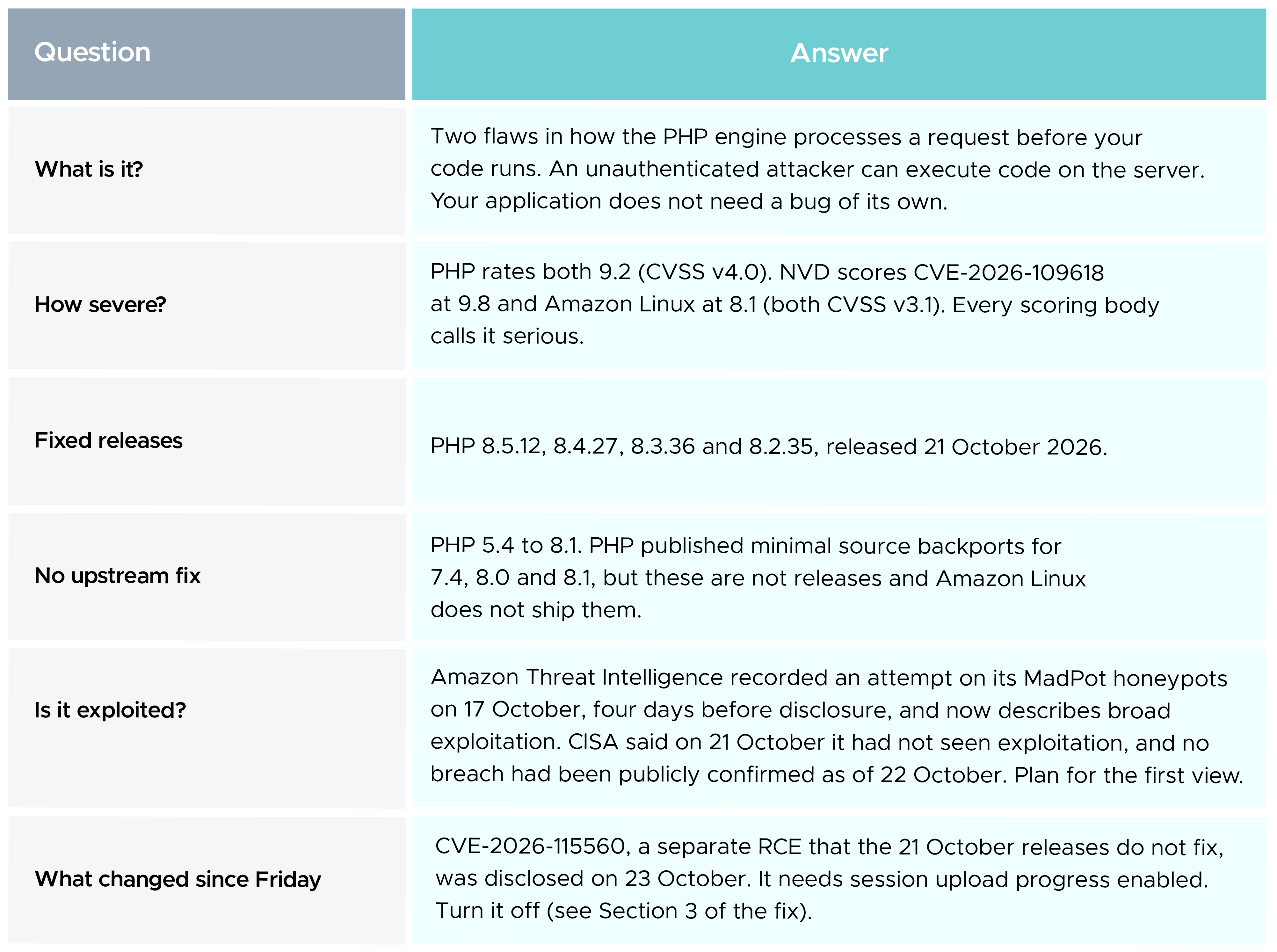
The exposure is large. CybelAngel counts roughly 2.24 million internet-facing PHP hosts, 59% of them on versions with no fix coming, and Amazon hosts the single largest population at about 293,000. If you run PHP on AWS, assume you are in that number until you have proved otherwise.
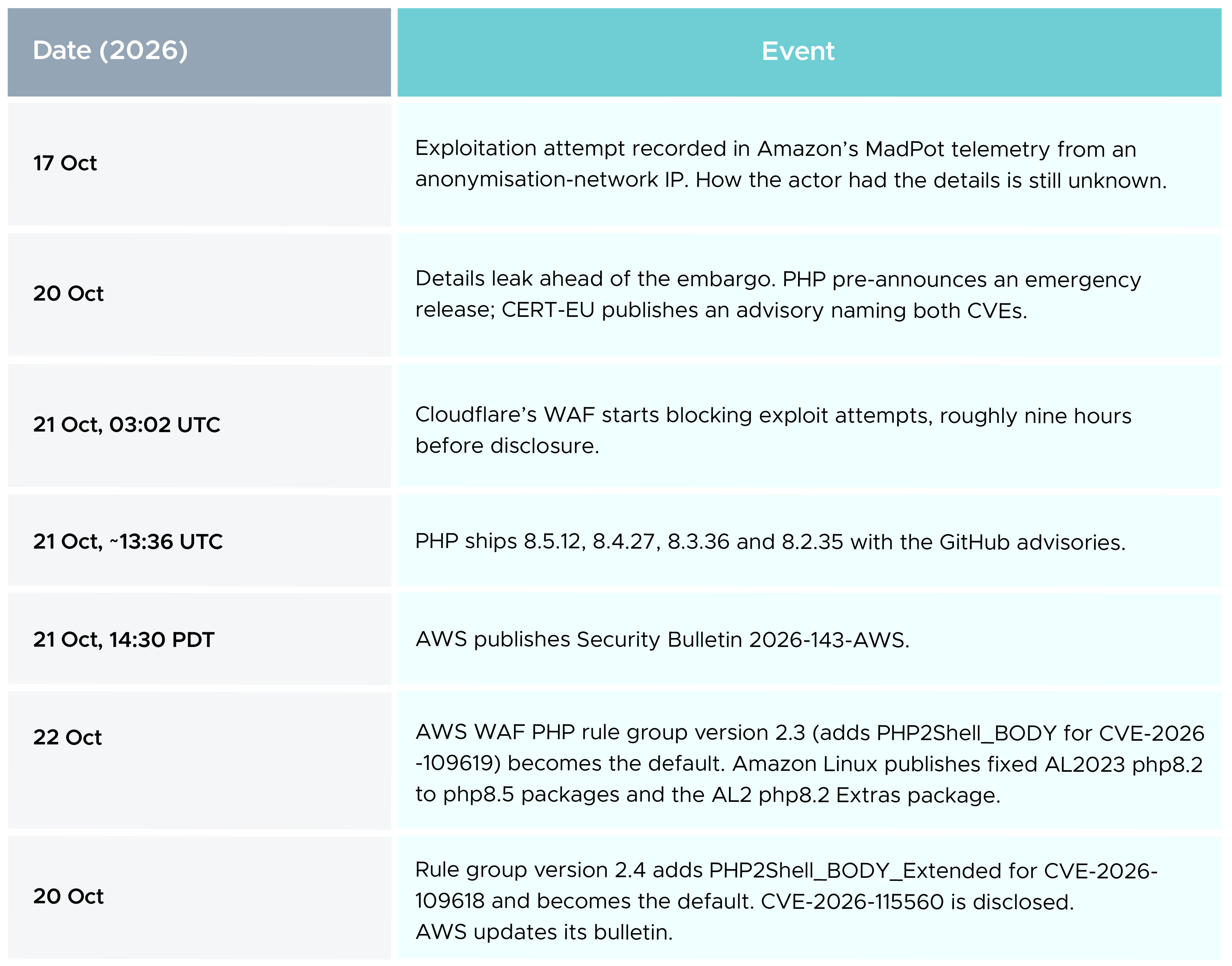
Read that table as a patching SLA. The window between disclosure and attack was negative. AWS now advises measuring mitigation for critical internet-facing flaws in hours, not the 7 or 30 days most policies still allow.
A production system on Amazon Linux 2, PHP 7.4.33, x86_64. The team did the right thing and checked for updates before calling us:
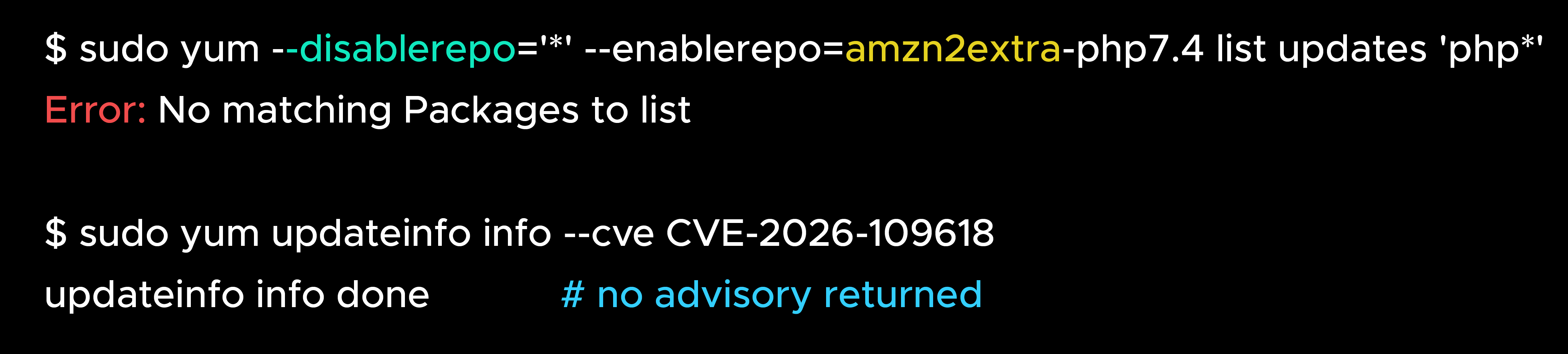
It reads like good news. It isn’t. AWS Premium Support launched a fresh AL2 instance, applied every available update and checked Amazon Linux Extras on a screen share. The only fixed PHP on AL2 is the php8.2 Extras topic. The Amazon Linux Security Center lists the AL2 core php package as No Fix Planned for both CVEs, and AWS confirmed in writing that it has no plan or timeline to backport a fix for 7.4.33. Amazon Linux 2 itself reached end of support on 30 June 2026. The team asked for a backport anyway. The answer was migrate.
Lesson: an empty update check tells you what your enabled repositories contain, not whether you are safe. No advisory is published for a package marked No Fix Planned, so a silent updateinfo is expected on an end-of-life runtime and proves nothing.
The same customer’s first message asked whether AWS Shield Advanced would cover this. We put the question to the AWS Shield team, and the answer was clear: Shield Advanced detects and mitigates DDoS. PHP2Shell is not a flood. It needs one well-formed request. Shield Advanced, at USD 3,000 a month on a one-year commitment, buys you DDoS protection and access to the Shield Response Team. It does not patch PHP, see inside a worker, or stop a single exploit request.
Lesson: buy controls for the threat you actually have. For this one, the control is a fixed runtime.
A team with a well-run WAF estate (CloudFront, internet-facing ALBs, private ALBs and API Gateway stages) asked us to confirm that AWSManagedRulesPHPRuleSet was pinned to static version 2.3 with PHP2Shell_BODY set to Block on every web ACL. AWS reviewed each web ACL. All were on the default version (2.3 at the time) with the rule blocking. A good result.
The detail worth sharing is what would have happened if they had pinned as intended. The next day AWS released version 2.4, which added the first managed rule for CVE-2026-109618. A web ACL pinned to 2.3 would never have received it. The review also turned up a test web ACL with no resources attached, which is harmless but is the kind of drift that hides gaps.
Lesson: during a live incident, stay on the default managed rule group version and subscribe to the AWS Managed Rules SNS topic. Pin only with a named owner who watches the changelog.
The hardest case. PHP 5.4 on EC2 instances in public subnets behind internet-facing ALBs, plus Lambda and API Gateway behind CloudFront. AWS WAF was not deployed in production and, because of how the estate is built, could not be added that night. Nothing in the WAF section below applies to this team.
What we could do was shrink the reachable surface: move instances into private subnets, allow inbound traffic only from the load balancer’s security group, restrict outbound traffic so a compromised worker cannot call home freely, and watch traffic closely while the upgrade the team had already started was accelerated.
Lesson: an instance with a public IP can be reached without ever touching the load balancer. Any WAF you add later is bypassable until the network shape is fixed. Topology is the first control, not the last.
On Friday another customer reported suspicious traffic against their APIs on 19 and 20 October and asked whether they had been breached. The timing fitted the story perfectly, and we still did not call it PHP2Shell. The evidence pointed to abusive request volume, so the response was rate-based rules scoped to the affected paths, the Amazon IP reputation list, WAF logging and alarms, and Count-before-Block, because a bot rule had caused an outage for them earlier. Attribution without evidence sends a team chasing the wrong fix.
Before your application sees a request, PHP unpacks it: URL, cookies, form fields and uploaded files. Both bugs live in that step, which is why application quality does not matter here.
Code runs as the PHP worker, usually the web server user. That is enough to read configuration holding database passwords and API keys, use the instance role to reach other AWS services, plant a web shell or miner, or take the site down. Being on a vulnerable version means you are exposed. Only your logs can tell you whether you were breached.
AWS and PHP agree that upgrading is the only complete fix. Where you stand depends on how you run PHP:
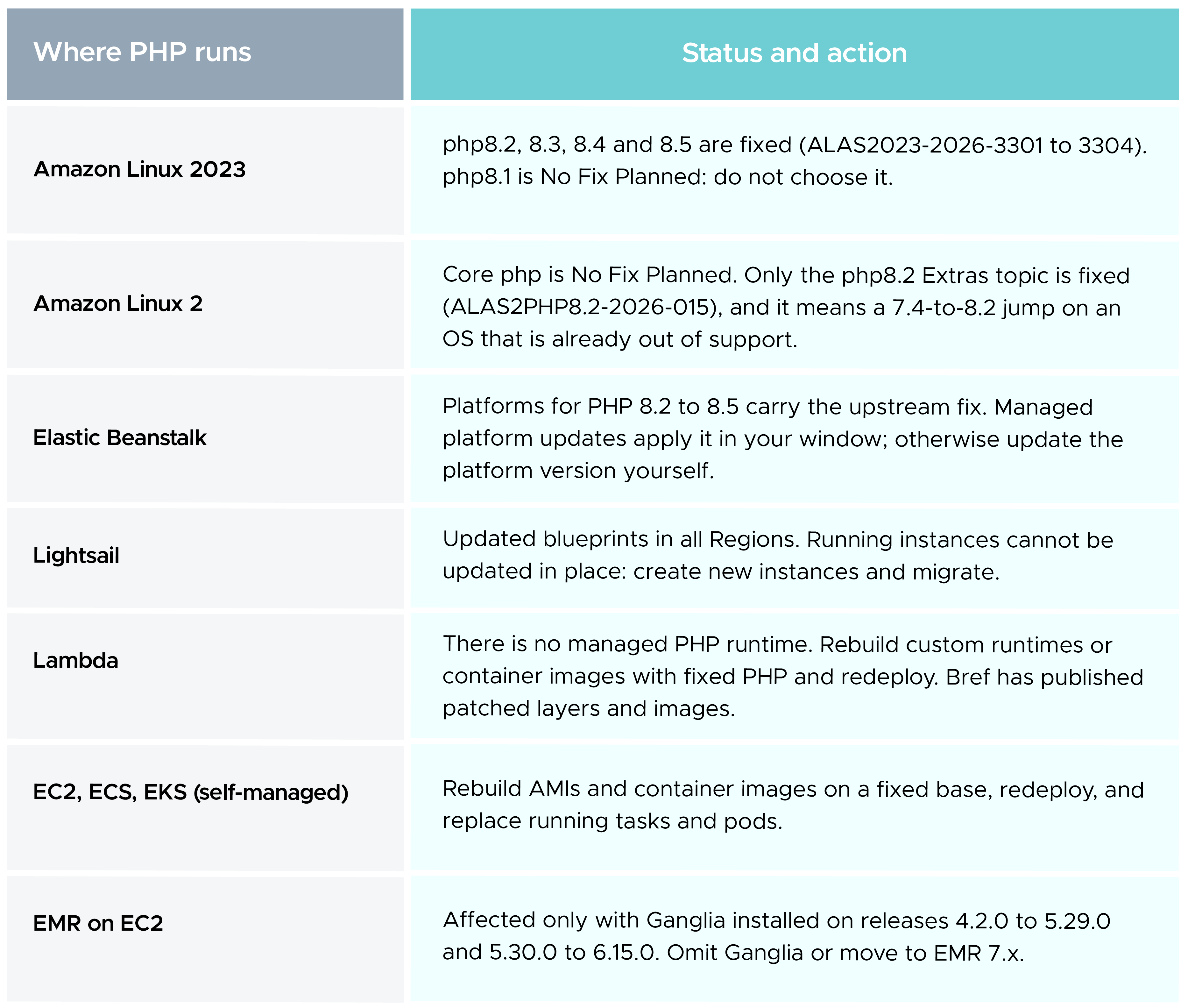
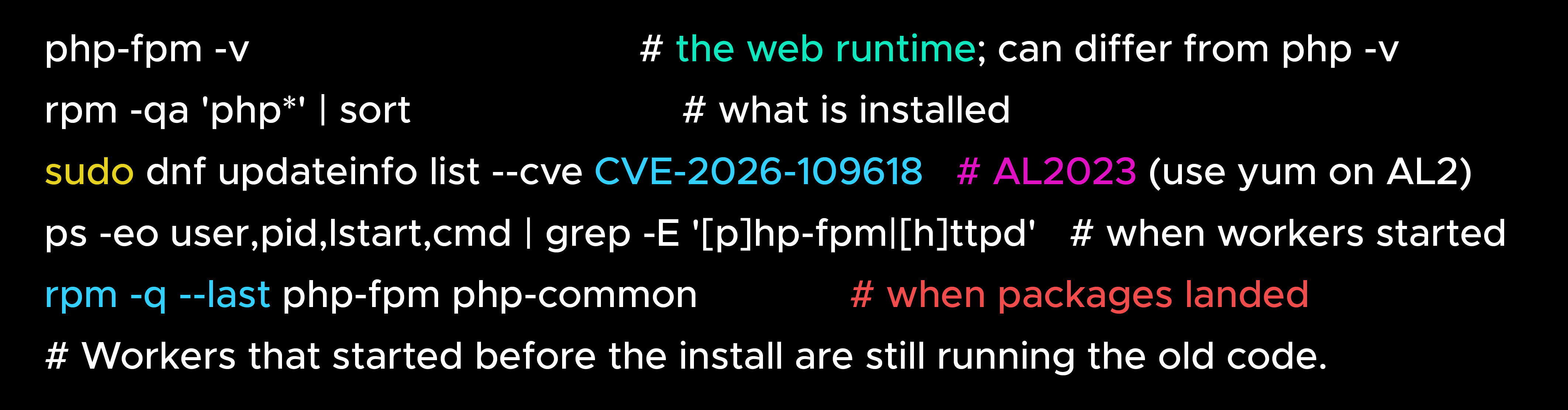
A fix protects you only when it is released, packaged, installed, every worker has restarted, and you have confirmed the version actually serving traffic. Check all five:
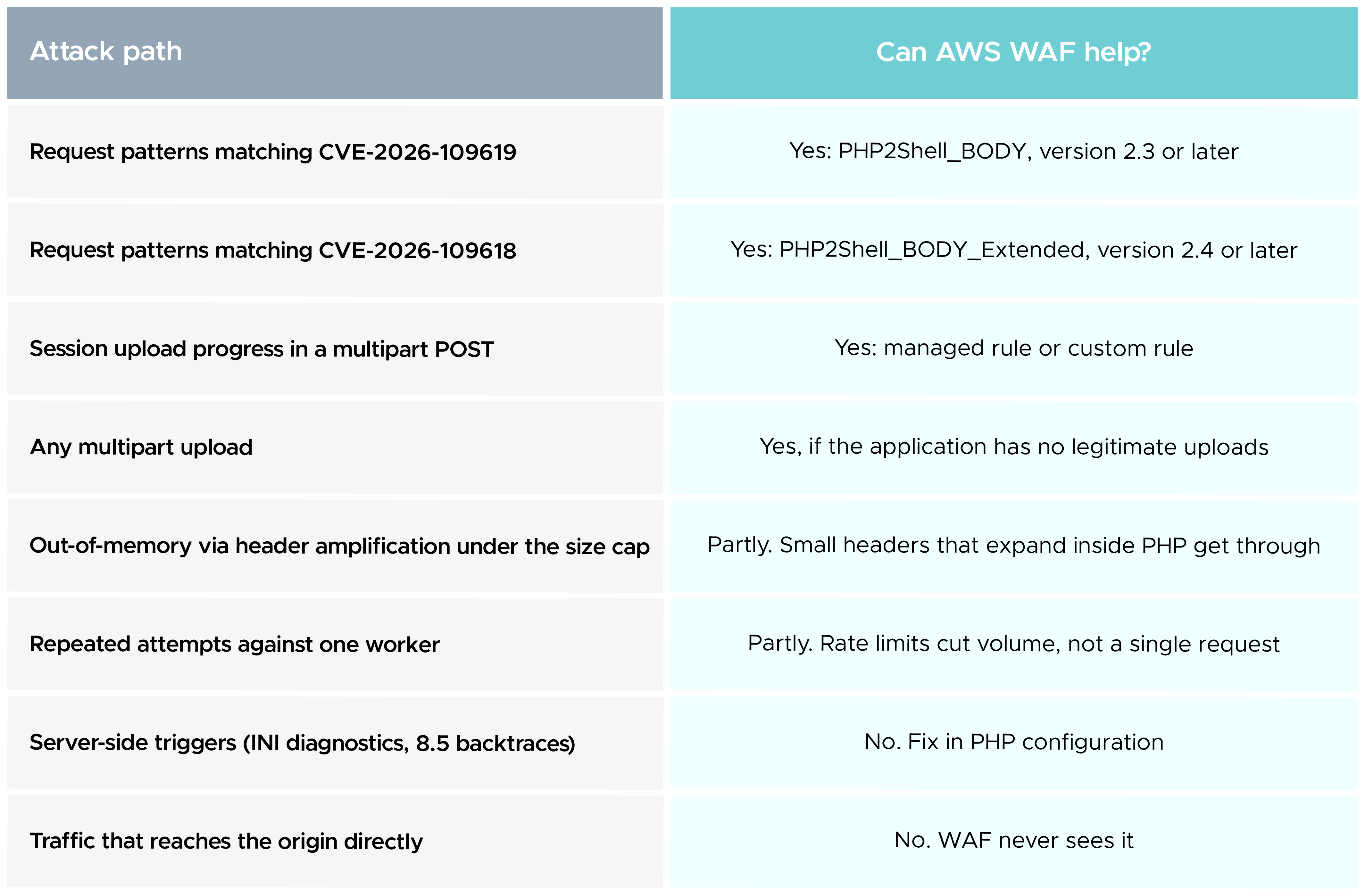
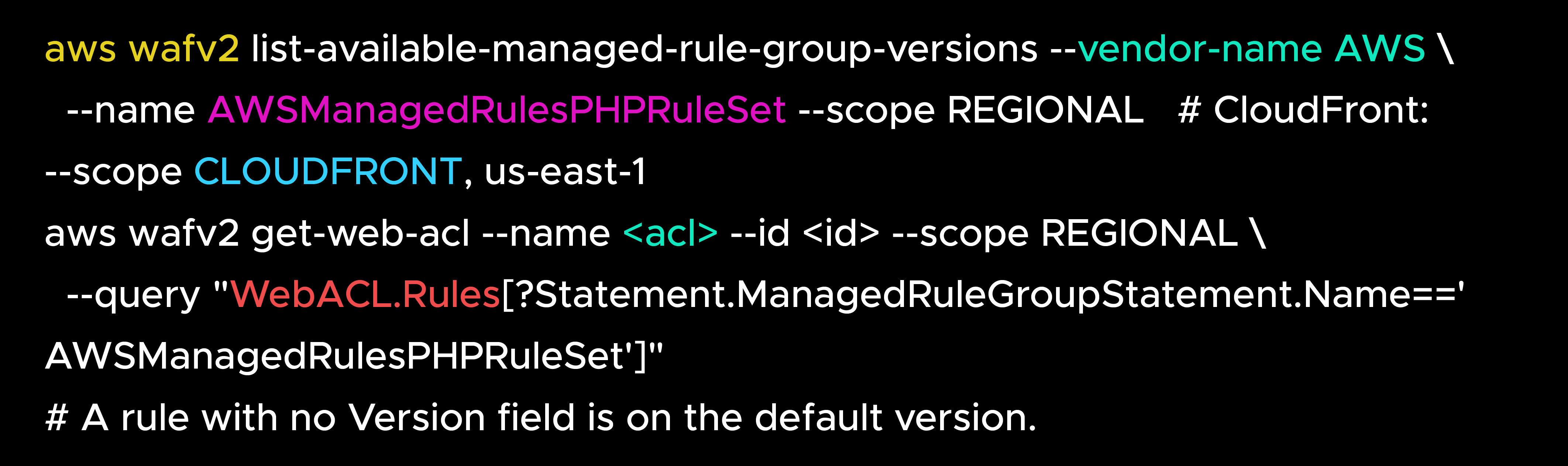 Know where WAF stops. It attaches to CloudFront, ALB, API Gateway and a few other front doors, never to an EC2 instance. It inspects only the first part of a body: a fixed 8 KB on ALB, 16 KB by default on CloudFront and API Gateway, raisable to 64 KB. It cannot parse headers inside multipart parts or see PHP memory and configuration.
Set these in php.ini, the FPM pool or the web server configuration, never through ini_set() or .user.ini, because they must apply before the request is parsed. Then restart every worker. None of them makes a vulnerable PHP safe; each closes one path.
Allow inbound traffic to instances only from the load balancer’s security group, and test that a direct connection fails. Put instances in private subnets. Restrict egress. Run PHP as a low-privilege user, trim the instance role to what the application needs, enforce IMDSv2, move secrets to AWS Secrets Manager, and take a tested backup before you touch production.
Patching removes the flaw, not an attacker who is already in. Start your review window on 17 October and look for:
On a host you suspect, capture volatile evidence (process list, network connections, memory if you can) before restarting workers, because a restart wipes the in-memory state CVE-2026-109619 abuses. If you confirm a compromise, isolate the instance, keep logs and a snapshot, rotate every credential it could read, and rebuild from a clean image.
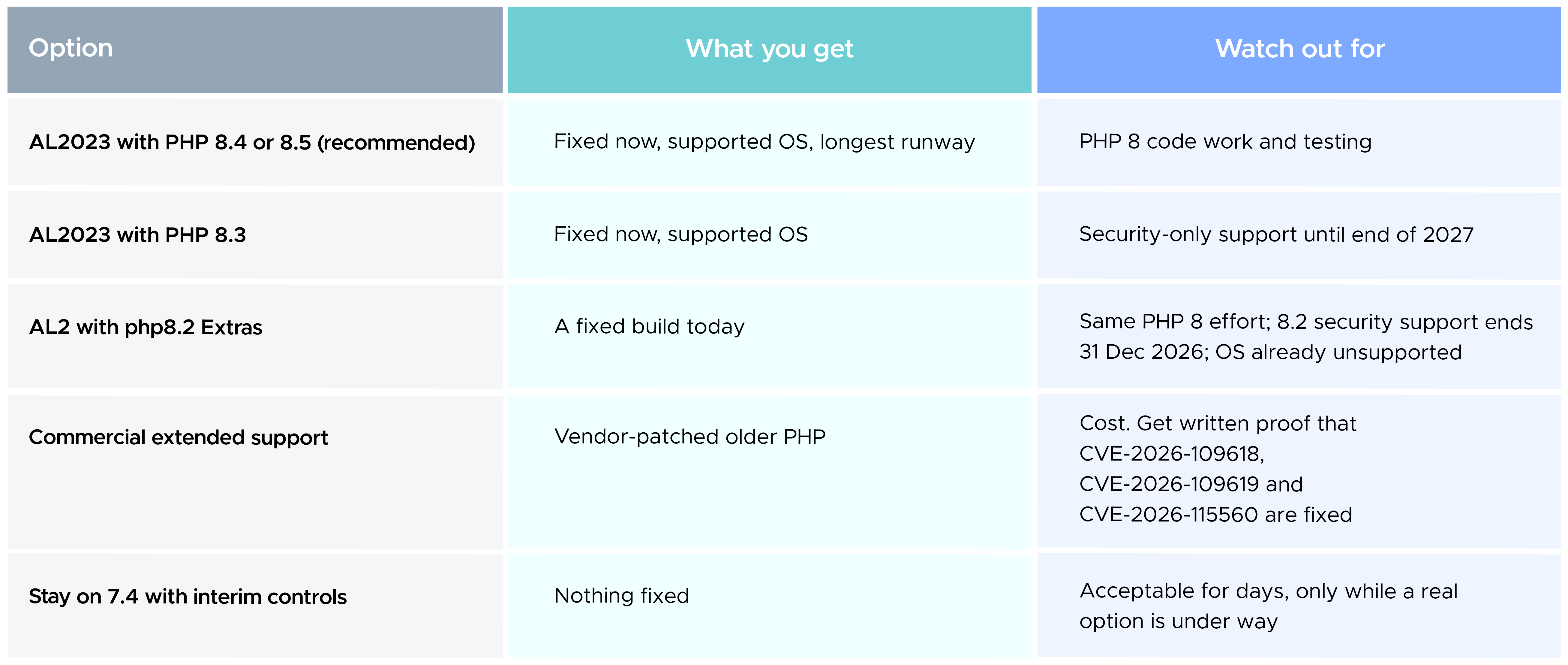
My recommendation is direct: if you are on 7.4 today, go straight to PHP 8.4 on Amazon Linux 2023. Most of the compatibility work is in the jump to 8.0. Stopping at 8.2 saves very little and guarantees a second migration within weeks.
Do not swap the version in place. PHP 8 changed comparisons between numbers and non-numeric strings, removed functions such as create_function() and each(), made many built-ins throw TypeError or ValueError, and later releases deprecate passing null to built-ins and dynamic properties. Frameworks, Composer packages and PECL extensions need PHP 8 versions, and compiled extensions must be rebuilt. A path that works:
None of the teams we worked with last week chose to run end-of-life software. Upgrades were postponed, one sprint at a time, until a vulnerability turned a backlog item into an incident. WAF rules and configuration buy time. Shield Advanced covers a different threat. The only thing that closes PHP2Shell is a fixed PHP release on a supported operating system, restarted and verified in the running process.
Patch SLAs for critical internet-facing flaws now need to be measured in hours. And end-of-life is not a risk you avoid by waiting. It is a decision you have deferred.
99% of companies saved up to 15% monthly with this plan & achieved peak performance.