

Chief Operating Officer
Aman spearheads business operations, strategic execution, and cross-functional alignment to drive sustainable growth.


Find your cloud savings in under 5 minutes

Get a $100 reward on signup

27 Jul, 2026 | 9 Min read

As tech teams scale their workloads, cloud spend tends to scale right alongside it, often faster than anyone planned for.
Most organizations respond by leaning on commitment-based discounts. AWS Savings Plan, Reserved Instances, and Committed Use Discounts all trade a promise of steady usage for a lower rate. They work, but they ask you to predict the future.
Spot Instances take a different approach. There's no commitment required, no multi-year contract to sign.
If done well, Spot Instances can cut compute costs by up to 90% compared to On-Demand pricing. Done poorly, they can quietly break a production workload at 2 a.m.
This blog walks through what Spot Instances are, how they behave across AWS, Azure, and Google Cloud, which workloads they're built for and which to avoid them for, and how they fit alongside AWS Savings Plans as part of a broader cost strategy.
Spot Instances let you tap into a cloud provider's unused compute capacity at a steep discount. Rather than reserving capacity in advance, you're using resources the provider currently has sitting idle.
The tradeoff is reclaim risk. When AWS, Azure, or Google Cloud needs that capacity back, whether for On-Demand customers or their own internal systems, they can take it away with short notice. For AWS Spot Instances, that notice is typically two minutes.
The mechanics are fairly consistent across providers, even if the terminology differs. When you request an instance, the provider checks whether idle capacity is available; if so, your instance launches at the current Spot price. For AWS Spot Instances specifically, this happens through AWS EC2 Instances, Azure Spot Fleets, or Auto Scaling groups.
That price moves over time based on supply and demand for the underlying hardware. AWS Spot Instances operate on a bidding model, where customers set a maximum price they are willing to pay. AWS retired that bidding system in 2017, and today you simply pay the prevailing Spot rate.
Once your Spot Instance is running, it performs identically to an On-Demand instance of the same type. The only difference is what happens when the provider wants the capacity back.
When that moment arrives, you receive an interruption notice via a mechanism such as AWS CloudWatch Events or instance metadata. That window, however short, is meant for graceful shutdown: saving state, flushing logs, or draining connections before the instance disappears. AWS Spot Instances are also unique among the major providers in offering a hibernate option, which pauses the instance to disk rather than terminating it outright.
It helps to see all three pricing models side by side, since teams often mix them within the same environment.
On-Demand pricing is the baseline. You pay per second or per hour with zero commitment, and the instance runs until you stop it. It's predictable and always available, but it's also the most expensive option per hour.
Reserved Instances (and their newer equivalent, Savings Plans) trade commitment for discount. You commit to a term, usually one or three years, and in return you get rates up to 72% below On-Demand. Availability is guaranteed for the term you've paid for.
Spot Instances sit at the opposite end from Reserved Instances. There's no term, no guaranteed availability, and no upfront payment. What you get instead is the deepest discount of the three, often 70-90% off On-Demand, in exchange for accepting that the instance can be reclaimed at any time.
None of these three models is inherently better than the others. The right mix depends on how predictable your workload is and how much interruption it can tolerate.
The concept of Spot Instances exists across all major providers, but the implementation details vary enough to warrant direct comparison.
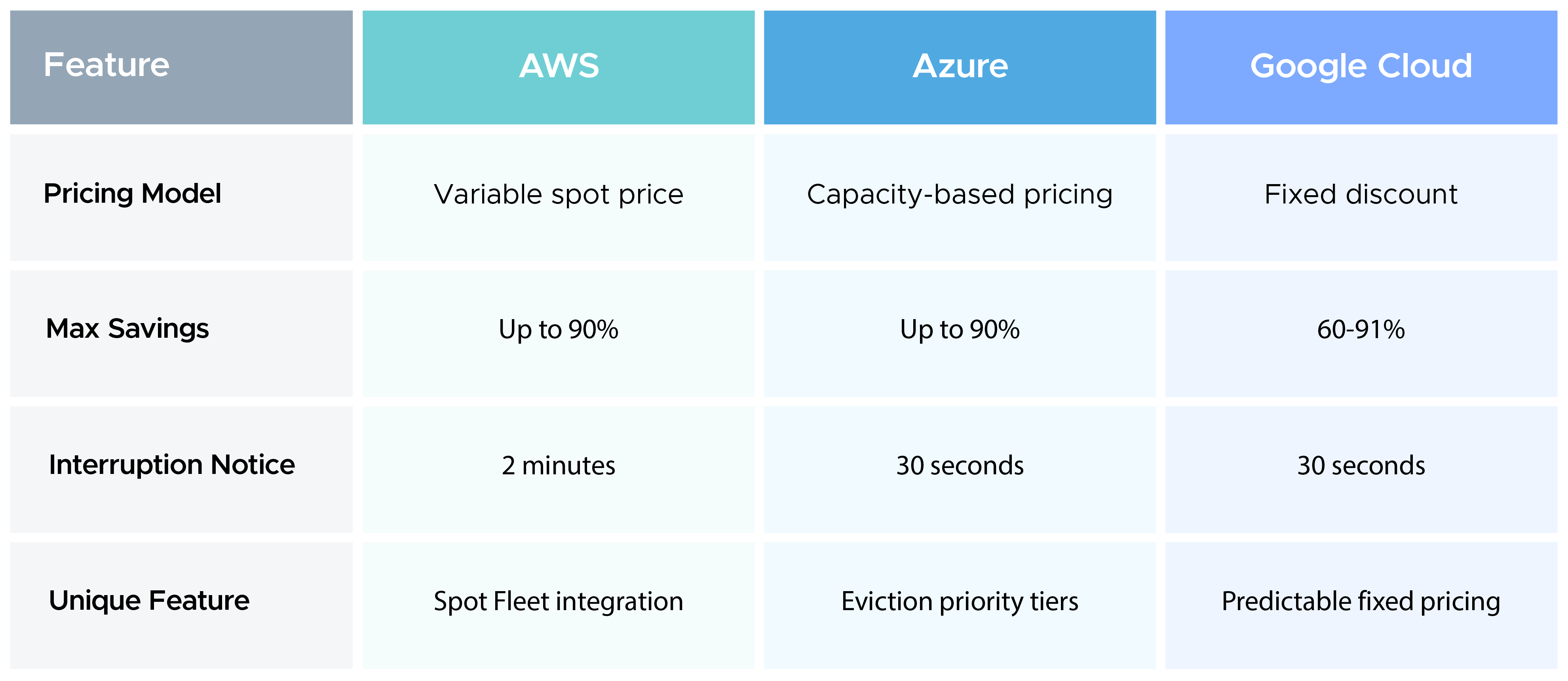
For teams standardized on AWS, the longer interruption window and integration with Spot Fleet and Auto Scaling groups make AWS Spot Instances somewhat easier to design around than their counterparts on other platforms.
Spot Instances bring real upside, but they come with tradeoffs that are worth understanding before you commit a workload to them.
Spot instances, if used as intended, can be one of the most effective cost levers in cloud infrastructure. AWS Spot Instances in particular pair well with services like AWS EC2 Auto Scaling, Amazon Elastic Container Service, and EMR. The common thread among good candidates is fault tolerance: the workload should be able to survive the disappearance of an instance without warning.
Across all of these cases, the pattern is the same: work that can be paused, retried, or redistributed without real consequence is exactly where Spot Instances deliver the most value.
Just as clearly, some workloads should stay off Spot Instances entirely. The deciding factor is usually how much the workload depends on continuous, guaranteed availability.
For all of these, the cost savings from Spot Instances simply aren't worth the operational risk. On-Demand or an AWS Savings Plan is the safer foundation for workloads like these.
Spot Instances and an AWS Savings Plan aren't competing strategies. In most mature AWS environments, they're used together, each covering a different layer of the workload.
An AWS Savings Plan works best for the predictable core of your infrastructure: the baseline compute that runs continuously, regardless of traffic or demand. Committing to that baseline through an AWS Savings Plan locks in a lower rate without sacrificing availability.
Spot Instances, meanwhile, are better suited to the variable, elastic portion of your workload. That's the extra capacity you spin up during traffic spikes, batch processing windows, or large parallel jobs.
A common pattern looks like this: cover your steady-state baseline with an AWS Savings Plan, then use Spot Instances to burst above that baseline when demand requires it. On-Demand capacity fills in as a fallback when Spot isn't available.
This layered approach avoids the double-paying trap mentioned earlier, in which idle Reserved Instance or Savings Plan capacity goes unused because workloads shift to Spot Instances. When the two are planned together rather than separately, every dollar of committed spend and every dollar of Spot savings work toward the same budget.
Auto Scaling groups make this blend easier to manage in practice. You can configure a mix of On-Demand, Savings Plan-covered, and Spot Instances within a single group, letting AWS automatically balance the mix as demand shifts.
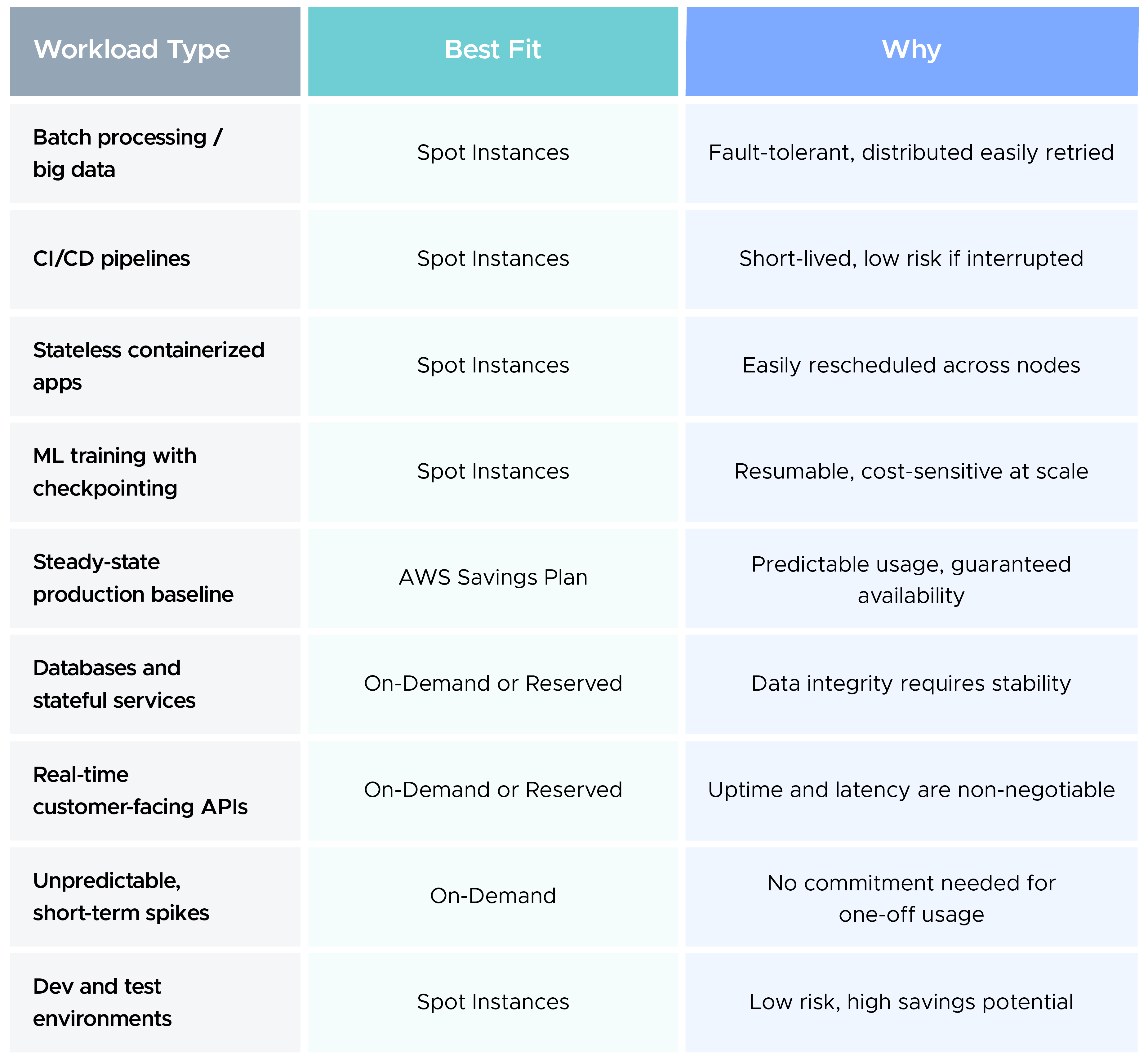
This isn't a rigid rulebook; instead, you should consider it a starting point for matching workload characteristics to the pricing model that actually fits them.
Spot Instances let you use idle cloud capacity at a steep discount, in exchange for accepting that capacity isn't guaranteed. That tradeoff makes them an excellent fit for fault-tolerant, flexible workloads like batch jobs, CI/CD pipelines for DevOps, and ML training, and a poor fit for databases, real-time APIs, and anything stateful.
Across AWS, Azure, and Google Cloud, the core idea stays consistent even as the details shift. AWS Spot Instances stand out for their longer two-minute interruption window and deep integration with Spot Fleet and Auto Scaling, which gives teams more room to design graceful shutdowns than the 30-second windows offered elsewhere.
Get that balance right, and Spot Instances stop being a risky experiment and become one of the most reliable cost levers in your cloud strategy, right alongside your AWS Savings Plan.
99% of companies saved up to 15% monthly with this plan & achieved peak performance.