

Chief Operating Officer
Aman spearheads business operations, strategic execution, and cross-functional alignment to drive sustainable growth.

21 Mar, 2025 | 12 Min read

Containers have changed how we build and deploy applications. They make it easier to package software and run it anywhere. But managing containers at scale requires orchestration tools. That's where services like Amazon Elastic Container Service (ECS) and Amazon Elastic Kubernetes Service (EKS) come in.
If you’re new to these services and want to understand their fundamentals, check out Part 1 of this blog, where we break down the basics of ECS vs. EKS.
Both AWS ECS and AWS EKS automate container deployment, scaling, and management. But they have key differences.
To better understand the AWS ECS vs EKS comparison, let’s take a look at a comparative table.
| Feature | AWS ECS | AWS EKS |
| Orchestration engine | AWS-proprietary | Kubernetes (open-source, CNCF) |
| Control plane cost | None — free | ~$0.10/hour per cluster (~$73–75/month) |
| Learning curve | Low — AWS-native concepts | Steep — requires Kubernetes expertise |
| Networking model | AWS VPC networking, simpler setup | Kubernetes CNI, more flexible but complex to configure |
| Scaling | Native ECS auto-scaling, task-based | Kubernetes HPA/VPA/Cluster Autoscaler, pod-based |
| Multi-cloud / portability | AWS-only (ECS Anywhere extends to on-prem) | Portable across clouds and on-prem (EKS Anywhere, self-managed K8s elsewhere)Portable across clouds and on-prem (EKS Anywhere, self-managed K8s elsewhere) |
| Stateful workloads/storage | Optimized for stateless services | Strong support via EBS, EFS, FSx CSI drivers |
| Ecosystem & tooling | Smaller, AWS-managed toolset | Large open-source ecosystem — Helm, Istio, Prometheus, custom controllers |
| Compute options | EC2, Fargate, ECS Anywhere | EC2, Fargate, self-managed/managed node groups |
| Best for | Teams wanting simplicity, AWS-native integration, lower ops overhead | Teams needing Kubernetes portability, advanced customization, ML/GPU-heavy or hybrid workloads |
Both ECS and EKS are powerful container orchestration solutions on AWS, each with unique advantages. While ECS provides a simpler, AWS-native framework, EKS offers greater flexibility and portability with Kubernetes Engine. The right choice depends on your application needs and operational preferences.
Amazon ECS is a great choice for a fully managed, deeply integrated container orchestration service within AWS. ECS pricing is also more cost-effective, with no additional management fees and flexible cost structures based on resource usage. It is designed to handle diverse workloads efficiently, offering seamless scalability, automation, and security.
If you have legacy applications that need better scalability and portability, ECS makes containerization straightforward. It allows you to migrate existing applications with minimal refactoring, ensuring they run efficiently in a modern cloud environment.
AWS ECS is ideal for organizations developing microservices-based architectures. With deep AWS integrations (like Amazon RDS and DynamoDB), ECS helps teams build and manage scalable, decoupled applications while automating service discovery and networking.
For teams focusing on continuous integration and deployment, AWS ECS vs EKS comes down to automation and ease of use. ECS integrates seamlessly with AWS CodePipeline, enabling automated application builds, testing, and deployments. This lets teams roll out updates with zero downtime, ensuring faster, more reliable releases.
For applications that require high computing power, such as scientific simulations, AI model training, or large-scale data processing, running ECS on Amazon EC2 allows you to choose compute-optimized or GPU-enabled instances to match workload needs. With AWS ECS, you can auto-scale instances based on demand, ensuring optimal performance without over-provisioning resources.
When comparing AWS ECS vs EKS for serverless and event-driven workloads, ECS with AWS Fargate stands out. It eliminates infrastructure management, making it an excellent option for event-driven applications, serverless workloads, and applications with unpredictable scaling needs.
With AWS ECS Anywhere, you can deploy applications both on AWS and on-premises infrastructure. This ensures consistency across development, testing, staging, and production environments - reducing configuration drift and deployment risks.
ECS supports auto-scaling policies that dynamically adjust the number of tasks based on demand. This ensures optimal performance during peak loads while minimizing costs during low-usage periods.
ECS integrates with Amazon CloudWatch to monitor logs and set up alerts. This makes it easier to track application health, detect anomalies, and proactively address issues before they impact users.
Whether you're modernizing applications, running microservices, or seeking cloud cost optimization, ECS provides the flexibility and efficiency to meet your cloud goals.
AWS EKS is the right choice if you need Kubernetes for container orchestration, hybrid or multi-cloud flexibility, or advanced networking controls. It works well for large microservices, machine learning, and applications that require persistent storage or GPU power. However, EKS pricing includes an additional cluster management fee, making it costlier than ECS, especially for smaller workloads.
To learn about Amazon EKS Provisioned Control Plane, you should check out this blog here.
Amazon EKS is the go-to choice for businesses that want to run applications in a Kubernetes-native environment. It lets organizations leverage Kubernetes’ extensive ecosystem, including Helm charts, custom controllers, and service meshes like AWS App Mesh and Istio.
(Learn how to optimize costs in EKS with our blog on Kubernetes Cluster Management.)
For businesses managing workloads across on-premises and multiple cloud environments, the choice between AWS ECS and EKS becomes clearer: AWS EKS is the better fit, as it simplifies hybrid and multi-cloud deployments. With EKS Anywhere, you can run Kubernetes clusters on your own infrastructure while maintaining the flexibility to move workloads between AWS and other cloud providers. Additionally, EKS integrates with AWS Cost Management tools, helping businesses track cloud spend across multiple environments and optimize resource allocation.
EKS offers granular networking control through features like custom VPC configurations, security groups, and Kubernetes Network Policies. It also integrates with third-party security tools, making it ideal for businesses that require highly customized security configurations.
Unlike ECS, which is optimized for stateless services, EKS is well-suited for stateful applications such as databases and data-intensive workloads. It integrates seamlessly with Amazon EBS, EFS, and FSx, providing reliable persistent storage.
Both tools support high-performance computing, however, while comparing AWS ECS vs EKS, the latter supports GPU-powered workloads better, making it a strong choice for AI/ML applications. It works with deep learning frameworks like TensorFlow and PyTorch, and integrates with SageMaker for efficient training and inference tasks.
EKS allows teams to install custom Kubernetes add-ons, such as Prometheus for monitoring, Fluentd for logging, or custom admission controllers. ECS, in contrast, has a more rigid, AWS-managed structure with fewer customization options.
AWS EKS lets you build highly available web applications across multiple availability zones, with automatic scaling in and out. Beyond performance, reliability, scale, and availability, the EKS platform also helps distribute load by integrating with AWS security and networking services.
Both EKS and ECS provide automated scaling, AWS integrations, and cost optimization through Spot Instances. They ensure high availability, security, and seamless deployments.
However, Amazon EKS is the better choice if you need advanced networking, cross-cloud portability, or Kubernetes-specific tools.
Selecting the right container orchestration service depends on your workload requirements, operational complexity, and cloud strategy. Here is a quick checklist to determine the best fit for your workloads:
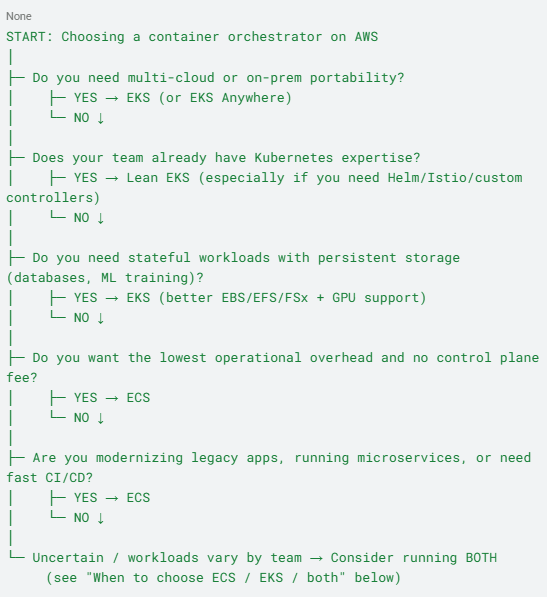
Running both isn't unusual at scale — treat ECS and EKS as tools for different jobs rather than a single either/or decision for the whole organization.
Comparing ECS, EKS, and Fargate isn’t exactly fair because Fargate isn’t a separate service - it's a compute option for running containers in ECS and EKS. While ECS and EKS help you manage and orchestrate containers, Fargate takes care of the underlying infrastructure, so you don’t have to worry about managing servers. With proper right-sizing and task scheduling, you can further optimize costs and pay only for the resources you actually need.
Fargate is ideal when you want to run containers without managing the underlying infrastructure. It automatically provisions and scales compute resources based on demand, making it a great option for teams that prefer a serverless approach.
Use Fargate when:
Sticker-level comparisons ("EKS has a $0.10/hour control plane fee, ECS doesn't") don't tell you much on their own. Here's how that plays out at different scales. These are illustrative estimates based on standard on-demand pricing — always confirm current rates with the AWS Pricing Calculator for your region and workload.
Scenario A — Small dev/test workload: 1 service, 2 Fargate tasks (0.5 vCPU / 1GB each), running ~730 hrs/month
Scenario B — Mid-size production workload 5–8 services, mixed
Scenario C — Large multi-cluster / multi-team enterprise 3 clusters (e.g., dev/staging/prod), 15+ services, mix of EC2, Fargate, GPU nodes for ML workloads
Amazon ECS and EKS both help you run containerized applications, but they serve different purposes. ECS is the easier, more AWS-native choice, perfect for teams that want a fully managed service with minimal setup. It’s great for businesses modernizing legacy apps, building microservices, or running batch workloads without worrying about Kubernetes complexities.
EKS, on the other hand, is built for companies that need the flexibility of Kubernetes. It’s ideal for hybrid or multi-cloud deployments, advanced networking, and high-performance applications like machine learning. While ECS keeps things simple, EKS offers more control and customization, making it better suited for enterprises with complex workloads.
On cost, ECS is usually the more affordable option, especially for AWS-focused businesses. AWS EKS adds overhead because its pricing includes a cluster management fee, but it makes sense if your team already knows Kubernetes and needs its advanced features.
Ultimately, the right choice depends on your infrastructure, how much control you need, and your team's expertise. If you want a straightforward, AWS-managed experience, go with ECS. If you need flexibility and scalability, EKS is the way to go.
Choosing between AWS ECS vs EKS is just one part of building an efficient containerized environment - optimizing workloads, managing infrastructure, and controlling costs are crucial too. CloudKeeper helps businesses streamline container management by providing expert guidance on architectural improvements, orchestration strategies, and cost efficiency.
With a team of certified AWS architects and cloud specialists, CloudKeeper ensures that your applications are built for scalability and performance while keeping operational complexity in check. From re-architecting workloads to implementing container orchestration best practices, our approach helps organizations make the most of their cloud investments.
Book a free consultation with one of our experts and learn how you can make the most of your container environment while reducing your cloud costs.
AWS Elastic Container Service (ECS) is a fully managed container orchestration service that allows you to run, scale, and manage containers. It supports both EC2 instances and AWS Fargate, giving you flexibility in resource management and scaling.
Deploying a service in ECS involves creating a task definition, configuring a cluster, and setting up a service to manage container instances. ECS handles scaling, load balancing, and updates, ensuring smooth application deployment.
An ECS cluster is a logical grouping of tasks and services running on either Amazon EC2 instances or AWS Fargate. It helps manage resource allocation, networking, and scaling for containerized applications.
ECS tasks are individual instances of a containerized application. A task definition specifies the Docker image, CPU/memory allocation, networking, and IAM permissions required to run a container within ECS.
AWS Fargate lets you run containers without managing EC2 instances. It automatically provisions compute resources and scales as needed, making it ideal for serverless and event-driven applications.
ECS is ideal when you need simple container orchestration with deep AWS integration, minimal operational overhead, and cost efficiency. It is a great choice for microservices, batch processing, and auto-scaling applications.
Using EC2 instances in ECS and EKS provides more control over networking, security, and cost optimization. EC2 allows for custom AMIs (Amazon Machine Images), reserved instance pricing, and better handling of workloads with specific performance requirements.
Kubernetes is an open-source container orchestration platform that automates scaling, deployment, and management of containerized applications. It enables multi-cloud and hybrid cloud deployments with advanced networking and security features.
Amazon EKS is a fully managed Kubernetes service that simplifies running Kubernetes workloads on AWS. AWS handles the Kubernetes control plane, while you manage worker nodes and workloads. It integrates with AWS services for networking, security, and scaling.
An EKS cluster consists of a managed Kubernetes control plane and worker nodes running on EC2 or AWS Fargate. It provides high availability, scalability, and automation for Kubernetes workloads.
EKS Anywhere extends EKS to on-premises and hybrid cloud environments, allowing businesses to manage Kubernetes clusters outside AWS. It provides a consistent Kubernetes experience across cloud and on-prem infrastructure.
EKS is better when you need multi-cloud flexibility, advanced networking, and Kubernetes-specific features like Helm charts and custom controllers. It is ideal for enterprises already invested in Kubernetes ecosystems.
EKS pricing includes additional costs, including a $0.10 per hour per-cluster control plane fee, higher operational complexity, and the need for specialized Kubernetes expertise. ECS pricing, in contrast, has no control plane cost and is easier to manage within AWS.
99% of companies saved up to 15% monthly with this plan & achieved peak performance.