

DevOps Engineer
Pratik brings together AWS cloud expertise and AI-driven approaches to enhance systems and operational resilience.


Find your cloud savings in under 5 minutes

Get a $100 reward on signup

16 Sep, 2026 | 11 Min read

Imagine hiring the most brilliant consultant you’ve ever met. Every morning you hand them a 50-page onboarding document. They read all 50 pages, answer your question perfectly, and then forget everything. Next question, same 50 pages. Again. And again.
Now imagine you’re being billed per page.
That is exactly how most teams are running their LLM workloads right now. Your system prompt, your tool definitions, your carefully tuned few-shot examples, that reference document you attach to every request: all of it gets reprocessed from scratch on every single call. You’re paying full price, over and over, for content that hasn’t changed in three months.
Prompt caching fixes this. And unlike most cloud cost optimizations, it doesn’t ask you to switch to a weaker model, trim your prompts, or degrade your output quality. At its core it’s a marker you add to your API call. Getting real production savings out of it takes more thought than that one line lets on, which is most of what this post is about.
But here’s the part almost nobody talks about, and the reason I wanted to write this: prompt caching can also cost you money. Turned on carelessly, it will quietly make your bill 25% worse while every dashboard you own reports perfect health. So let’s do both halves of the story.
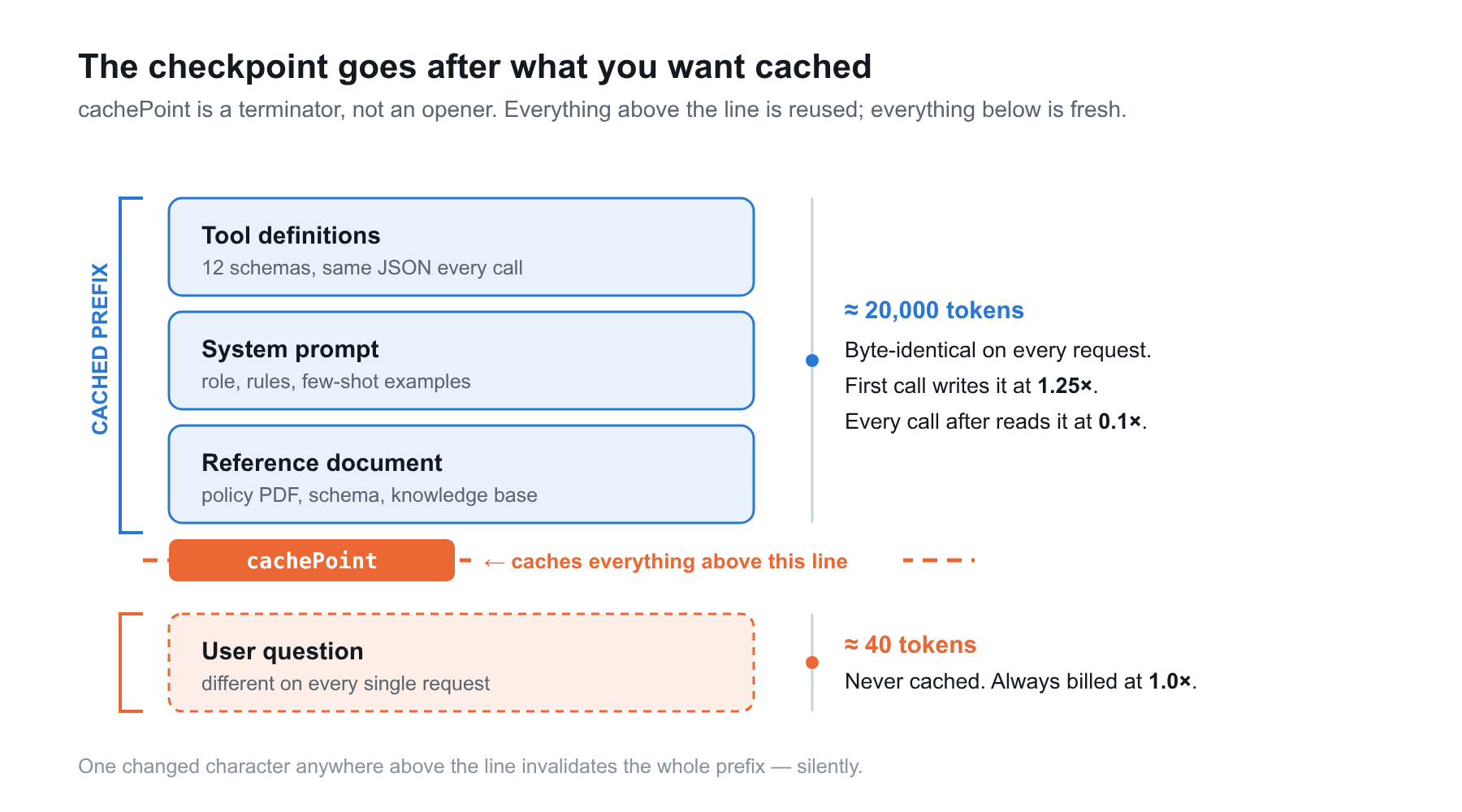
Every time you call an LLM, it has to process your entire prompt before it writes a single word of the reply. Prompt caching lets it skip that work for any chunk it has seen before. If the beginning of your prompt is byte-for-byte identical to one it handled a moment ago, it reuses the processing it already did instead of redoing it from scratch. Same output, a fraction of the cost.
You mark the boundary with a cache checkpoint. Everything before the checkpoint becomes cacheable. Everything after it stays fresh on every request.
Here’s the detail that trips up nearly everyone on their first attempt: the checkpoint goes after the content you want cached, not before it. It’s a terminator, not an opener. Think of it as a bookmark you place at the end of the pages you’ve already read, not at the start of the ones you haven’t.
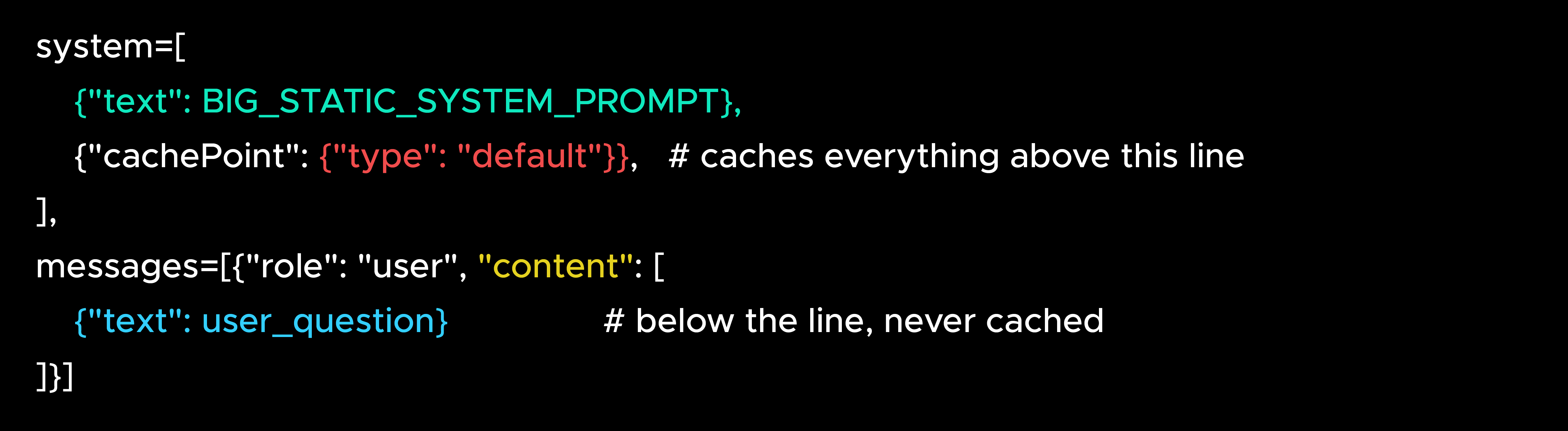 The mechanism really is that clean: one block in the Converse API, no new infrastructure or data migration, and a rollback that’s just deleting the marker. The work isn’t in the wiring. It’s in making sure the content above that line is genuinely stable and reused enough to pay off, which on a real workload is where the effort goes.
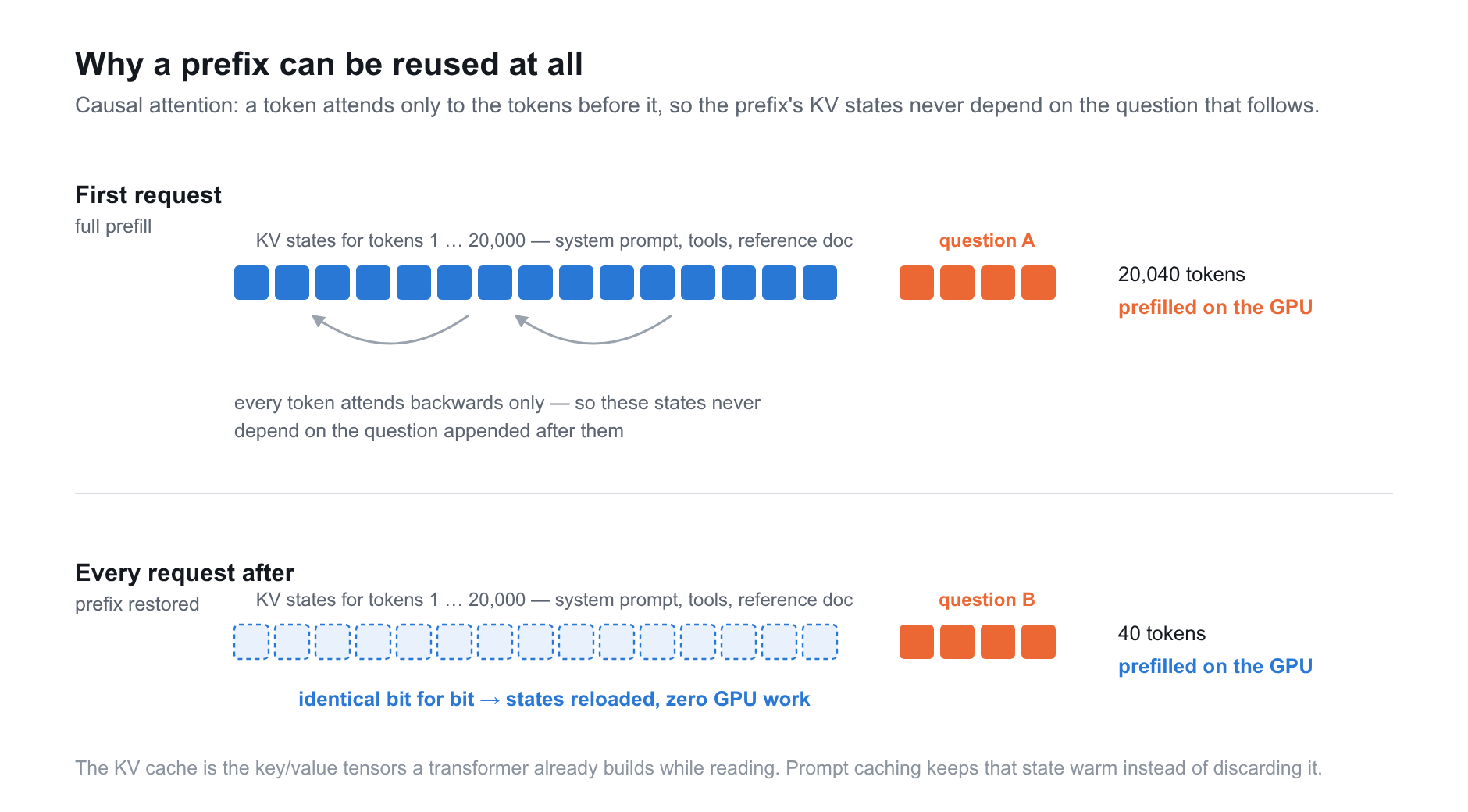 When a model processes your prompt, it isn’t just reading text. For every token, it runs a forward pass that computes and stores a set of internal attention states: the key and value vectors that capture how that token relates to every token before it. This step is called the prefill, and it’s the compute-heavy part of handling input. It’s what you’re actually paying for on input tokens.
Those stored vectors have a name used across the whole field: the KV cache, short for the key and value tensors it holds. And one quirk of how transformers read is what makes caching possible in the first place. A model processes text under causal attention, meaning every token can look back at the tokens before it but never ahead. So the internal states for the first 20,000 tokens of your prompt depend only on those 20,000 tokens, never on whatever question you append afterward. Swap the question, and the prefix’s computed state is identical, bit for bit. That is exactly why a single cached prefix can serve thousands of otherwise different requests.
None of this is unique to Amazon Bedrock, or even to cloud APIs. Every transformer-based model already builds a KV cache on the fly as it runs. It’s how the model avoids re-reading the entire conversation to produce each new token. Normally that state is thrown away the instant a request finishes. Prompt caching just keeps it warm and hands it back to the next call that starts with the same prefix.
That’s why a cache read is billed at a tenth of the normal rate. Reusing a prefix means skipping prefill entirely: the model reloads the attention states it already computed and resumes from where the new, unique part of the prompt begins. You’re not paying it to recompute those tokens. The expensive GPU work is already done and sitting in memory, so you cover only the much smaller cost of holding that state and loading it back. Same tokens either way. The only difference is whether the model recalculates them or simply remembers them.
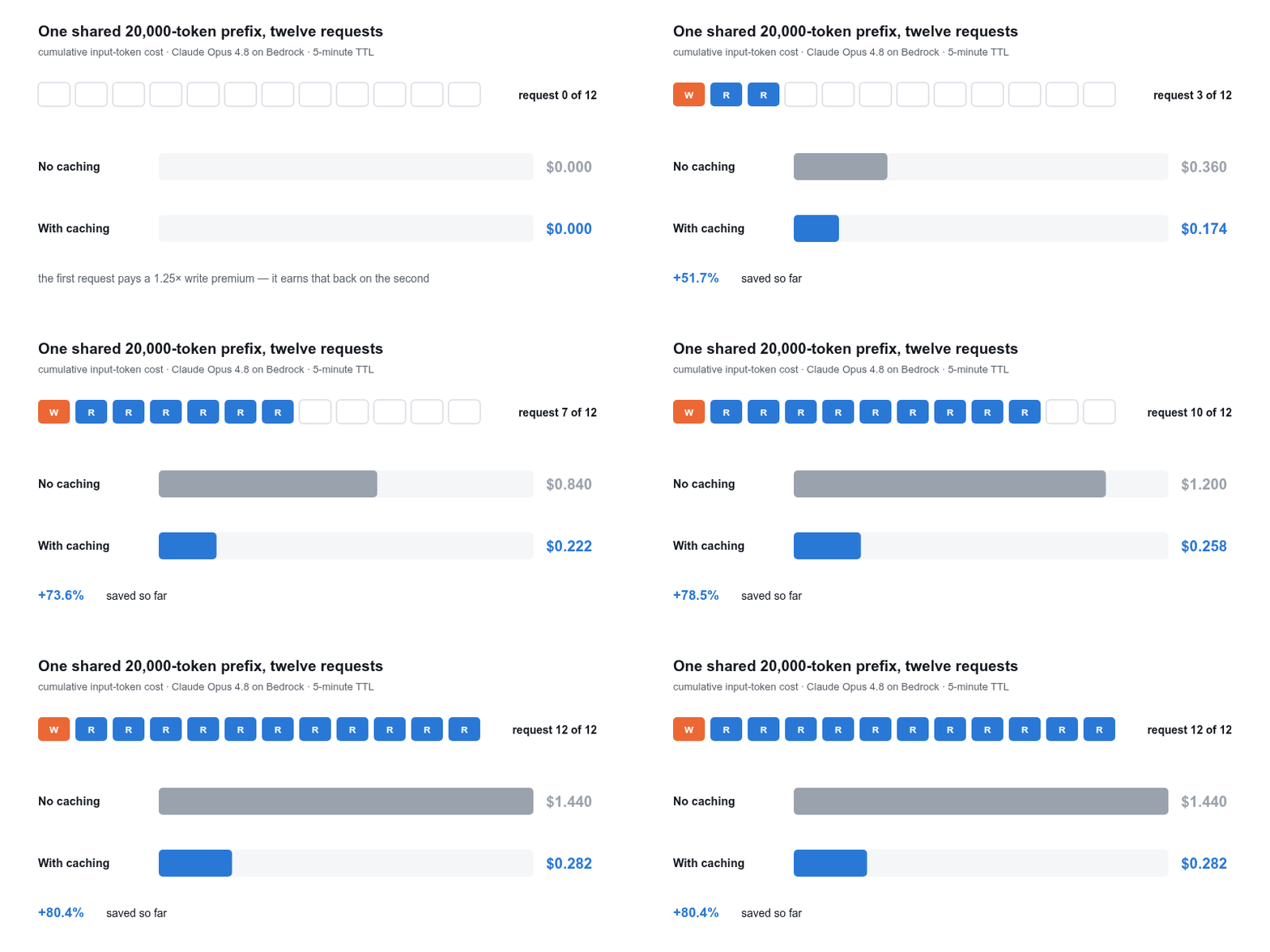
Cached input tokens are billed at 0.1× the normal input rate. Ninety percent off, on the largest and most repetitive chunk of your prompt.
Let’s put real numbers on it. Take Claude Opus 4.8 on Amazon Bedrock at $6.00 per million input tokens, and a workload with a 20,000-token static prefix (tool definitions, a system prompt, and a reference document). Twelve requests share that prefix inside a cache window.
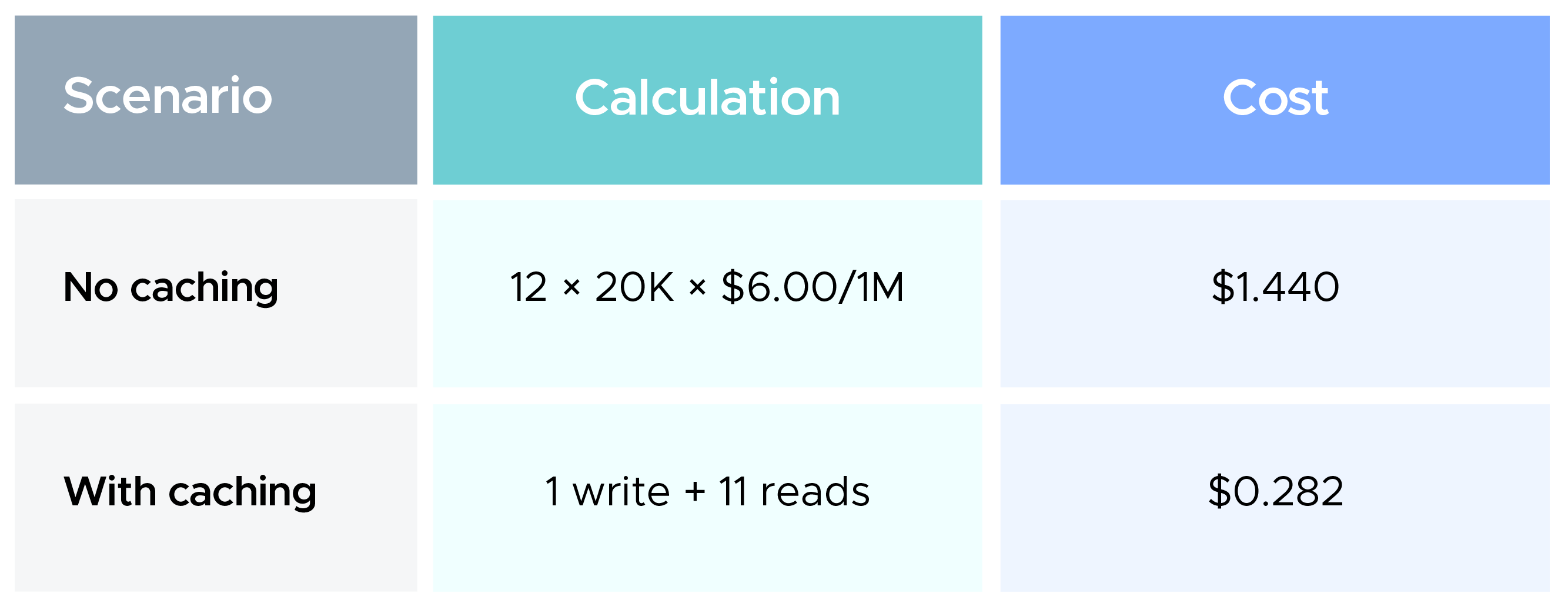
That’s an 80.4% saving on those requests.
Now scale it to something that looks like production. Same 20,000-token prefix, 50,000 requests a day:
To be straight with you: caching affects input tokens only. Your output tokens are billed either way identically. But for RAG pipelines, agents, coding assistants, and document-analysis workloads, input is where the weight sits, often 90%+ of the token volume. That’s exactly why the lever is so big.
And there’s a second benefit that rarely makes the headline: cached prefixes skip recomputation, so time-to-first-token drops noticeably on long contexts. Your users feel it before your finance team sees it.
And this isn’t a whitepaper projection. When Anthropic launched prompt caching on the Claude API, it published production numbers: caching a 100K-token book cut cost by 90% and latency by 79%, and a many-shot prompt cut cost by 86%. Notion wired it into Notion AI, with co-founder Simon Last saying it made the product “faster and cheaper, all while maintaining state-of-the-art quality.” Amazon Bedrock exposes the same underlying mechanism, so the shape of those savings carries straight over.
The first time Amazon Bedrock caches a prefix, it charges you a premium to write it: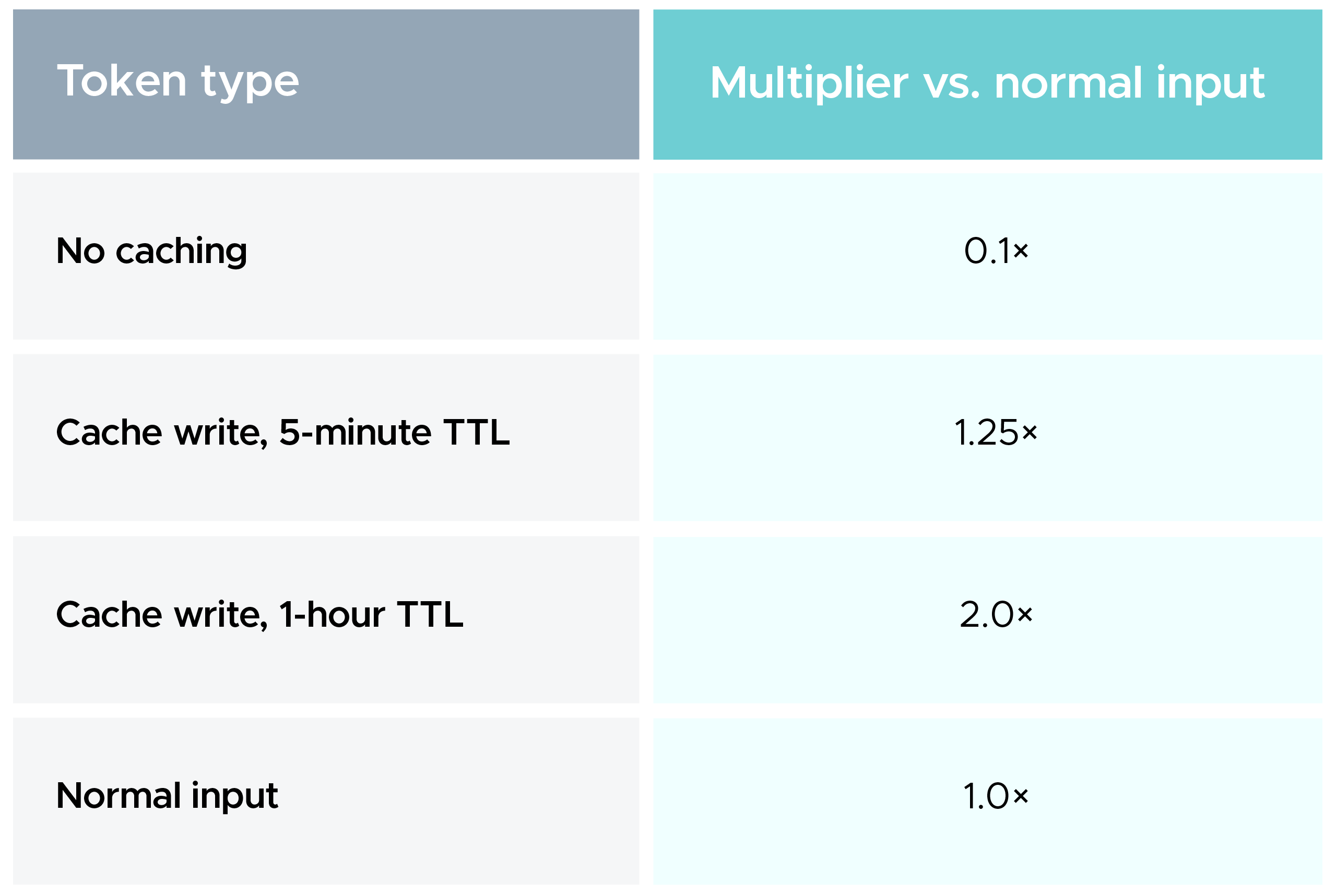 So caching is not free to switch on. You pay 25% extra (or 100% extra on the 1-hour cache) for the privilege of the first request, and you earn it back on every request after.
Which means there’s a break-even point, and it’s worth burning into your brain:
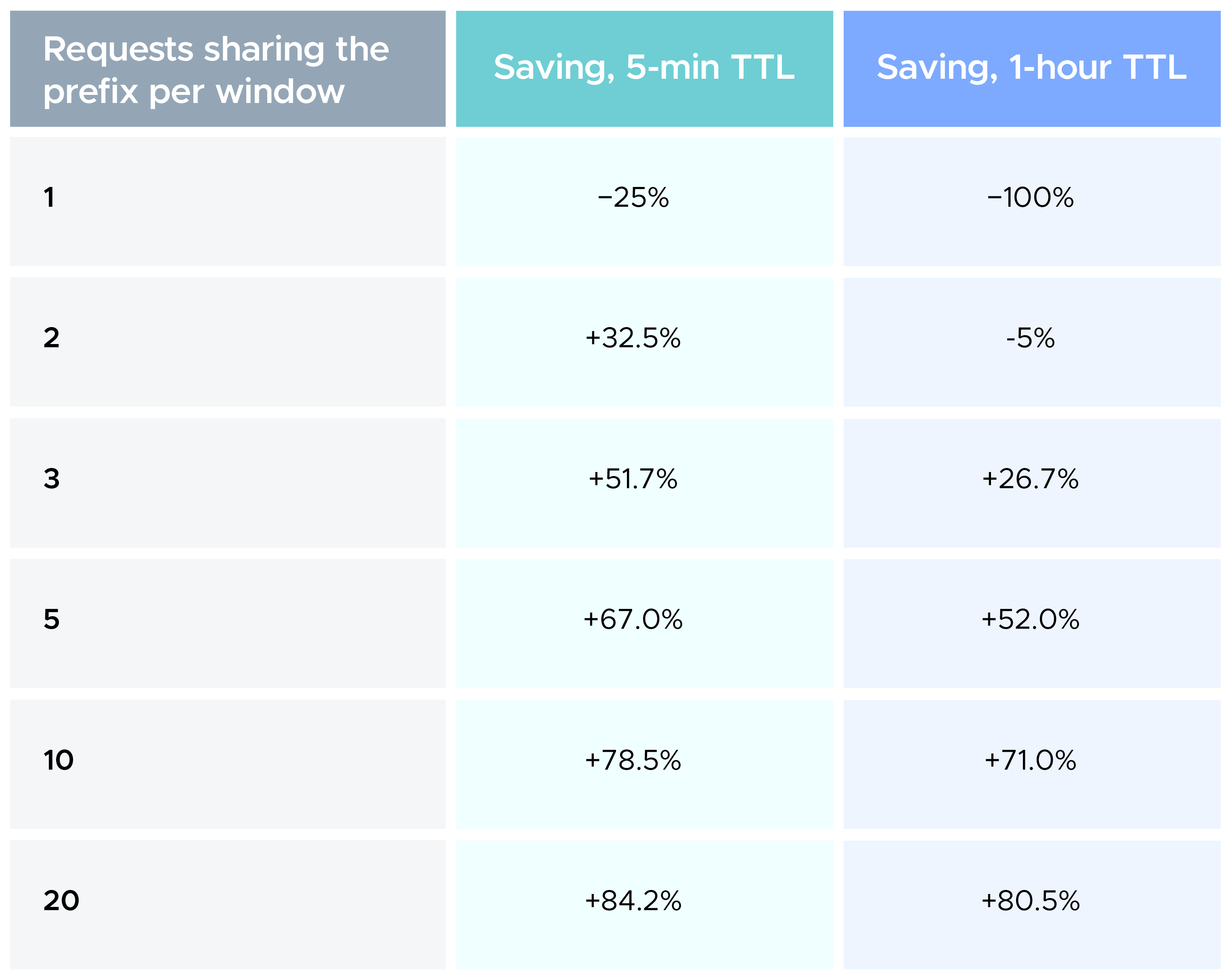 Read the first row again. A prefix that gets cached and then read zero times before expiring costs you 25% more than never caching at all. On the 1-hour TTL, it costs you double.
The 5-minute cache needs at least 2 reads in the window to pay off. The 1-hour cache needs at least 3, and it’s still underwater at two. That last part quietly bites teams who reach for the longer TTL by default because it sounds like the safer choice.
This is the entire reason prompt caching deserves an evaluation rather than a blanket rollout. If your workload sends one request per unique prefix, caching is a guaranteed loss. Not a small gain, not a wash. A loss.
Amazon Bedrock’s cache TTL is a sliding idle timer, not a countdown from creation. Every cache hit resets it. So a prompt reused more often than every 5 minutes keeps its entry alive indefinitely, refreshed at no extra charge.
Here’s what happens when cadence and TTL don’t match. Same workload as before: 12 requests, 20K prefix, but now with consistent 6-minute gaps between them.
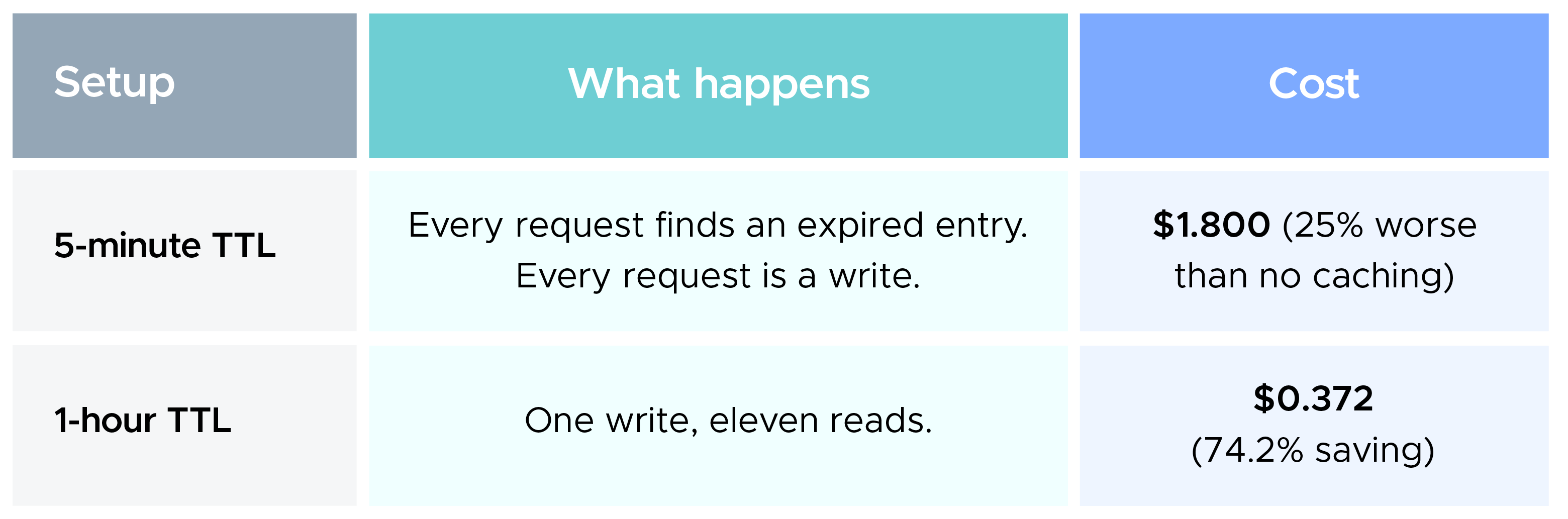
Identical traffic. Identical prompts. One config value. The difference between burning 25% extra and saving 74%.
The rule is simple. Reuse tighter than 5 minutes → stay on the 5-minute TTL, it refreshes for free. Reuse between 5 and 60 minutes → the 1-hour TTL exists exactly for you. Reuse gaps longer than an hour → caching can’t help, move on.
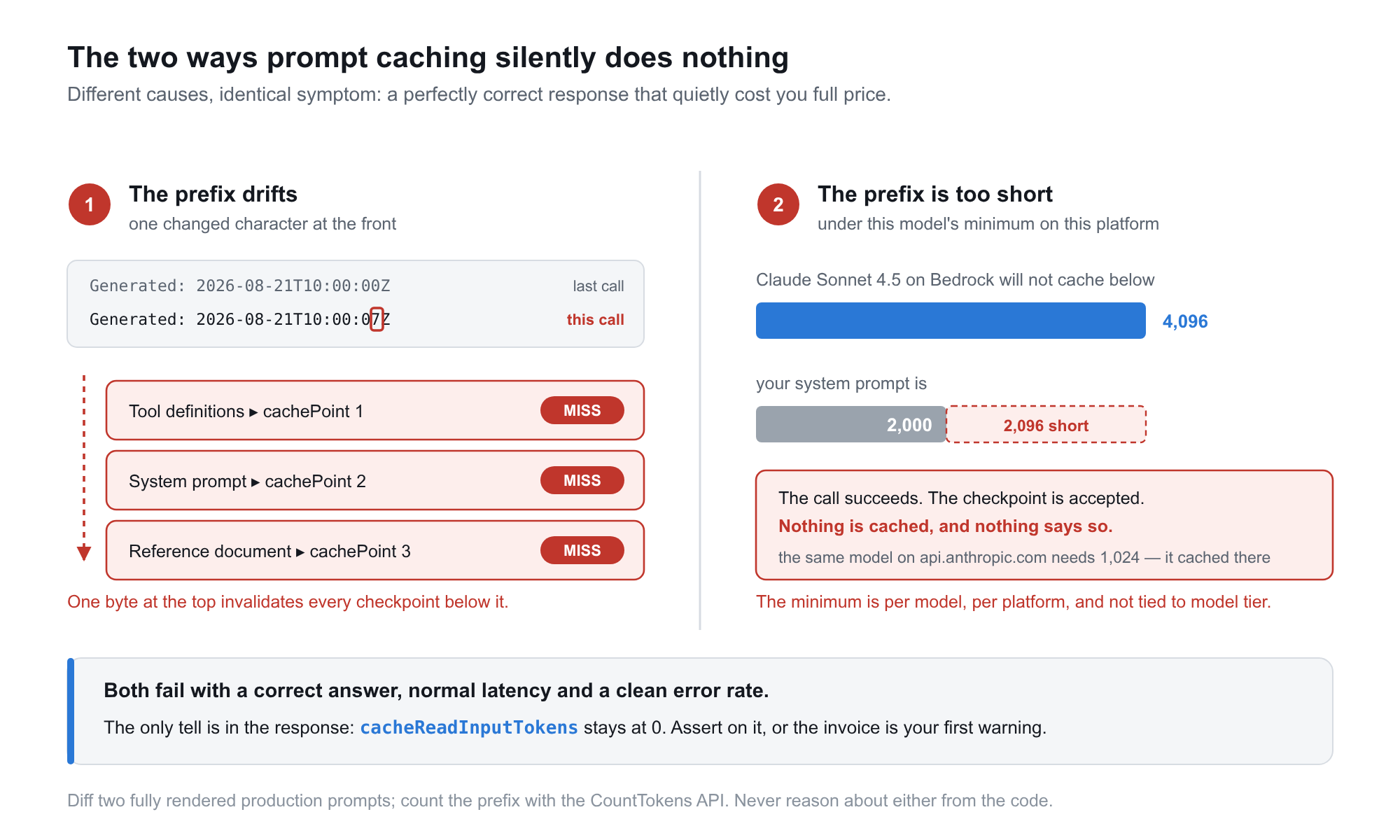 This is the part I’d tattoo on a wall if I could, because both failure modes are completely invisible. Your responses stay correct. Your latency barely moves. Your error rate doesn’t budge. Nothing logs a warning. You find out from the invoice.
1. The prefix must be byte-identical. Not “basically the same.” Identical. One changed character anywhere in the cached region invalidates that checkpoint and every checkpoint after it. The usual culprits, in roughly the order I’ve seen them show up:
Every one of these sits at the front of the prompt and poisons everything downstream. The fix is always the same: make it deterministic, or move it after the last checkpoint.
And please don’t reason about this from your code. Capture two fully rendered production prompts and diff them. I have never regretted doing this, and I have regretted skipping it.
2. The prefix must clear a minimum token count. Below the model’s threshold, Amazon Bedrock does not cache and does not complain. AWS documents this plainly: your inference still succeeds; your prefix just isn’t cached.
The threshold isn’t what you’d guess, either. It’s per-model, and it is not monotonic with model tier. Claude Sonnet 4.6 needs 1,024 tokens while the older Sonnet 4.5 needs 4,096. Never infer a minimum from a model’s generation. Check the model card.
There’s a particularly nasty version of this. The same model can have a different minimum on Amazon Bedrock than on the first-party Anthropic API. Claude Sonnet 4.5 requires 4,096 tokens on Amazon Bedrock but only 1,024 on api.anthropic.com. A team ports a working integration across; their 2,000-token system prompt cached fine before, and on Bedrock the checkpoint is silently ignored. Everything looks healthy for a full billing cycle.
Never infer caching from latency. Amazon Bedrock hands you the answer directly, in the usage object of every response:
u = response["usage"]
print(u["inputTokens"], u.get("cacheWriteInputTokens", 0), u.get("cacheReadInputTokens", 0))
Fire two identical requests, assert cacheReadInputTokens > 0 on the second, and make that an integration test, not a manual check you do once. Because every failure here is silent, a fragmentation bug can run for an entire quarter before anyone notices.
One accounting trap catches almost everyone. Once caching is on, inputTokens reports only the non-cached remainder. A dashboard plotting inputTokens alone will show a dramatic cliff the day you ship, and will understate your true prompt size forever after. The real total is:
total input = inputTokens + cacheReadInputTokens + cacheWriteInputTokens
Track the cache hit rate (reads divided by reads plus writes) and alarm when it drops. On a healthy cached route, writes should trend toward zero relative to invocations. Writes climbing while traffic stays flat means fragmentation has crept in, or you’re on a cross-region inference profile that’s re-writing the cache in multiple regions under load.
Amazon Bedrock reserves your tokens-per-minute quota at the start of each request, based on input tokens plus cache writes plus maxTokens.
Cache reads are deliberately excluded from that formula. They don’t count against your rate limit. So a well-cached workload sustains meaningfully more concurrency on the exact same quota, and the effect grows with your hit rate. You bought a cost optimization and got a scaling win attached.
While you’re in there: always set maxTokens explicitly. Left unset, it defaults to the model’s maximum and reserves that entire budget on every request. On a 2M TPM quota, a request with maxTokens=1000 supports roughly 1,300 concurrent requests. The same request with maxTokens unset supports about 31. Same quota, same real traffic, roughly 40× fewer requests, all because of one value nobody set. If you’re seeing ThrottlingException that has nothing to do with your traffic volume, this is almost always why.
Before you ship it, four questions:
Two quick disqualifiers worth knowing up front: prompt caching does not work on batch inference at all, and on Amazon Nova, the automatic caching you get for free delivers latency benefits only. If you want the cost savings on Nova, you have to place cachePoint markers explicitly.
Prompt caching is one of the rare optimizations that pairs a large payoff with a relatively small surface area of change. Ninety percent off your most repetitive tokens, faster first-token latency, and extra headroom against your rate limits. And when you need to back it out, you just remove the marker. The catch is that the payoff is only ever as good as the discipline behind it.
But it rewards understanding and punishes autopilot. The same feature that saves 80% on a well-shaped workload costs 25% extra on a badly-shaped one, and it will never once tell you which side you’re on. Measure your reuse, diff your prompts, verify with the token counters, and alarm on the hit rate.
The biggest AI cost wins usually aren’t hiding in a cheaper model. They’re hiding in the work you’re paying to redo.
Start with your highest-reuse route. Measure it before, measure it after. Then go find the next one.

99% of companies saved up to 15% monthly with this plan & achieved peak performance.