12
12In 2026, AI adoption has moved well into workflows and become integral to them, which is a sharp contrast to the days of experimentation just a few years ago. Adoption has grown faster, and so have cloud bills. The trends point to a similar story in 2027.
This makes AI Cost Reduction an engineering and cloud FinOps’ problem. Teams need to control token consumption, optimize inference, improve GPU utilization, and govern AI spending.
This guide covers 12 practical ways to reduce AI costs in 2027 without compromising production workload performance.
Why Is AI Cost Reduction Becoming More Difficult?
Understanding these challenges is the first step to identifying where teams can reduce costs and implement AI Cost Optimization practices. Have a look at the key areas where teams struggle when trying to rein in AI costs:
1 . High GPU Costs
GPU infrastructure can cost significantly more per hour than CPU-based compute, making even small utilization inefficiencies financially significant. For example, an Azure H100 instance can cost up to $98.32 per hour, which translates to roughly $71,774 per month when running continuously.
2 . Usage-Based LLM Costs
LLM applications are typically billed by input and output tokens, so larger prompts, higher usage, and more frequent model calls directly increase costs. Enterprise LLM workloads can have an input-to-output token ratio of around 10:1, meaning input context can account for a substantial portion of total token consumption.
3. Continuous Inference
Training workloads typically run for specific periods, while production inference can operate continuously. This makes inference costs harder to control as AI applications scale and usage grows.
4 . Agentic AI Workflows
Agentic AI applications can generate repeated model calls as an agent reasons, retrieves information, uses tools, and continues the workflow. Each additional step can increase token consumption and overall AI spend.
5 . Limited AI Cost Visibility
AI costs extend beyond model or API bills to include GPUs, storage, networking, Kubernetes resources, and other supporting infrastructure. AI-driven cloud consumption can be around 12x higher than the spend captured in AI-specific billing lines, making granular visibility important for identifying the actual drivers of AI spend.
6 . High-Cost Model Usage
AI applications may use high-cost models for tasks that less expensive models could potentially handle. Choosing models without considering cost alongside performance can lead to unnecessary AI spend. It is for this use case, FinOps for Generative AI cost optimization becomes a top-priority line item.
7 . Idle GPU Capacity
GPU resources can remain provisioned even when they aren't fully used. This creates ongoing infrastructure costs without generating equivalent workload value.
8 . Large Prompt Contexts
Large prompt contexts increase the number of input tokens LLMs process. As AI applications scale, unnecessary context can contribute significantly to token usage and API costs.
9 . Managing Direct and Supporting Costs
AI spending includes both direct AI service costs and the cloud infrastructure that supports AI workloads. Teams therefore need visibility across both areas to manage AI spending effectively.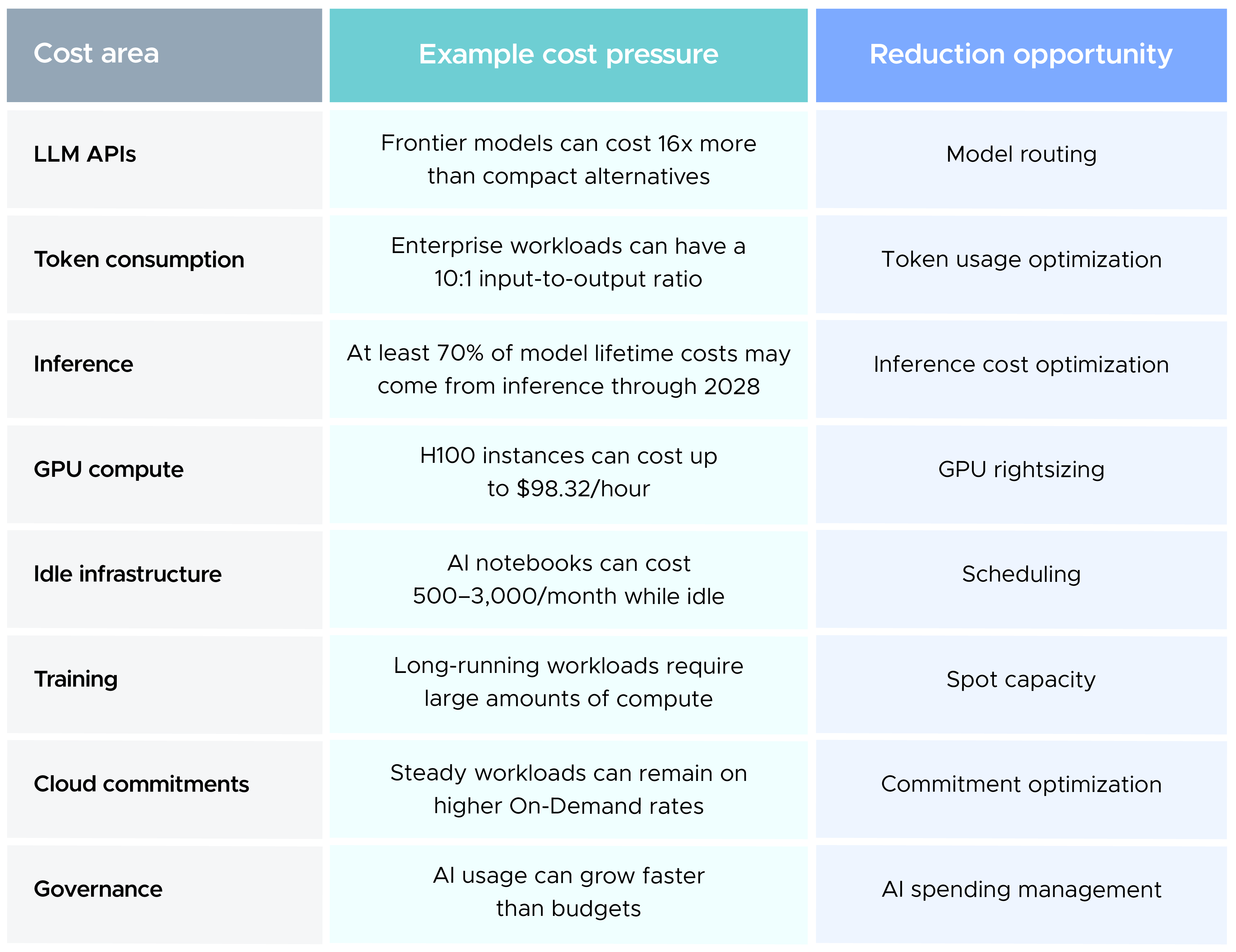
12 Proven Strategies for AI Cost Reduction
A practical AI cost reduction strategy needs to address every layer of the AI stack, from model and token usage to inference, infrastructure, pricing, and governance. Here are 12 proven strategies you can use to reduce AI costs while maintaining the performance and reliability of production workloads.
1. Start With Granular AI Cost Visibility
AI-related cloud consumption can extend well beyond the AI-specific line items visible in billing data. AI-driven cloud consumption can be around 12x higher than the spend captured in AI-specific billing lines, making granular cost attribution essential for AI Cost Reduction.
For FinOps teams, this means tracking AI spend across the model layer and the infrastructure supporting it. Model APIs, GPU compute, Kubernetes engine resources, storage, networking, and other cloud services can all contribute to an AI workload's cost.
Cost attribution should extend to the workload, application, team, environment, and business unit wherever possible. This lets teams identify which workloads drive spend and investigate changes before they become significant budget variances.
CloudKeeper Lens provides cloud cost visibility and AI cost visibility across AWS, Azure, and GCP, acting as a holistic insight tool for cloud infrastructure.
2. Reduce Token Consumption at the Application Layer
Enterprise LLM workloads can have an approximate 10:1 ratio between prompt input and generated output tokens. System instructions, retrieved context, and conversation history can account for a significant share of that recurring input volume.
This makes token usage optimization an application-level concern, not something you can address only through model selection.
Context curation can reduce token volume by roughly 42% and tool calls by around 64%. Explicit output limits can also reduce token consumption by 10–40% for structured tasks such as classification and JSON generation.
Engineering teams can apply these techniques by:
- Limiting retrieved context to information relevant to the request
- Removing unnecessary conversation history
- Reducing repeated system instructions
- Setting output limits for structured tasks
- Reviewing tool calls for redundant or unnecessary steps
For teams working on LLM Cost Reduction, reducing the volume of tokens processed can deliver savings without changing the underlying model.
3. Match the Model to the Workload
Model pricing can vary significantly even when different models are used for similar application workflows. GPT-4o is priced at $2.50 per million input tokens and $10 per million output tokens, compared with $0.15 and $0.60 for GPT-4o mini. Claude Sonnet 4 is listed at $3 input and $15 output, while Claude Haiku 3.5 is listed at $1 and $5.
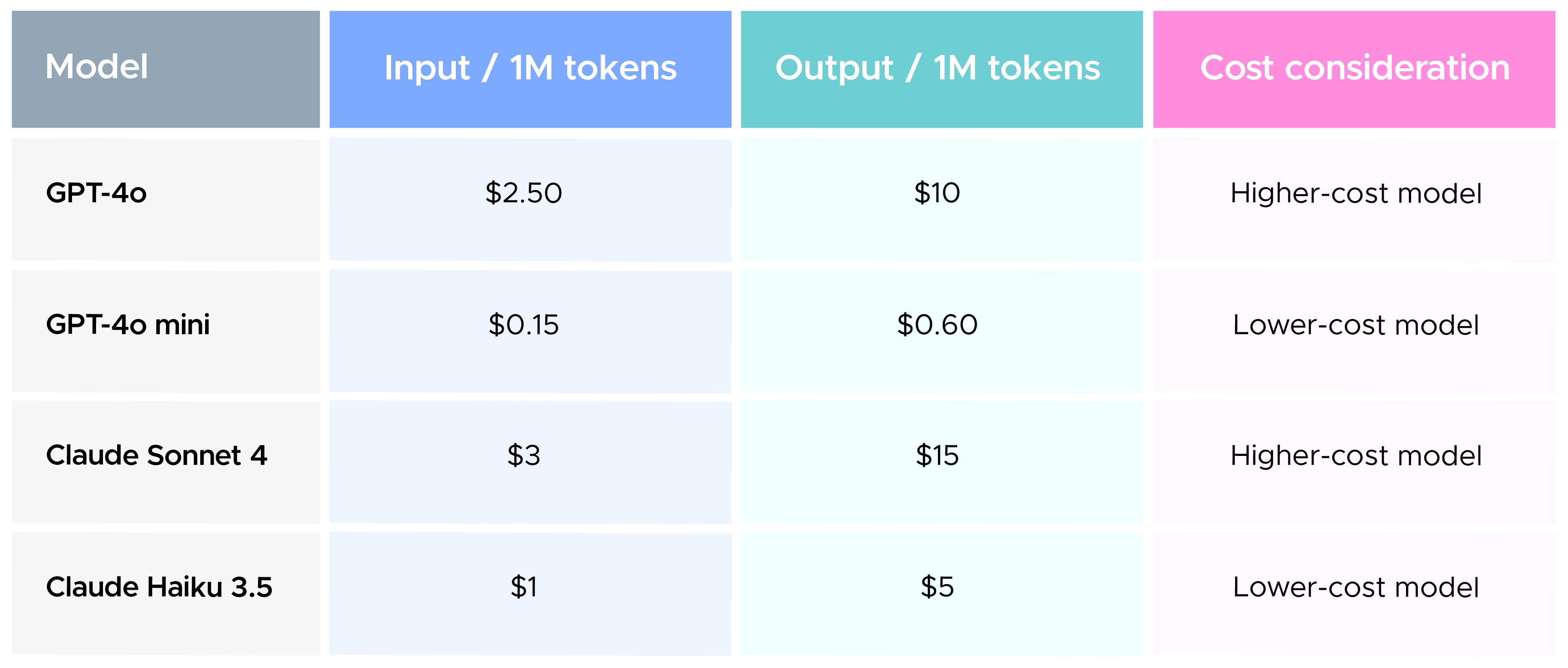
The examples represent a 16x price spread between the frontier and compact models.
A classification request, summarization task, or routine extraction workflow may not require the same model as a complex reasoning workload. Model routing lets applications reserve higher-cost models for tasks that require their additional capabilities.
Microsoft's Hybrid LLM approach has reduced calls to larger models by 40% without degrading quality. BEST-Route has reported up to 60% lower costs with less than 1% performance change, while Databricks Smart Router has reported more than 30% lower average task cost.
For LLM Cost Optimization, model selection should therefore account for both cost and task requirements. The lowest-priced model is only useful if it meets the required quality and performance level. You can compare LLM pricing using this LLM Pricing table.
4. Focus on Inference Cost Optimization
Inference is expected to account for at least 70% of total model lifetime costs through 2028. As production applications continue serving requests over extended periods, inference cost optimization becomes a major component of AI Cost Reduction.
Serving efficiency directly affects the amount of compute required to process a given workload. Quantization from FP16 to INT8 or INT4 can reduce memory requirements by 4x and may lower serving costs by 50–75%.
Inference engines can further change the economics of production serving, with modern inference optimizations delivering up to 2x–4x higher throughput and up to 50% lower prefill compute.
A complete inference cost analysis should consider GPU utilization, concurrency, latency, memory consumption, throughput, and cost per request together. Optimizing one metric without accounting for the others can increase costs elsewhere in the serving stack.
5. Right-Size Expensive GPU Capacity
GPU pricing varies considerably across accelerator types and cloud providers. AWS p5.48xlarge is listed at $55.04 per hour, GCP a3-highgpu-8g at $88.49 per hour, and Azure ND96isr_H100_v5 at $98.32 per hour. At continuous usage, the Azure configuration reaches approximately $71,774 per month.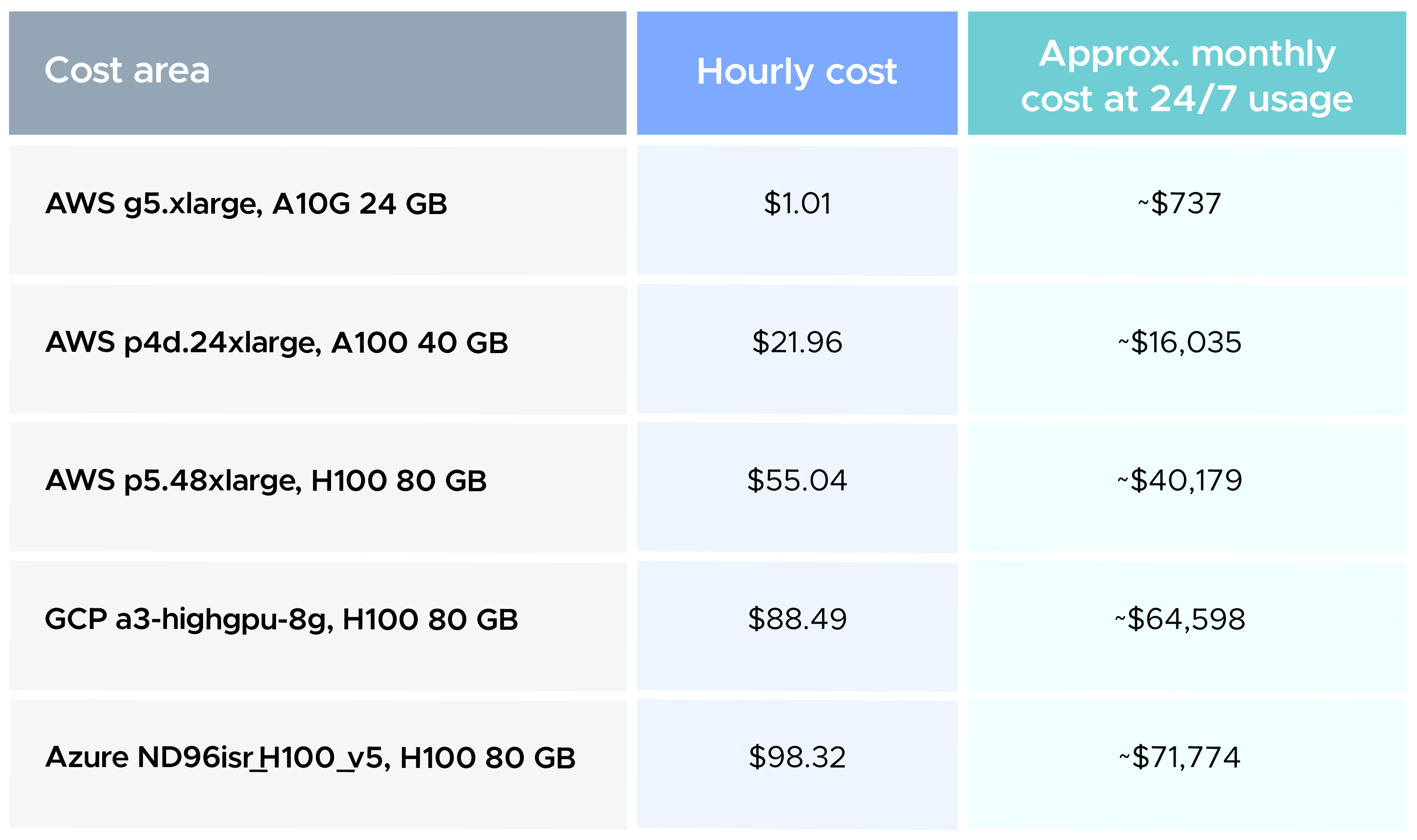
An estimated 40–60% of GPU instances may be oversized. GPU utilization, memory requirements, concurrency, latency, and workload duration should therefore inform capacity decisions rather than selecting infrastructure based only on peak theoretical demand.
An AWS g5.xlarge with an A10G 24 GB GPU costs $1.01 per hour, while an AWS p5.48xlarge with H100 GPUs costs $55.04 per hour. This difference makes workload-to-instance matching especially important for optimizing cloud AI costs.
CloudKeeper Tuner analyzes resource utilization patterns to identify optimization opportunities in your cloud setup.
6. Schedule Resources That Do Not Need to Run Continuously
Idle SageMaker or Vertex AI staging notebooks with attached GPUs can cost 500–3,000 per month per instance. For a development environment with 10 such instances, the upper end of that range represents $30,000 in monthly infrastructure spend.
The same issue extends to GPU-backed experimentation environments that remain provisioned outside active development periods. Since these resources don't need to serve production traffic continuously, you can align their operating schedules with actual usage.
Development and staging environments can be automatically stopped during non-working hours and restarted when teams resume work. This removes the need for engineers to manually track which resources can be shut down.
CloudKeeper Tuner Scheduler supports this approach by allowing teams to define operating schedules for eligible resources and automate shutdowns.
7. Use Spot Capacity for Suitable Training Workloads
Training workloads with checkpointing and recovery mechanisms can use interruptible compute without necessarily compromising the overall training process. Spot Instances can provide 60–90% savings for suitable fault-tolerant training workloads.
The economics are particularly relevant for experimentation and training jobs that can tolerate interruptions. Before adopting Spot capacity, teams should evaluate checkpoint frequency, restart time, job duration, and the cost of losing training progress.
Workloads that require uninterrupted execution or have expensive restart cycles may still require more stable capacity. For suitable training jobs, however, Spot capacity can substantially reduce compute costs. Explore our comprehensive blog on Spot Instances in which you will learn how to identify workloads that are suitable for them.
8. Use Prompt Caching and Semantic Caching
Repeated context creates repeated token consumption when you send the same information to an LLM across multiple requests.
Anthropic Prompt Caching can provide up to 90% savings on cached input tokens for qualifying workloads, while OpenAI Prompt Caching can reduce costs by 50% for prompts exceeding 1,024 tokens.
Semantic caching addresses a different use case. When requests are sufficiently similar, a caching layer can return an existing result instead of sending another request to the model. One example has achieved a roughly 47% cache hit rate.
These approaches can support token usage optimization in applications with recurring system instructions, repeated queries, or frequently reused context. Cache expiration and freshness rules still need to account for information that changes frequently.
9. Move Non-Urgent Workloads to Batch Processing
OpenAI and Anthropic Batch APIs offer a 50% discount for qualifying workloads. This creates a direct LLM Cost Reduction opportunity for AI workloads where real-time responses are not required.
Document enrichment, bulk classification, evaluation runs, reporting, and other background workloads can often be processed asynchronously. Instead of routing every request through a low-latency serving path, applications can separate real-time workloads from tasks that can be completed in batches.
Customer-facing requests can continue using real-time inference while suitable background processing moves to batch execution. This allows teams to align the execution model and pricing structure with the actual latency requirements of each workload.
10. Optimize Commitments as AI Workloads Stabilize
Compute Savings Plans and Reserved Instances can provide estimated savings of 40–72% on eligible GPU compute. These savings become particularly relevant once AI workloads develop sufficiently predictable usage patterns.
AI infrastructure can still change quickly. Model migrations, GPU changes, traffic growth, and inference architecture changes can alter the capacity a team needs, which means a commitment based on an earlier usage profile may no longer match the workload.
Continuous commitment management allows teams to reassess their position as those patterns change. The objective is to maintain the appropriate level of committed capacity while avoiding commitments that no longer align with actual usage.
For this use case, CloudKeeper offers CloudKeeper Commit, a zero-touch, automated platform that optimizes AWS RIs and Savings Plans and eliminates the manual effort involved in commitment management.
11. Build AI Spending Management Into FinOps Governance
Progressive spending controls can establish different responses as AI consumption moves beyond forecast budgets. An organization can trigger an automated warning when consumption reaches 80% of its forecast budget, with higher thresholds triggering model downshifting or additional review.
An AI gateway can provide another control layer between applications and model providers. Rate limiting, quotas, token tracing, semantic caching, and model routing can be incorporated into this layer to apply spending controls during request execution.
This moves AI spending management closer to the point where consumption occurs rather than relying entirely on post-billing analysis.
Governance should also cover experimentation. Teams can establish spending thresholds for sandboxes and define controls for workloads moving from experimentation into production.
12. Measure AI Spend Against Business Outcomes
AI cost metrics become more useful when they are connected to the business output generated by the workload. Cost per feature, cost per active customer, and cost per resolved ticket show how teams can measure AI economics beyond cost per token.
Cost per business outcome = Total AI spend ÷ Completed business outcomes
Consider an AI support system that costs $100,000 per month and resolves 50,000 tickets. Its cost per resolved ticket is $2. If monthly spend increases to $120,000 while the system resolves 80,000 tickets, the cost per resolved ticket falls to $1.50.
The workload costs more in absolute terms, but its cost per business outcome has improved. For enterprise FinOps teams, that distinction provides a more meaningful framework for evaluating AI Cost Reduction as workloads scale.
How Can Enterprises Sustain AI Cost Reduction?
The optimization opportunities span the entire AI stack. Token usage optimization reduces model consumption, model routing changes determine which model handles each request, inference cost optimization improves serving efficiency, and GPU rightsizing addresses accelerator capacity.
Workload timing and infrastructure pricing create additional opportunities. Batch processing can reduce the cost of non-urgent workloads, Spot capacity can lower training costs where suitable, and commitment optimization can reduce rates for more predictable workloads.
Cloud unit economics can then provide a consistent measurement framework across these initiatives. This becomes increasingly relevant as AI workloads scale, particularly with the Gartner forecast that at least 50% of GenAI projects could exceed their budgeted costs through 2028 because of poor architectural choices and limited operational know-how.
CloudKeeper's Full-Stack FinOps for AI
CloudKeeper's Full-Stack FinOps for AI is a one-stop solution to reduce AI spend across models, workloads, and the cloud infrastructure that powers them. It brings together AI Visibility & Intelligence, AI/LLM Rate Optimization, and AI Usage Optimization to address AI costs across the model, usage, and infrastructure layers.
- AI Visibility & Intelligence: CloudKeeper Lens and LensGPT provide visibility across AI licensing, inference, infrastructure, token usage, GPU utilization, and multi-cloud environments. LensGPT makes this visibility more accessible by letting teams query their cloud infrastructure in simple conversational English.
AI/LLM Rate Optimization: CloudKeeper helps optimize the rates associated with AI and cloud services through its commitment optimization programs, including PPA+ and EDP+, helping organizations reduce the cost of eligible compute and AI services. - AI Usage Optimization: CloudKeeper Tuner analyzes compute, memory, disk I/O, and GPU utilization to identify resource inefficiencies, while Scheduler identifies idle environments and automates shutdowns for eligible resources.
Together, these capabilities help enterprises manage AI spend across models, workloads, and the infrastructure supporting them, with visibility and optimization built into the same FinOps approach.
Conclusion
AI cost reduction becomes more important as workloads move from experimentation into production, where higher usage, larger infrastructure requirements, and more complex AI workflows can quickly change the cost profile.
The 12 strategies covered in this guide address the main levers teams can control: visibility, token consumption, model selection, inference efficiency, GPU utilization, resource scheduling, workload pricing, caching, batch processing, commitments, governance, and business-level cost measurement.
These levers also need to evolve as the AI environment changes. As models become more capable, workloads scale, and architectures change, the cost of running AI will keep shifting. Continuous monitoring helps teams identify these changes early and adjust infrastructure, usage, and pricing decisions accordingly.
For FinOps and cloud infrastructure teams, the objective is to make AI spending measurable, explainable, and aligned with business outcomes. When cloud cost optimization becomes part of how teams design, deploy, and operate AI workloads, they can scale AI adoption while maintaining control over the economics behind it.