

Senior DevOps Engineer
Gourav specializes in helping organizations design secure and scalable Kubernetes infrastructures on AWS.


Find your cloud savings in under 5 minutes

Get a $100 reward on signup

08 Sep, 2026 | 8 Min read

Every Kubernetes release ships with dozens of new features. Most of them will not affect your cloud bill, but a few actually do.
We work with teams running Kubernetes at scale every day, and we keep seeing the same patterns of wasted money. We see workloads that never scale down when they are not being used.
We see storage volumes that nobody remembers creating. We see memory requests padded with huge safety margins because developers are afraid their apps will crash.
Kubernetes 1.37 addresses several of these exact problems. It shipped on August 26, 2026, with 67 enhancements.
I did a Proof of Concept to test the new features. I wanted to see how they actually work, what the catches are, and which features are actually useful for our customers. Since managed providers like AWS EKS, GKE, and AKS have not launched 1.37, I set up a local cluster with kind to test this myself. Here is what I found and what you should actually care about.
The feature we have been waiting for is the ability to set the Horizontal Pod Autoscaler minReplicas to 0.
Think about tasks like processing a large folder of images, or running a daily database report. These tasks might take only ten minutes to run and might happen only once a day. For the rest of the 24 hours, they are just sitting there doing absolutely nothing.
In older versions of Kubernetes, you had to keep at least one pod running all day just in case a task came in. That single pod keeps the underlying server node awake and running, which costs you money. If you have ten of these tasks, you end up paying for servers to run all day and night for work that only actually takes a few hours.
Now, you can tell Kubernetes to scale those pods down to zero. Here is what the config looks like:
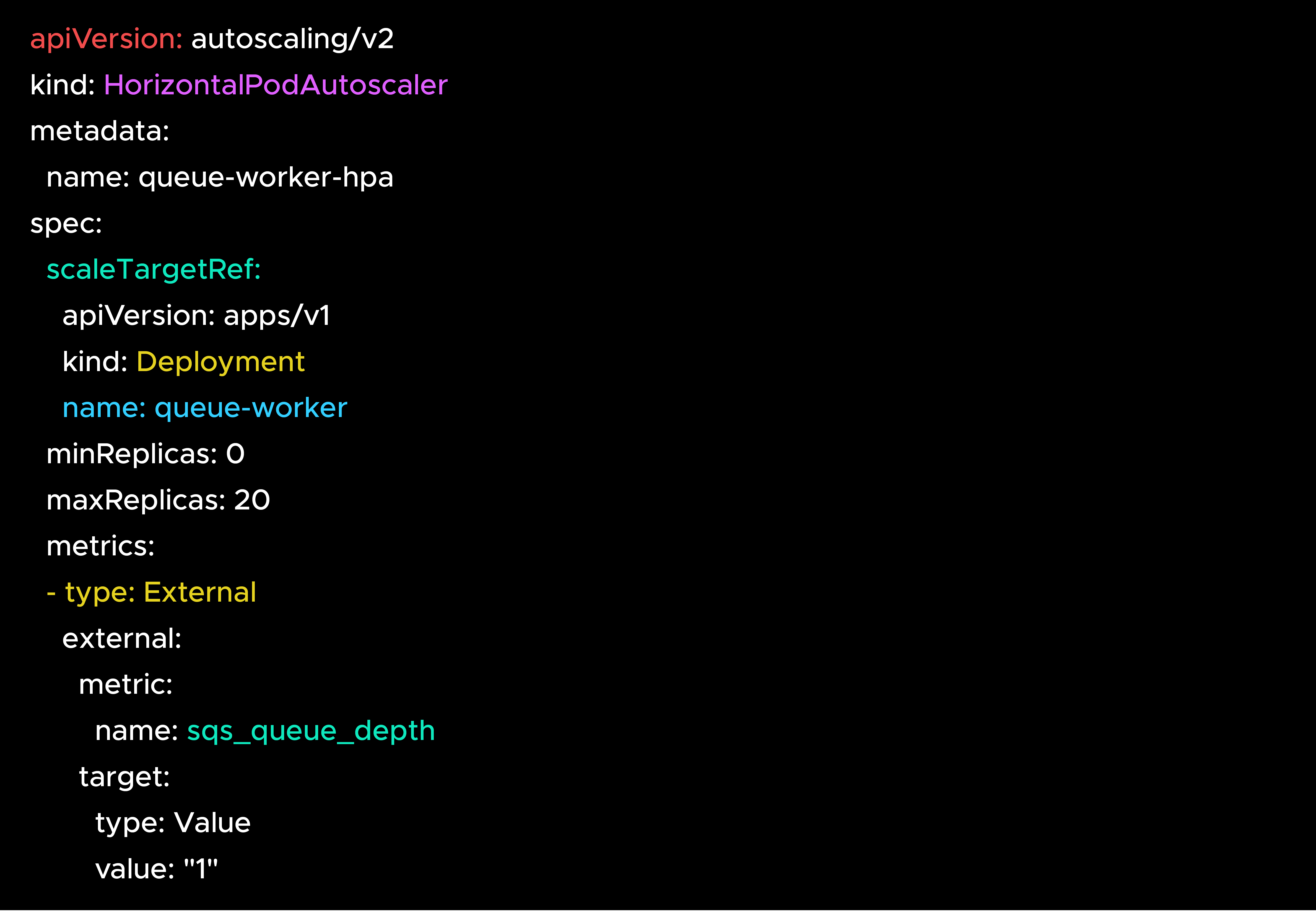
When there is no work to do, the pods disappear. When new messages or tasks arrive, they spin back up. The system tracks this with a specific status condition, so your monitoring tools will know the pods scaled down on purpose, rather than someone accidentally breaking the deployment.
There are a few things to keep in mind. This only works if you use external metrics, like checking the depth of a message queue. It will not work if you rely on CPU or memory usage, because if there are no pods running, there is no CPU or memory to measure.
There is also a delay when scaling from zero. Kubernetes has to notice the new work, schedule the pods, and download the container images. For background tasks, that delay is perfectly fine. But if a human user is clicking a button on a website and waiting for a response, they will notice that delay.
If you are paying for idle GPU workloads, this feature alone will save you a lot of money.
This is one of the features we're most excited about — we've spent years helping customers write scripts just to find volumes they're paying for and no longer using. Usually, a developer deletes a pod but forgets to delete the storage drive attached to it.
Kubernetes 1.37 adds an "Unused" status directly to the storage volume. I tested this on my local cluster. I created a volume, attached it to a pod, and then deleted the pod. About a minute later, the volume status updated to show it was unused:
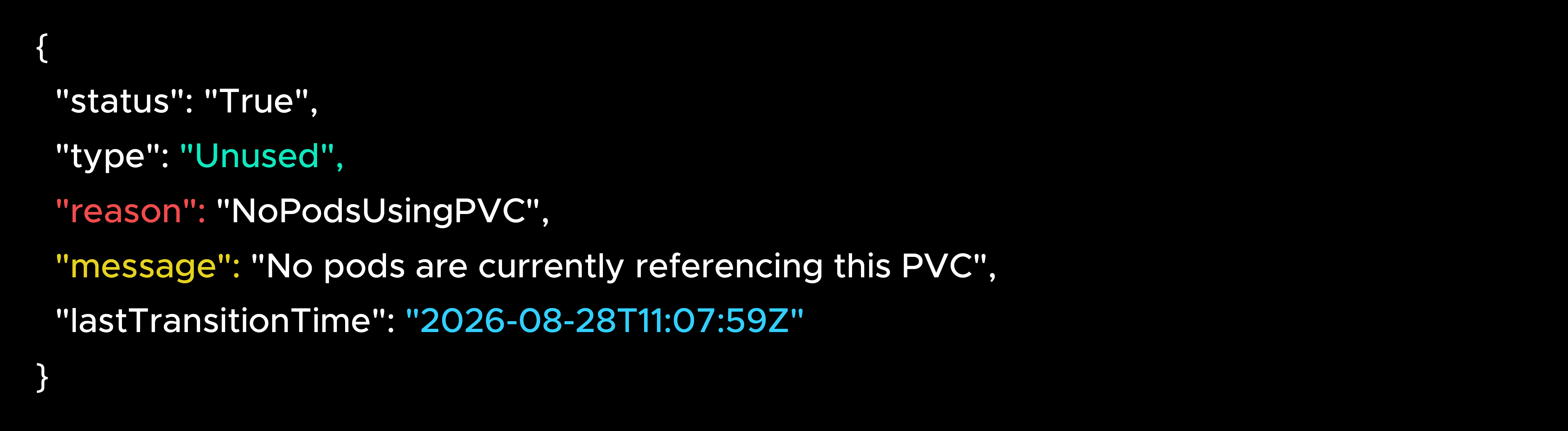
That timestamp is great because it tells you exactly when the volume stopped being used. You can use a simple command to find every unused volume in your cluster:
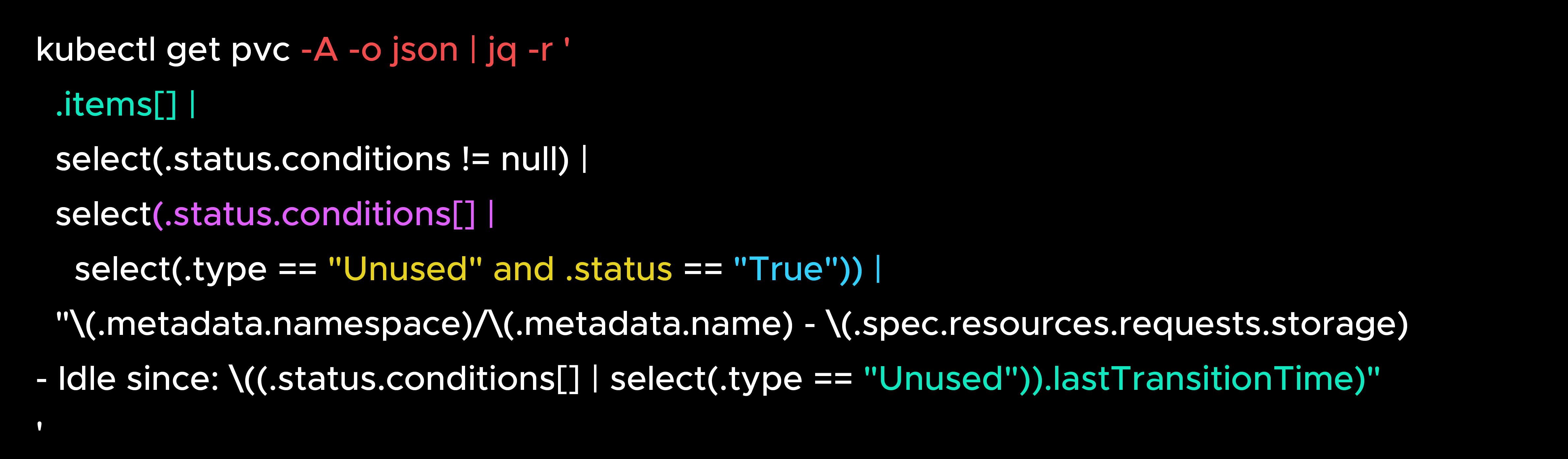
I did find one catch that the official release notes do not mention. If you create a volume and never attach it to a pod in the first place, it will not show up in this list. The system only tracks volumes that were used and then abandoned. It covers the most common mistake, but you will still need to check for completely orphaned volumes separately.
Even with that catch, this makes it incredibly easy to set up a simple cleanup rule. You can flag volumes that have been unused for 30 days, and automatically delete them after 90 days.
This one surprised me. The memory quality of service feature is enabled by default in 1.37. I expected this to automatically protect pod memory based on the limits we set.
But when I checked the system settings for a pod, the protection was not actually turned on.
It turns out this is intentional. The default settings are designed to do nothing so they do not accidentally slow down your existing apps. The feature gate just turns the engine on, but you still have to steer.
To actually use this, you have to configure two settings in your kubelet. You need to set a memory reservation policy to protect the base memory your app requests. You also need to set a throttling factor to slow the pod down before it hits its hard limit.
This matters for your cloud bill because it gives developers the confidence to request less memory. Normally, if a pod uses too much memory, Kubernetes just kills it instantly. Because developers are afraid of their apps crashing, they ask for twice as much memory as they actually need.
If you configure this feature correctly, the pod will just slow down gracefully instead of crashing. Developers can then request the exact amount of memory they need. This allows Kubernetes to pack more apps onto the same servers, which means you need to run fewer servers overall. We have seen 20 to 30 percent compute savings just from fixing memory requests.
But you will not get these savings just by upgrading. You have to configure the settings and then adjust your app requests. Test this in a staging environment first.
Imagine you are training a machine learning model. You need 8 GPU pods to work together at the exact same time. In older versions, Kubernetes might schedule 7 pods and leave the 8th waiting. Those 7 pods just sit there burning expensive GPU hours doing nothing because they cannot start without the 8th one.
Group scheduling is now in its final testing phase and enabled by default. It works on an all-or-nothing basis. Either all pods in the group get resources at the same time, or none of them do.
This update also fixes older issues in which the scheduler would get confused and keep canceling pods repeatedly. Now, it considers the whole group when making decisions, which prevents frustrating deadlocks.
These are two features that fix annoying problems when you use multiple storage drives.
First, the Cluster Autoscaler now correctly counts how many storage drives a server can handle. Previously, when calculating how many new servers to add, it ignored the fact that each server can connect only a limited number of drives at a time. It might add 5 servers when you actually needed 8, leaving your pods stuck. The new feature addresses this by properly simulating the setup before adding servers.
Second, the scheduler can now look at how much free storage space a server has. By default, it prefers servers with the most free space. But you can change it to fill servers up tightly. This helps you use fewer servers overall if you have heavy storage workloads.
If you run massive clusters, two backend changes here will reduce memory pressure on your main control servers.
Instead of loading a massive dataset into memory all at once, the database now sends it in smaller chunks. It also uses a pool of 10 threads to process events concurrently, rather than one by one.
The Kubernetes team reports that this makes the system start up 55 percent faster on massive clusters with over 150,000 pods. You will not notice this on a small cluster. But if you are running 500 or more servers, this might allow you to use smaller, cheaper control plane instances because you no longer need massive amounts of extra memory just to start the system up.
You need to plan for these changes before they break your setup.
The kube-proxy ipvs mode is deprecated. It will be completely removed in version 1.43. You can check if you are using it with this command:

If it says ipvs, you need to start testing the new nftables backend.
The old kube-dns system stops getting updates after version 1.40. If you are somehow still using it, you need to migrate to CoreDNS.
Finally, the older cgroup version 1 is being phased out. New features only work on version 2. If your servers are still running version 1, you need to plan your migration now.
Every cluster is different. The features that save the most money depend on what you are running and where your current waste is hiding.
I did this Proof of Concept on a local cluster so we know exactly how these features work under the hood before they are available on the major cloud providers. At CloudKeeper, we do this exact analysis across hundreds of customer environments.
If you are planning a 1.37 upgrade and want to know which features will make the biggest difference for your specific setup, or if you suspect your clusters have cost issues you haven't identified yet, talk to our team. We will look at your environment and show you the actual numbers.
Based on testing with Kubernetes v1.37.0 and the upstream release notes. Feature availability on managed services like AWS EKS, GKE, and AKS depends on when your provider rolls them out.
Want to know exactly how much Kubernetes 1.37 could save your team? Get a free assessment from our Kubernetes expert today!

99% of companies saved up to 15% monthly with this plan & achieved peak performance.